The Tech Edvocate

Top Menu

  • Advertisement
  • Apps
  • Home Page
  • Home Page Five (No Sidebar)
  • Home Page Four
  • Home Page Three
  • Home Page Two
  • Home Tech2
  • Icons [No Sidebar]
  • Left Sidbear Page
  • Lynch Educational Consulting
  • My Account
  • My Speaking Page
  • Newsletter Sign Up Confirmation
  • Newsletter Unsubscription
  • Our Brands
  • Page Example
  • Privacy Policy
  • Protected Content
  • Register
  • Request a Product Review
  • Shop
  • Shortcodes Examples
  • Signup
  • Start Here
    • Governance
    • Careers
    • Contact Us
  • Terms and Conditions
  • The Edvocate
  • The Tech Edvocate Product Guide
  • Topics
  • Write For Us
  • Advertise

Main Menu

  • Start Here
    • Our Brands
    • Governance
      • Lynch Educational Consulting, LLC.
      • Dr. Lynch’s Personal Website
      • Careers
    • Write For Us
    • The Tech Edvocate Product Guide
    • Contact Us
    • Books
    • Edupedia
    • Post a Job
    • The Edvocate Podcast
    • Terms and Conditions
    • Privacy Policy
  • Topics
    • Assistive Technology
    • Child Development Tech
    • Early Childhood & K-12 EdTech
    • EdTech Futures
    • EdTech News
    • EdTech Policy & Reform
    • EdTech Startups & Businesses
    • Higher Education EdTech
    • Online Learning & eLearning
    • Parent & Family Tech
    • Personalized Learning
    • Product Reviews
  • Advertise
  • Tech Edvocate Awards
  • The Edvocate
  • Pedagogue
  • School Ratings

logo

The Tech Edvocate

  • Start Here
    • Our Brands
    • Governance
      • Lynch Educational Consulting, LLC.
      • Dr. Lynch’s Personal Website
        • My Speaking Page
      • Careers
    • Write For Us
    • The Tech Edvocate Product Guide
    • Contact Us
    • Books
    • Edupedia
    • Post a Job
    • The Edvocate Podcast
    • Terms and Conditions
    • Privacy Policy
  • Topics
    • Assistive Technology
    • Child Development Tech
    • Early Childhood & K-12 EdTech
    • EdTech Futures
    • EdTech News
    • EdTech Policy & Reform
    • EdTech Startups & Businesses
    • Higher Education EdTech
    • Online Learning & eLearning
    • Parent & Family Tech
    • Personalized Learning
    • Product Reviews
  • Advertise
  • Tech Edvocate Awards
  • The Edvocate
  • Pedagogue
  • School Ratings
  • Shocking: Your Smart Ring Knows When You’re Having Sex

  • The SwiftRefi Scandal: 7 Astonishing Truths About Their ‘Zero-Fee’ Refinance

  • The AION 2 Scandal: Why This Korean MMO Controversy Is Boiling Over

  • The Bombshell Truth About Gaming’s Legal Reckoning

  • Staggering: AI’s ALS Breakthrough Comes With a $5 Million Price Tag

  • The Astonishing AI Predicting Housing Trends With 98% Accuracy — Regulators Are Freaking Out

  • Your Kids’ Classrooms Are Changing: Here’s What’s Coming by 2026

  • Jaw-Dropping: Millions Face Triple Tax Bills on Forgiven Student Loans

  • Mind-Blowing: Critical Infrastructure Faces Collapse From This Overlooked Threat

  • Unsettling: AI Agents Just Hacked 7 Major Banks — Here’s What It Means For Your Money

Digital & Mobile Technology
Home›Digital & Mobile Technology›How to Fix It When Your iPhone GPS Isn’t Working

How to Fix It When Your iPhone GPS Isn’t Working
By Matthew Lynch
June 9, 2023
0
Spread the love

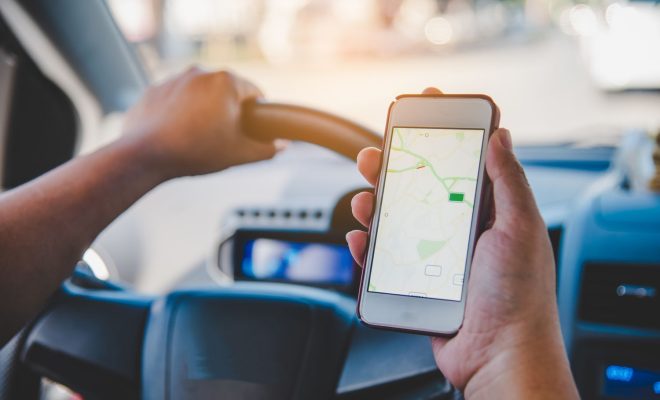
The GPS feature on an iPhone is one of its most useful features. It helps users navigate through unfamiliar streets and highways, track their fitness routines, and even locate the nearest restaurant. However, sometimes it can go wrong and stop working, thereby causing inconveniences. This can happen due to a number of reasons, such as software bugs, hardware issues, or incorrect settings. Fortunately, there are several ways to fix the issue when your iPhone GPS isn’t working.

Firstly, check if your iPhone has a clear view of the sky. The GPS needs an unobstructed view of the sky to work. If it is blocked by a tall building, mountains or trees, it might not be able to get a signal. In such situations, try moving to an open area to get a better signal.

Secondly, ensure that the GPS is enabled on your iPhone. Go to ‘Settings’, then ‘Privacy’, and then ‘Location Services’ to verify that Location Services is enabled. Also, make sure that the app you want to use GPS with has permission to access your location.

Thirdly, try resetting your network settings. Go to ‘Settings’, then ‘General’, ‘Reset’, and then ‘Reset Network Settings’. This will reset your Wi-Fi, mobile, and Bluetooth connections, which can help in fixing GPS issues.

Fourthly, if none of the above steps worked, then try resetting your iPhone’s settings. Go to ‘Settings’, then ‘General’ and then ‘Reset’. From there, select ‘Reset All Settings’. This will restore your iPhone to its default settings, and it can help in fixing GPS issues without losing your data.

Lastly, if the problem still persists, then it could be due to a hardware issue. In this case, it is recommended to take your iPhone to an authorized Apple Store for repairs. If your iPhone is under warranty, then it might be repaired for free.

In conclusion, there are several ways to fix the issue when your iPhone GPS isn’t working. These include checking if your iPhone has a clear view of the sky, ensuring that the GPS is enabled, resetting network settings, resetting iPhone settings, and taking the iPhone for repairs if none of the above methods work. With these solutions, you can get your GPS working again, allowing you to continue enjoying the convenience that it offers.


Previous Article

How to Organize Messages With Categories in ...

Next Article

End Powerpoint Presentations With a Black Slide

Matthew Lynch

Related articles More from author

  • Digital & Mobile Technology

    How Much Money Do YouTubers Make?

    June 8, 2023
    By Matthew Lynch
  • Digital & Mobile Technology

    How to Change Notification Sounds for Each App on Your Android Phone

    June 8, 2023
    By Matthew Lynch
  • Digital & Mobile Technology

    Use Time Warner Cable? You Should Buy Your Own Cable Modem

    March 20, 2023
    By Matthew Lynch
  • Digital & Mobile Technology

    How to Format an External Hard Drive for Mac

    May 28, 2023
    By Matthew Lynch
  • Digital & Mobile Technology

    How to Create Group Chat Names on iPhone and Android

    June 1, 2023
    By Matthew Lynch
  • Digital & Mobile Technology

    How to Disable the Built-In Laptop Keyboard in Windows

    June 9, 2023
    By Matthew Lynch

Search

Login & Registration

  • Log in
  • Entries feed
  • Comments feed
  • WordPress.org

Newsletter

Signup for The Tech Edvocate Newsletter and have the latest in EdTech news and opinion delivered to your email address!

About Us

Since technology is not going anywhere and does more good than harm, adapting is the best course of action. That is where The Tech Edvocate comes in. We plan to cover the PreK-12 and Higher Education EdTech sectors and provide our readers with the latest news and opinion on the subject. From time to time, I will invite other voices to weigh in on important issues in EdTech. We hope to provide a well-rounded, multi-faceted look at the past, present, the future of EdTech in the US and internationally.

We started this journey back in June 2016, and we plan to continue it for many more years to come. I hope that you will join us in this discussion of the past, present and future of EdTech and lend your own insight to the issues that are discussed.

Newsletter

Signup for The Tech Edvocate Newsletter and have the latest in EdTech news and opinion delivered to your email address!

Contact Us

The Tech Edvocate
910 Goddin Street
Richmond, VA 23231
(601) 630-5238
[email protected]

Copyright © 2026 Matthew Lynch. All rights reserved.