The Tech Edvocate

Top Menu

  • Advertisement
  • Apps
  • Home Page
  • Home Page Five (No Sidebar)
  • Home Page Four
  • Home Page Three
  • Home Page Two
  • Home Tech2
  • Icons [No Sidebar]
  • Left Sidbear Page
  • Lynch Educational Consulting
  • My Account
  • My Speaking Page
  • Newsletter Sign Up Confirmation
  • Newsletter Unsubscription
  • Our Brands
  • Page Example
  • Privacy Policy
  • Protected Content
  • Register
  • Request a Product Review
  • Shop
  • Shortcodes Examples
  • Signup
  • Start Here
    • Governance
    • Careers
    • Contact Us
  • Terms and Conditions
  • The Edvocate
  • The Tech Edvocate Product Guide
  • Topics
  • Write For Us
  • Advertise

Main Menu

  • Start Here
    • Our Brands
    • Governance
      • Lynch Educational Consulting, LLC.
      • Dr. Lynch’s Personal Website
      • Careers
    • Write For Us
    • The Tech Edvocate Product Guide
    • Contact Us
    • Books
    • Edupedia
    • Post a Job
    • The Edvocate Podcast
    • Terms and Conditions
    • Privacy Policy
  • Topics
    • Assistive Technology
    • Child Development Tech
    • Early Childhood & K-12 EdTech
    • EdTech Futures
    • EdTech News
    • EdTech Policy & Reform
    • EdTech Startups & Businesses
    • Higher Education EdTech
    • Online Learning & eLearning
    • Parent & Family Tech
    • Personalized Learning
    • Product Reviews
  • Advertise
  • Tech Edvocate Awards
  • The Edvocate
  • Pedagogue
  • School Ratings

logo

The Tech Edvocate

  • Start Here
    • Our Brands
    • Governance
      • Lynch Educational Consulting, LLC.
      • Dr. Lynch’s Personal Website
        • My Speaking Page
      • Careers
    • Write For Us
    • The Tech Edvocate Product Guide
    • Contact Us
    • Books
    • Edupedia
    • Post a Job
    • The Edvocate Podcast
    • Terms and Conditions
    • Privacy Policy
  • Topics
    • Assistive Technology
    • Child Development Tech
    • Early Childhood & K-12 EdTech
    • EdTech Futures
    • EdTech News
    • EdTech Policy & Reform
    • EdTech Startups & Businesses
    • Higher Education EdTech
    • Online Learning & eLearning
    • Parent & Family Tech
    • Personalized Learning
    • Product Reviews
  • Advertise
  • Tech Edvocate Awards
  • The Edvocate
  • Pedagogue
  • School Ratings
  • Zola Suite pricing 2026

  • How to become Airbnb Superhost

  • Yelp Elite status how to get

  • Rocket Matter vs CosmoLex comparison

  • Lawyaw vs Documate which is better

  • How to use Yelp for marketing

  • How many templates in Lawyaw

  • Can TripAdvisor reviews be edited

  • How to manage documents in Zola Suite

  • Filevine vs Litify features

Digital & Mobile Technology
Home›Digital & Mobile Technology›How to Connect PSVR to a PC

How to Connect PSVR to a PC
By Matthew Lynch
June 6, 2023
0
Spread the love

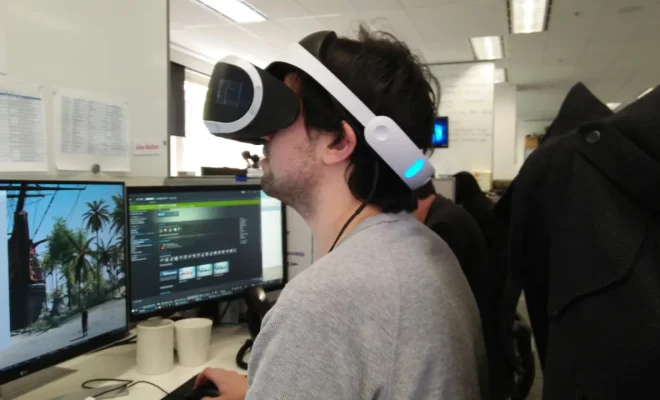
The PlayStation VR (PSVR) headset is not just restricted to playing PlayStation games, as it can also be connected to a PC. This not only offers more gaming options but also provides a more immersive experience for PC gamers. Here’s how to connect PSVR to a PC:

1. Check PC compatibility

Before getting started, ensure that your PC meets the minimum requirements to use the PSVR. This includes an Intel Core i5-4590 or higher, a GeForce GTX 970 or better graphics card, and at least 8GB of RAM.

2. Install SteamVR and Trinus PSVR software

In order to use the PSVR on a PC, users need to install the SteamVR and Trinus PSVR software. SteamVR is a virtual reality platform that allows users to access a variety of VR games, while Trinus PSVR is an application that converts the PSVR headset into a PC VR headset.

3. Connect PSVR to PC

Use an HDMI cable to connect the PSVR processing unit to the PC. Then, connect the PSVR headset to the processing unit with another HDMI cable, and use a USB cable to connect the processing unit to a USB port on the PC.

4. Configure Trinus PSVR settings

After installing Trinus PSVR, users need to configure the settings to be able to use the PSVR on a PC. This includes selecting the right display mode and screen size, changing the rotation and rendering angle, and adjusting the position tracking settings.

5. Launch SteamVR

Once the settings have been configured, users can then launch SteamVR and start playing VR games. When playing games, users can use the PSVR headset to look around and move their head, while using the PC keyboard or gamepad to control the movements of their character.

Connecting the PSVR to a PC offers an expanded range of gaming options, allowing gamers to experience the thrill of VR games on a platform they are already familiar with. With this guide, you are now equipped to connect your PSVR headset to your PC, and start enjoying the immersive VR gaming experience on offer.

Previous Article

How Long Does a Ring Battery Last?

Next Article

How to Enable Editing in Word (and ...

Matthew Lynch

Related articles More from author

  • Digital & Mobile Technology

    Productive Things to Do on Your Phone Instead of Mindlessly Scrolling

    June 21, 2023
    By Matthew Lynch
  • Digital & Mobile Technology

    What is Hosting?

    May 22, 2023
    By Matthew Lynch
  • Digital & Mobile Technology

    Fix Google Play Services Battery Drain on Android

    April 13, 2023
    By Matthew Lynch
  • Digital & Mobile Technology

    What is Source Code Escrow?

    May 12, 2023
    By Matthew Lynch
  • Digital & Mobile Technology

    Is Your iPhone Volume Way Too Low? How to Fix It

    August 5, 2023
    By Matthew Lynch
  • Digital & Mobile Technology

    How to Find a Photo in Google Photos and Organize Images

    August 3, 2023
    By Matthew Lynch

Search

Login & Registration

  • Log in
  • Entries feed
  • Comments feed
  • WordPress.org

Newsletter

Signup for The Tech Edvocate Newsletter and have the latest in EdTech news and opinion delivered to your email address!

About Us

Since technology is not going anywhere and does more good than harm, adapting is the best course of action. That is where The Tech Edvocate comes in. We plan to cover the PreK-12 and Higher Education EdTech sectors and provide our readers with the latest news and opinion on the subject. From time to time, I will invite other voices to weigh in on important issues in EdTech. We hope to provide a well-rounded, multi-faceted look at the past, present, the future of EdTech in the US and internationally.

We started this journey back in June 2016, and we plan to continue it for many more years to come. I hope that you will join us in this discussion of the past, present and future of EdTech and lend your own insight to the issues that are discussed.

Newsletter

Signup for The Tech Edvocate Newsletter and have the latest in EdTech news and opinion delivered to your email address!

Contact Us

The Tech Edvocate
910 Goddin Street
Richmond, VA 23231
(601) 630-5238
[email protected]

Copyright © 2026 Matthew Lynch. All rights reserved.