The Tech Edvocate

Top Menu

  • Advertisement
  • Apps
  • Home Page
  • Home Page Five (No Sidebar)
  • Home Page Four
  • Home Page Three
  • Home Page Two
  • Home Tech2
  • Icons [No Sidebar]
  • Left Sidbear Page
  • Lynch Educational Consulting
  • My Account
  • My Speaking Page
  • Newsletter Sign Up Confirmation
  • Newsletter Unsubscription
  • Our Brands
  • Page Example
  • Privacy Policy
  • Protected Content
  • Register
  • Request a Product Review
  • Shop
  • Shortcodes Examples
  • Signup
  • Start Here
    • Governance
    • Careers
    • Contact Us
  • Terms and Conditions
  • The Edvocate
  • The Tech Edvocate Product Guide
  • Topics
  • Write For Us
  • Advertise

Main Menu

  • Start Here
    • Our Brands
    • Governance
      • Lynch Educational Consulting, LLC.
      • Dr. Lynch’s Personal Website
      • Careers
    • Write For Us
    • The Tech Edvocate Product Guide
    • Contact Us
    • Books
    • Edupedia
    • Post a Job
    • The Edvocate Podcast
    • Terms and Conditions
    • Privacy Policy
  • Topics
    • Assistive Technology
    • Child Development Tech
    • Early Childhood & K-12 EdTech
    • EdTech Futures
    • EdTech News
    • EdTech Policy & Reform
    • EdTech Startups & Businesses
    • Higher Education EdTech
    • Online Learning & eLearning
    • Parent & Family Tech
    • Personalized Learning
    • Product Reviews
  • Advertise
  • Tech Edvocate Awards
  • The Edvocate
  • Pedagogue
  • School Ratings

logo

The Tech Edvocate

  • Start Here
    • Our Brands
    • Governance
      • Lynch Educational Consulting, LLC.
      • Dr. Lynch’s Personal Website
        • My Speaking Page
      • Careers
    • Write For Us
    • The Tech Edvocate Product Guide
    • Contact Us
    • Books
    • Edupedia
    • Post a Job
    • The Edvocate Podcast
    • Terms and Conditions
    • Privacy Policy
  • Topics
    • Assistive Technology
    • Child Development Tech
    • Early Childhood & K-12 EdTech
    • EdTech Futures
    • EdTech News
    • EdTech Policy & Reform
    • EdTech Startups & Businesses
    • Higher Education EdTech
    • Online Learning & eLearning
    • Parent & Family Tech
    • Personalized Learning
    • Product Reviews
  • Advertise
  • Tech Edvocate Awards
  • The Edvocate
  • Pedagogue
  • School Ratings
  • 100 Best Apps for Community-Led Growth

  • 100 Best Apps for Product-Led Growth

  • 100 Best Apps for User Activation

  • 100 Best Apps for Acquiring Customers

  • 100 Best Apps for 1-on-1 Meetings

  • 100 Best Apps for Eliminating Bottlenecks

  • 100 Best Apps for Automating Workflows

  • 100 Best Apps for Sales-Led Growth

  • 100 Best Apps for Viral Growth

  • 100 Best Apps for Growth Hacking

Digital & Mobile Technology
Home›Digital & Mobile Technology›How to Connect Two AirPods to One Phone

How to Connect Two AirPods to One Phone
By Matthew Lynch
June 4, 2023
0
Spread the love

AirPods are a popular wireless earphone option for iPhone users thanks to their convenience and portability. They can be connected to one iPhone seamlessly. However, it is possible to connect two AirPods to one phone. This allows multiple people to listen to audio from the same device, without requiring additional audio splitters or cables. Here’s how to get it done.

Method 1: Using Audio Sharing (iOS 13 and newer)

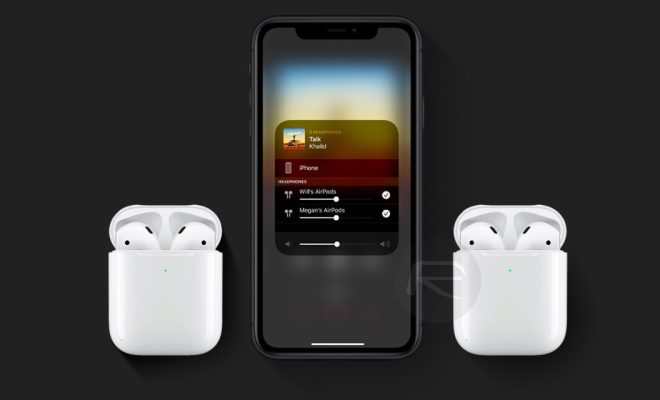
Apple introduced Audio Sharing with iOS 13, which allows two sets of AirPods to connect to one device. This is currently only available on Apple devices running iOS 13 or newer, including iPhones and iPads. To set up Audio Sharing, follow these steps:

1. Ensure that both sets of AirPods are connected to the same iPhone.
2. Start playing audio on your iPhone from any app, such as Apple Music or Spotify.
3. On the second set of AirPods, press and hold the button on the back until the light starts blinking white.
4. Hold the second set of AirPods near the first set that is connected to your iPhone until a panel appears on your phone.
5. Tap on the “Share Audio” button.
6. The second set of AirPods should now be connected to your phone and playing the same audio.

Method 2: Using a Third-Party App

If your device does not support Audio Sharing or if you’re running an older version of iOS, you can also use a third-party app to connect two sets of AirPods to one device. These apps simulate the Audio Sharing feature and can be used on any smartphone or tablet. Here are some popular options:

1. SoundSeeder:

This app is available for both Android and iOS devices and allows you to create a virtual sound system by connecting multiple devices together. You can connect two sets of AirPods to one device using SoundSeeder and play audio in sync on both sets.

2. SplitCloud Double Music Player:

SplitCloud is a free app available on the App Store that lets you split audio between two sets of headphones. You can connect two sets of AirPods to one device using SplitCloud and play different audio streams simultaneously.

In conclusion, connecting two AirPods to one phone is possible, and there are two main methods to achieve this: using Audio Sharing on iOS 13 or newer devices, or using a third-party app. Whether you want to share audio with a friend or enjoy listening to music together, having this option is a great feature for iPhone users.


Previous Article

How to Change Your iPad Name

Next Article

History of the Atari 2600 VCS

Matthew Lynch

Related articles More from author

  • Digital & Mobile Technology

    Logitech Combo Touch vs. Logitech Folio Touch: What’s the Difference?

    June 5, 2023
    By Matthew Lynch
  • Digital & Mobile Technology

    How to Install and Use Grammarly in Google Docs

    June 12, 2023
    By Matthew Lynch
  • Digital & Mobile Technology

    How to Fix Ntdll.dll Errors

    June 6, 2023
    By Matthew Lynch
  • Digital & Mobile Technology

    Best Coding Games to Build Your Programming Skills

    June 23, 2023
    By Matthew Lynch
  • Digital & Mobile Technology

    Best Mac Apps of 2023

    July 5, 2023
    By Matthew Lynch
  • Digital & Mobile Technology

    Best House Cleaning Apps of 2023

    June 8, 2023
    By Matthew Lynch

Search

Login & Registration

  • Log in
  • Entries feed
  • Comments feed
  • WordPress.org

Newsletter

Signup for The Tech Edvocate Newsletter and have the latest in EdTech news and opinion delivered to your email address!

About Us

Since technology is not going anywhere and does more good than harm, adapting is the best course of action. That is where The Tech Edvocate comes in. We plan to cover the PreK-12 and Higher Education EdTech sectors and provide our readers with the latest news and opinion on the subject. From time to time, I will invite other voices to weigh in on important issues in EdTech. We hope to provide a well-rounded, multi-faceted look at the past, present, the future of EdTech in the US and internationally.

We started this journey back in June 2016, and we plan to continue it for many more years to come. I hope that you will join us in this discussion of the past, present and future of EdTech and lend your own insight to the issues that are discussed.

Newsletter

Signup for The Tech Edvocate Newsletter and have the latest in EdTech news and opinion delivered to your email address!

Contact Us

The Tech Edvocate
910 Goddin Street
Richmond, VA 23231
(601) 630-5238
[email protected]

Copyright © 2026 Matthew Lynch. All rights reserved.