The Tech Edvocate

Top Menu

  • Advertisement
  • Apps
  • Home Page
  • Home Page Five (No Sidebar)
  • Home Page Four
  • Home Page Three
  • Home Page Two
  • Home Tech2
  • Icons [No Sidebar]
  • Left Sidbear Page
  • Lynch Educational Consulting
  • My Account
  • My Speaking Page
  • Newsletter Sign Up Confirmation
  • Newsletter Unsubscription
  • Our Brands
  • Page Example
  • Privacy Policy
  • Protected Content
  • Register
  • Request a Product Review
  • Shop
  • Shortcodes Examples
  • Signup
  • Start Here
    • Governance
    • Careers
    • Contact Us
  • Terms and Conditions
  • The Edvocate
  • The Tech Edvocate Product Guide
  • Topics
  • Write For Us
  • Advertise

Main Menu

  • Start Here
    • Our Brands
    • Governance
      • Lynch Educational Consulting, LLC.
      • Dr. Lynch’s Personal Website
      • Careers
    • Write For Us
    • The Tech Edvocate Product Guide
    • Contact Us
    • Books
    • Edupedia
    • Post a Job
    • The Edvocate Podcast
    • Terms and Conditions
    • Privacy Policy
  • Topics
    • Assistive Technology
    • Child Development Tech
    • Early Childhood & K-12 EdTech
    • EdTech Futures
    • EdTech News
    • EdTech Policy & Reform
    • EdTech Startups & Businesses
    • Higher Education EdTech
    • Online Learning & eLearning
    • Parent & Family Tech
    • Personalized Learning
    • Product Reviews
  • Advertise
  • Tech Edvocate Awards
  • The Edvocate
  • Pedagogue
  • School Ratings

logo

The Tech Edvocate

  • Start Here
    • Our Brands
    • Governance
      • Lynch Educational Consulting, LLC.
      • Dr. Lynch’s Personal Website
        • My Speaking Page
      • Careers
    • Write For Us
    • The Tech Edvocate Product Guide
    • Contact Us
    • Books
    • Edupedia
    • Post a Job
    • The Edvocate Podcast
    • Terms and Conditions
    • Privacy Policy
  • Topics
    • Assistive Technology
    • Child Development Tech
    • Early Childhood & K-12 EdTech
    • EdTech Futures
    • EdTech News
    • EdTech Policy & Reform
    • EdTech Startups & Businesses
    • Higher Education EdTech
    • Online Learning & eLearning
    • Parent & Family Tech
    • Personalized Learning
    • Product Reviews
  • Advertise
  • Tech Edvocate Awards
  • The Edvocate
  • Pedagogue
  • School Ratings
  • How to use ClickUp goals feature

  • Trello for Business

  • Can Smartsheet do automation

  • How to use Microsoft Planner boards

  • How many transactions in Kashoo

  • Sage

  • Is Sage worth it for accountants

  • How to use Smartsheet templates

  • How many users in Zoho Books free plan

  • Can Wrike integrate with Adobe Creative Cloud

Digital & Mobile Technology
Home›Digital & Mobile Technology›How to Delay or Schedule an Email in Outlook

How to Delay or Schedule an Email in Outlook
By Matthew Lynch
May 30, 2023
0
Spread the love

Outlook is a popular email management system used by many professionals and businesses. One of its features is the ability to delay or schedule an email to be sent at a later time. This can be useful in many situations, such as when you want to send an email at a specific time or when you want to check and revise the content of an email before it is sent. In this article, we will discuss how to delay or schedule an email in Outlook.

Delaying an Email

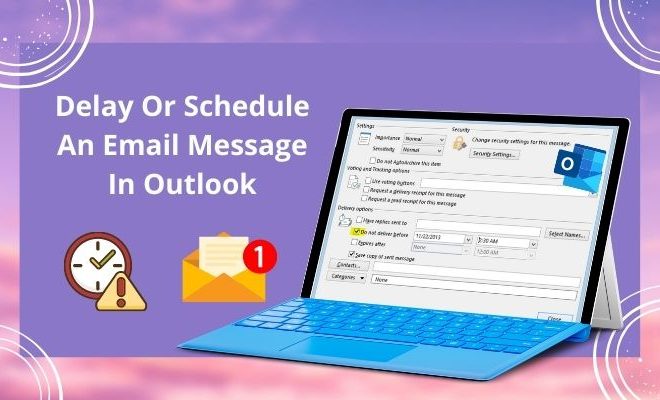
To delay an email in Outlook, first, you need to compose the email as usual. Once you have finished writing the email, click on the Options tab in the ribbon, and then click on the Delay Delivery option.

This will open a new window where you can schedule the delivery of your email. Here, you can choose to delay the delivery for a specified amount of time after you click send or set a specific date and time for the email to be sent. Once you have made your selection, click Close.

Next, click send to send the email as usual. Outlook will hold the email in the outbox until the specified time, and then automatically send the email.

Scheduling an Email

Scheduling an email in Outlook is a similar process to delaying an email. You begin by composing your email and then clicking on the Options tab in the ribbon. This time, instead of clicking on the Delay Delivery option, click on the More Options button.

This will open a new window where you can schedule the delivery of your email. Under the Delivery options heading, check the box next to ‘Do not deliver before’ and then choose the date and time you want the email to be sent. Once you have made your selection, click Close.

Finally, click send to send the email as usual. Outlook will hold the email in the outbox until the specified time, and then automatically send the email.

Conclusion

By using the delayed or scheduled delivery features in Outlook, you can manage your emails more effectively and send them at the most appropriate time. Whether you want to send an email at a particular time of day or check and revise the content of an email before it is sent, Outlook’s delay and scheduled delivery options are a great way to do so. With just a few clicks, you can be sure that your emails are sent at the right time and with the right content.


Previous Article

How to Make the Copyright Symbol on ...

Next Article

Encouraging Kindness in Children

Matthew Lynch

Related articles More from author

  • Digital & Mobile Technology

    Best Slideshow Apps of 2023

    June 6, 2023
    By Matthew Lynch
  • Digital & Mobile Technology

    How to Add and Use Stickers on Discord

    June 6, 2023
    By Matthew Lynch
  • Digital & Mobile Technology

    What Is an FB2 File?

    June 2, 2023
    By Matthew Lynch
  • Digital & Mobile Technology

    How to Stop Unwanted & Spam Calls on Your Cellphone or Landline

    July 14, 2023
    By Matthew Lynch
  • Digital & Mobile Technology

    Free Alternatives to Windows Operating Systems

    June 23, 2023
    By Matthew Lynch
  • Digital & Mobile Technology

    What Is Apple’s Continuity Feature? (And How Does It Work?)

    June 13, 2023
    By Matthew Lynch

Search

Login & Registration

  • Log in
  • Entries feed
  • Comments feed
  • WordPress.org

Newsletter

Signup for The Tech Edvocate Newsletter and have the latest in EdTech news and opinion delivered to your email address!

About Us

Since technology is not going anywhere and does more good than harm, adapting is the best course of action. That is where The Tech Edvocate comes in. We plan to cover the PreK-12 and Higher Education EdTech sectors and provide our readers with the latest news and opinion on the subject. From time to time, I will invite other voices to weigh in on important issues in EdTech. We hope to provide a well-rounded, multi-faceted look at the past, present, the future of EdTech in the US and internationally.

We started this journey back in June 2016, and we plan to continue it for many more years to come. I hope that you will join us in this discussion of the past, present and future of EdTech and lend your own insight to the issues that are discussed.

Newsletter

Signup for The Tech Edvocate Newsletter and have the latest in EdTech news and opinion delivered to your email address!

Contact Us

The Tech Edvocate
910 Goddin Street
Richmond, VA 23231
(601) 630-5238
[email protected]

Copyright © 2026 Matthew Lynch. All rights reserved.