The Tech Edvocate

Top Menu

  • Advertisement
  • Apps
  • Home Page
  • Home Page Five (No Sidebar)
  • Home Page Four
  • Home Page Three
  • Home Page Two
  • Home Tech2
  • Icons [No Sidebar]
  • Left Sidbear Page
  • Lynch Educational Consulting
  • My Account
  • My Speaking Page
  • Newsletter Sign Up Confirmation
  • Newsletter Unsubscription
  • Our Brands
  • Page Example
  • Privacy Policy
  • Protected Content
  • Register
  • Request a Product Review
  • Shop
  • Shortcodes Examples
  • Signup
  • Start Here
    • Governance
    • Careers
    • Contact Us
  • Terms and Conditions
  • The Edvocate
  • The Tech Edvocate Product Guide
  • Topics
  • Write For Us
  • Advertise

Main Menu

  • Start Here
    • Our Brands
    • Governance
      • Lynch Educational Consulting, LLC.
      • Dr. Lynch’s Personal Website
      • Careers
    • Write For Us
    • The Tech Edvocate Product Guide
    • Contact Us
    • Books
    • Edupedia
    • Post a Job
    • The Edvocate Podcast
    • Terms and Conditions
    • Privacy Policy
  • Topics
    • Assistive Technology
    • Child Development Tech
    • Early Childhood & K-12 EdTech
    • EdTech Futures
    • EdTech News
    • EdTech Policy & Reform
    • EdTech Startups & Businesses
    • Higher Education EdTech
    • Online Learning & eLearning
    • Parent & Family Tech
    • Personalized Learning
    • Product Reviews
  • Advertise
  • Tech Edvocate Awards
  • The Edvocate
  • Pedagogue
  • School Ratings

logo

The Tech Edvocate

  • Start Here
    • Our Brands
    • Governance
      • Lynch Educational Consulting, LLC.
      • Dr. Lynch’s Personal Website
        • My Speaking Page
      • Careers
    • Write For Us
    • The Tech Edvocate Product Guide
    • Contact Us
    • Books
    • Edupedia
    • Post a Job
    • The Edvocate Podcast
    • Terms and Conditions
    • Privacy Policy
  • Topics
    • Assistive Technology
    • Child Development Tech
    • Early Childhood & K-12 EdTech
    • EdTech Futures
    • EdTech News
    • EdTech Policy & Reform
    • EdTech Startups & Businesses
    • Higher Education EdTech
    • Online Learning & eLearning
    • Parent & Family Tech
    • Personalized Learning
    • Product Reviews
  • Advertise
  • Tech Edvocate Awards
  • The Edvocate
  • Pedagogue
  • School Ratings
  • The Zhipu ZCode Data Scandal: How Your Code Vanished and What Happens Next

  • Dramatic: Your Smart Glasses Are Recording You — And Everyone Around You

  • This Startup Just Raised $6.8M to Fix Your Broken Job Hunt — Here’s How

  • Oracle’s Billion-Dollar AI Bet Hits a Wall: What This Means for Leaner Startups

  • Outrageous: Vietnam PUBG Boycott Explodes — How It Threatens Krafton’s Empire

  • This PS5 Game Just Proved Everyone Wrong About Live Service Dominance

  • Aurora High School Police Cameras: Why This Expansion Has Civil Rights Groups Fuming

  • The Brutal Truth About AI and Reading: Why Top Students Are Avoiding It

  • Billion-Dollar Verdict: What This Facebook Privacy Lawsuit Means For YOU

  • Millions of VW Owners Face Sudden Steering Loss — The Critical Details You Need Now

Online Learning & eLearning
Home›Online Learning & eLearning›How to View Your Nest Thermostat’s Usage History

How to View Your Nest Thermostat’s Usage History
By Matthew Lynch
March 27, 2023
0
Spread the love

If you’re looking to monitor your home’s energy usage and optimize your energy costs, viewing your Nest Thermostat’s usage history is a great way to do it. By analyzing monthly, weekly or daily usage, you can identify patterns and adjust your thermostat settings or habits accordingly.

Here’s a step-by-step guide on how to view your Nest Thermostat’s usage history:

1. Open the Nest App

The Nest App is available for iOS and Android devices and can be downloaded either from the App Store or Google Play.

2. Sign in to Your Nest Account

Once the app is installed, sign in to your Nest account using your login credentials. If you don’t already have a Nest account, you will need to create one.

3. Tap on the Nest Thermostat Icon

From the Nest App’s dashboard, tap on the thermostat icon that corresponds to the thermostat you want to view usage history for.

4. Tap on “History”

On the thermostat screen, scroll down until you see the “History” option. Tap on it, and you’ll be taken to your thermostat’s usage history page.

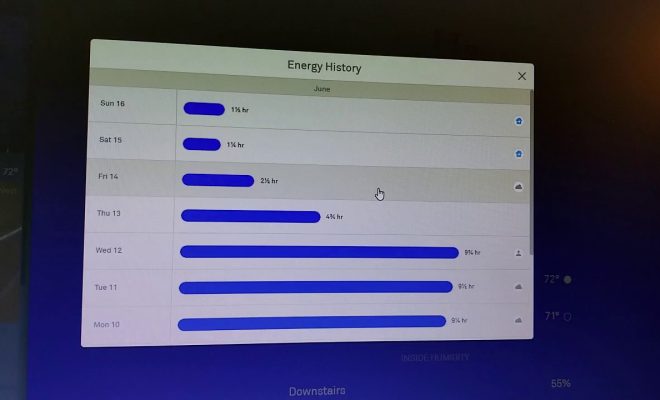
5. View Your Usage History

On the usage history page, you can see how much energy your thermostat has used each day, week or month. You can adjust the view by tapping on the dropdown menu at the top of the screen.

6. Analyze Your Usage Data

Once you’ve selected the time frame you want to view, take a look at the usage data to identify patterns. For example, if you notice that your energy usage is higher on weekends or during certain hours of the day, you can adjust your thermostat settings accordingly.

7. Make Adjustments

To make adjustments to your thermostat settings, tap on the “Settings” button on the thermostat screen in the Nest App. From there, you can adjust the temperature, set schedules, switch to eco mode, and more. Using your Nest’s usage history is a great way to stay on top of your energy bills and ensure that your thermostat settings are optimized for energy efficiency. By monitoring and adjusting accordingly, you can save energy and money in the long run.


Previous Article

How to View Your Google Play Store ...

Next Article

How to View Your Own Webcam

Matthew Lynch

Related articles More from author

  • Online Learning & eLearning

    What Are Hops & Hop Counts?

    June 11, 2023
    By Matthew Lynch
  • Higher Education EdTechOnline Learning & eLearning

    Is Your eLearning Course Rigorous Enough?

    January 29, 2020
    By Matthew Lynch
  • Online Learning & eLearning

    The 15 Best Campgrounds in Iowa – Top-Rated & Hidden Gems

    March 24, 2024
    By Matthew Lynch
  • How to Use System Restore in Windows 11
    Online Learning & eLearning

    How to View Pictures as a Slideshow in Windows 11

    March 26, 2023
    By Matthew Lynch
  • Online Learning & eLearning

    Tesla Model X Plaid vs. Lamborghini Urus: Which Is Faster?

    June 9, 2023
    By Matthew Lynch
  • Online Learning & eLearning

    Unbelievable New Ways of Generating Electricity

    June 14, 2023
    By Matthew Lynch

Search

Login & Registration

  • Log in
  • Entries feed
  • Comments feed
  • WordPress.org

Newsletter

Signup for The Tech Edvocate Newsletter and have the latest in EdTech news and opinion delivered to your email address!

About Us

Since technology is not going anywhere and does more good than harm, adapting is the best course of action. That is where The Tech Edvocate comes in. We plan to cover the PreK-12 and Higher Education EdTech sectors and provide our readers with the latest news and opinion on the subject. From time to time, I will invite other voices to weigh in on important issues in EdTech. We hope to provide a well-rounded, multi-faceted look at the past, present, the future of EdTech in the US and internationally.

We started this journey back in June 2016, and we plan to continue it for many more years to come. I hope that you will join us in this discussion of the past, present and future of EdTech and lend your own insight to the issues that are discussed.

Newsletter

Signup for The Tech Edvocate Newsletter and have the latest in EdTech news and opinion delivered to your email address!

Contact Us

The Tech Edvocate
910 Goddin Street
Richmond, VA 23231
(601) 630-5238
[email protected]

Copyright © 2026 Matthew Lynch. All rights reserved.