The Tech Edvocate

Top Menu

  • Advertisement
  • Apps
  • Home Page
  • Home Page Five (No Sidebar)
  • Home Page Four
  • Home Page Three
  • Home Page Two
  • Home Tech2
  • Icons [No Sidebar]
  • Left Sidbear Page
  • Lynch Educational Consulting
  • My Account
  • My Speaking Page
  • Newsletter Sign Up Confirmation
  • Newsletter Unsubscription
  • Our Brands
  • Page Example
  • Privacy Policy
  • Protected Content
  • Register
  • Request a Product Review
  • Shop
  • Shortcodes Examples
  • Signup
  • Start Here
    • Governance
    • Careers
    • Contact Us
  • Terms and Conditions
  • The Edvocate
  • The Tech Edvocate Product Guide
  • Topics
  • Write For Us
  • Advertise

Main Menu

  • Start Here
    • Our Brands
    • Governance
      • Lynch Educational Consulting, LLC.
      • Dr. Lynch’s Personal Website
      • Careers
    • Write For Us
    • The Tech Edvocate Product Guide
    • Contact Us
    • Books
    • Edupedia
    • Post a Job
    • The Edvocate Podcast
    • Terms and Conditions
    • Privacy Policy
  • Topics
    • Assistive Technology
    • Child Development Tech
    • Early Childhood & K-12 EdTech
    • EdTech Futures
    • EdTech News
    • EdTech Policy & Reform
    • EdTech Startups & Businesses
    • Higher Education EdTech
    • Online Learning & eLearning
    • Parent & Family Tech
    • Personalized Learning
    • Product Reviews
  • Advertise
  • Tech Edvocate Awards
  • The Edvocate
  • Pedagogue
  • School Ratings

logo

The Tech Edvocate

  • Start Here
    • Our Brands
    • Governance
      • Lynch Educational Consulting, LLC.
      • Dr. Lynch’s Personal Website
        • My Speaking Page
      • Careers
    • Write For Us
    • The Tech Edvocate Product Guide
    • Contact Us
    • Books
    • Edupedia
    • Post a Job
    • The Edvocate Podcast
    • Terms and Conditions
    • Privacy Policy
  • Topics
    • Assistive Technology
    • Child Development Tech
    • Early Childhood & K-12 EdTech
    • EdTech Futures
    • EdTech News
    • EdTech Policy & Reform
    • EdTech Startups & Businesses
    • Higher Education EdTech
    • Online Learning & eLearning
    • Parent & Family Tech
    • Personalized Learning
    • Product Reviews
  • Advertise
  • Tech Edvocate Awards
  • The Edvocate
  • Pedagogue
  • School Ratings
  • Cybersecurity vs. Green Energy: Which Path Will Make You Richer in 2026?

  • Why These 10 Renewable Energy Certifications Are Quietly Reshaping Careers by 2026

  • Why Millions Are Rushing to Online Renewable Energy Certifications Right Now

  • August AI vs. USMLE: The Unsettling Future of Medical Licensing

  • One AI’s Perfect USMLE Score Just Blew Up Medical Education As We Know It

  • This AI Just Aced the USMLE: Why Your Medical Career Might Never Be the Same

  • The Quiet Exodus: Why Senior FinTech Developers Are Abandoning Corporate Life

  • The Quiet Revolution: Where Elite FinTech Developers Are Fleeing in 2026

  • The Quiet Exodus: Why Senior FinTech Developers Are Ditching Corporate Life

  • AI Governance Software: Pricing and Features Comparison

Google Classroom
Home›Google Classroom›How to Add Video Directions for Your Students in Google Classroom

How to Add Video Directions for Your Students in Google Classroom
By Matthew Lynch
September 19, 2018
0
Spread the love

Do you ever feel like some students have a difficult time understanding written directions for projects or assignments? Do you need to differentiate or modify directions for a specific population of students in your class? An easy way to overcome this obstacle and accomplish your goal is to add your voice to online assignments by creating video directions for students. Providing an opportunity for students to see and hear you allows them to make a connection with the lesson through their relationship with you.

There are two straightforward ways to record your video directions – through the Classroom app on a mobile device and through a webcam on a computer.

Video Directions Using the Classroom App

Using a mobile phone or mobile device is a simple way to add video directions to any assignment – anywhere, anytime.

Step 1: Create the Assignment

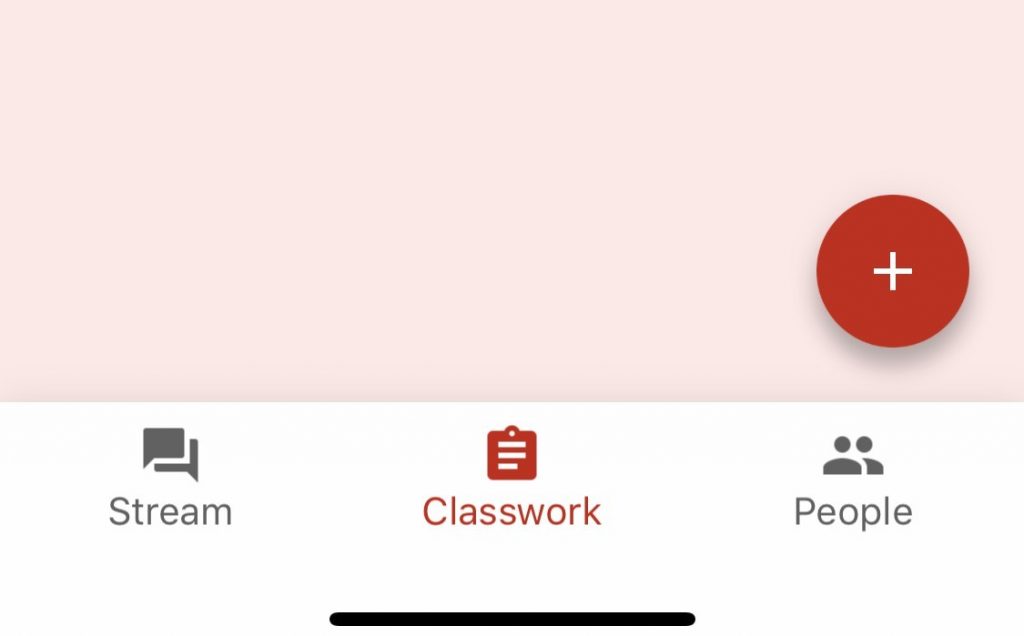
Open the Google Classroom app on your mobile phone or device. Navigate to the Classwork tab and click the plus sign to create a new assignment.
Step 2: Attach Materials

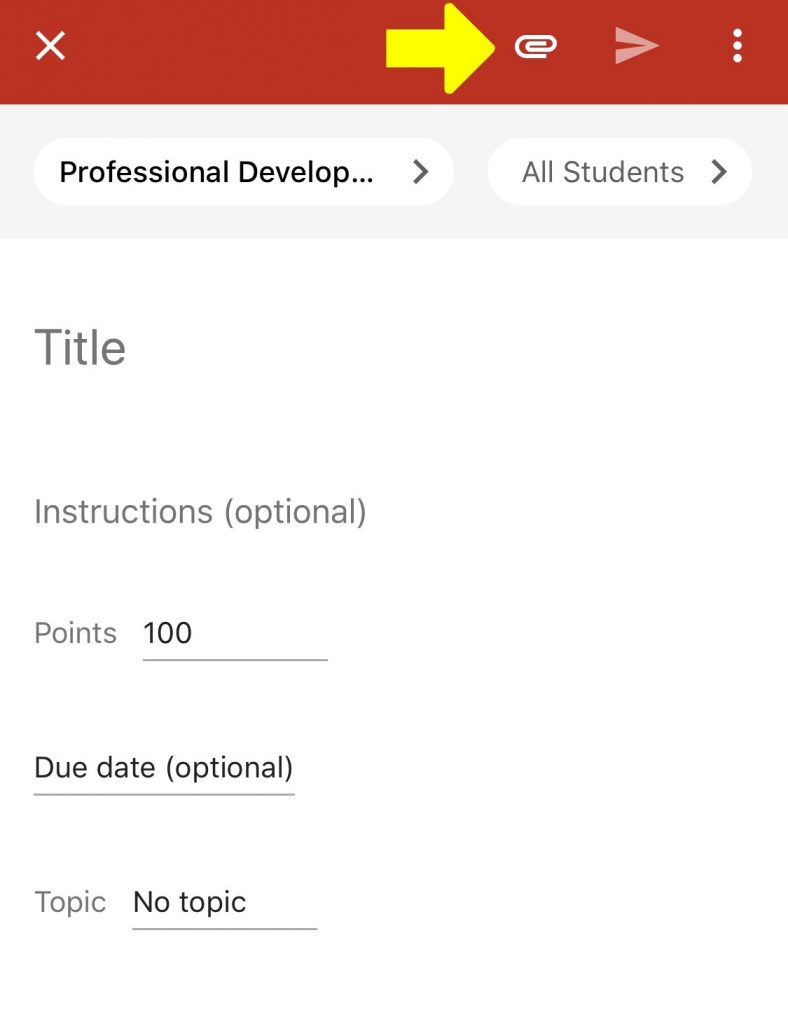
On the Assignment dialogue box, click the paperclip at the top right corner to attach materials to the assignment.
Step 3: Create and Upload the Video

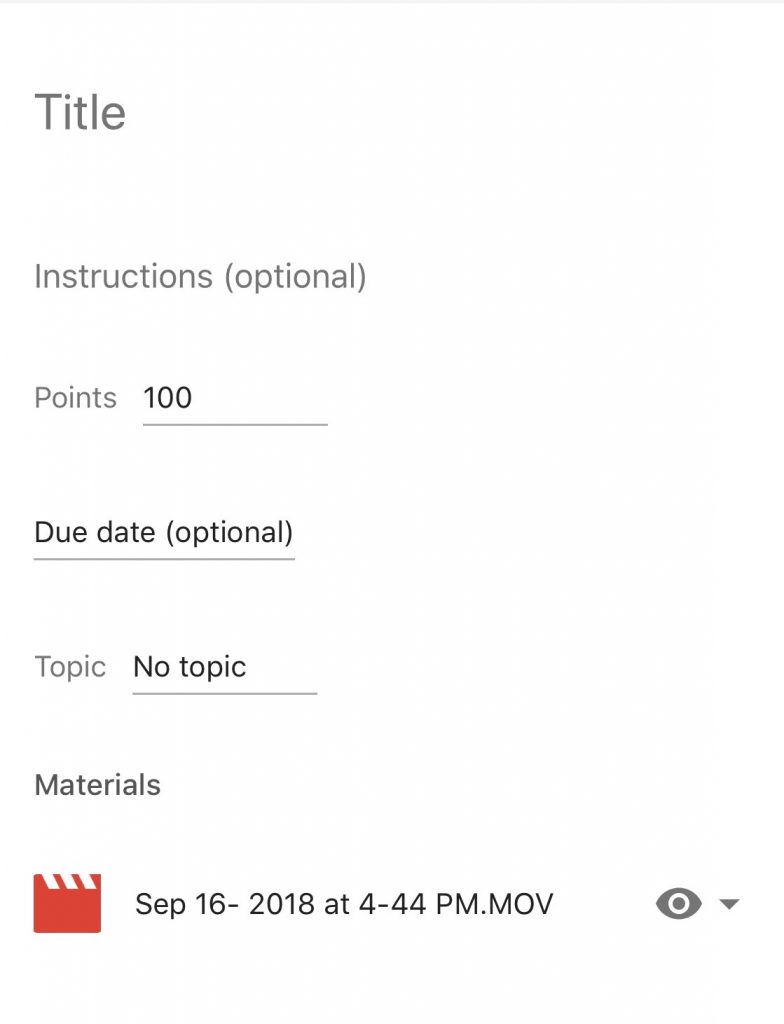
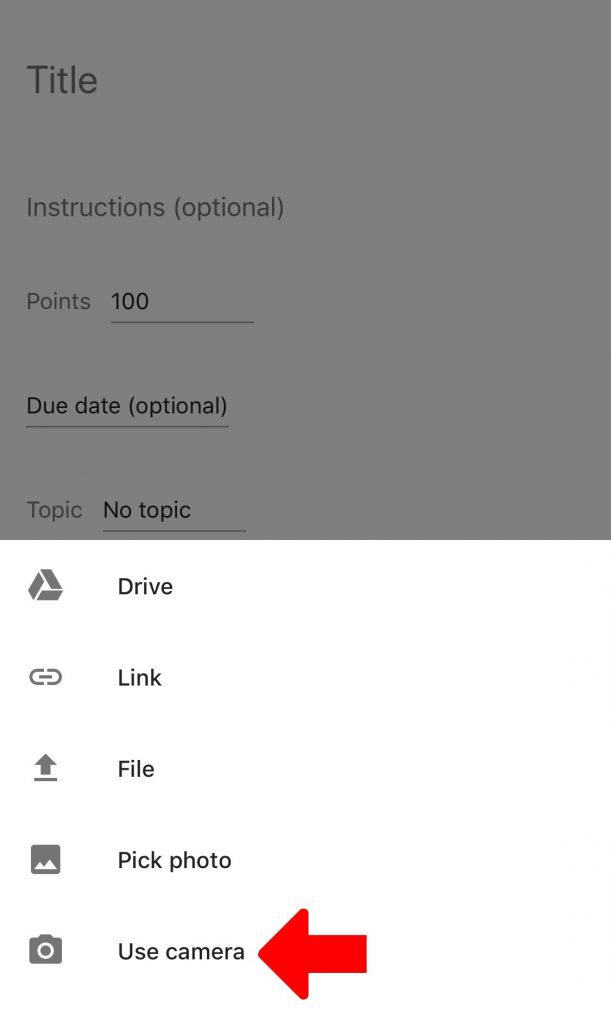
Select the Use Camera option to record video directions. Once your video is complete, it will be uploaded to the assignment and will appear in the assignment materials list as an mp4. The video will also be saved to your Classroom folder in Google Drive.
Video Directions Using a Webcam

If your computer has a built-in or external webcam, video directions can easily be uploaded to Classroom assignments.

Step 1: Create Video Using a Webcam

Open the webcam application on your computer and create a video explaining the assignment directions. If your webcam is not set up to automatically save videos, make sure to save the video you created to your computer or to Google Drive.

Step 2: Upload Video to Assignment

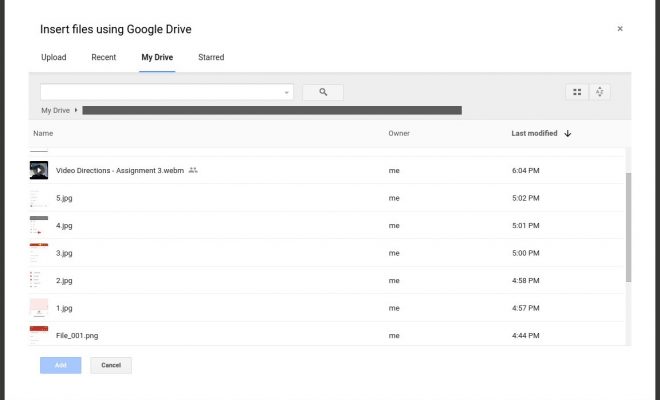
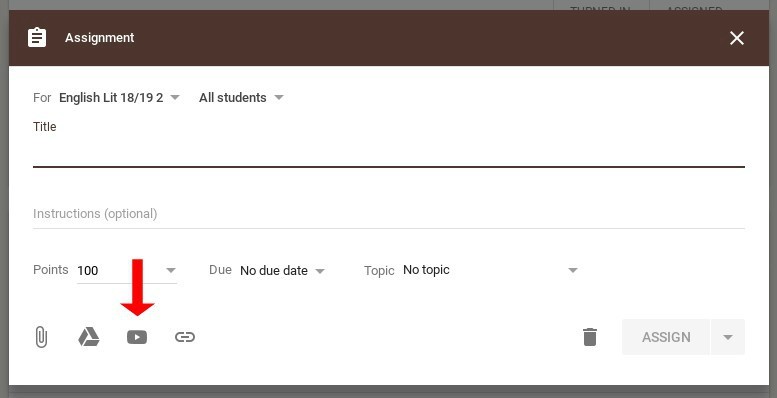
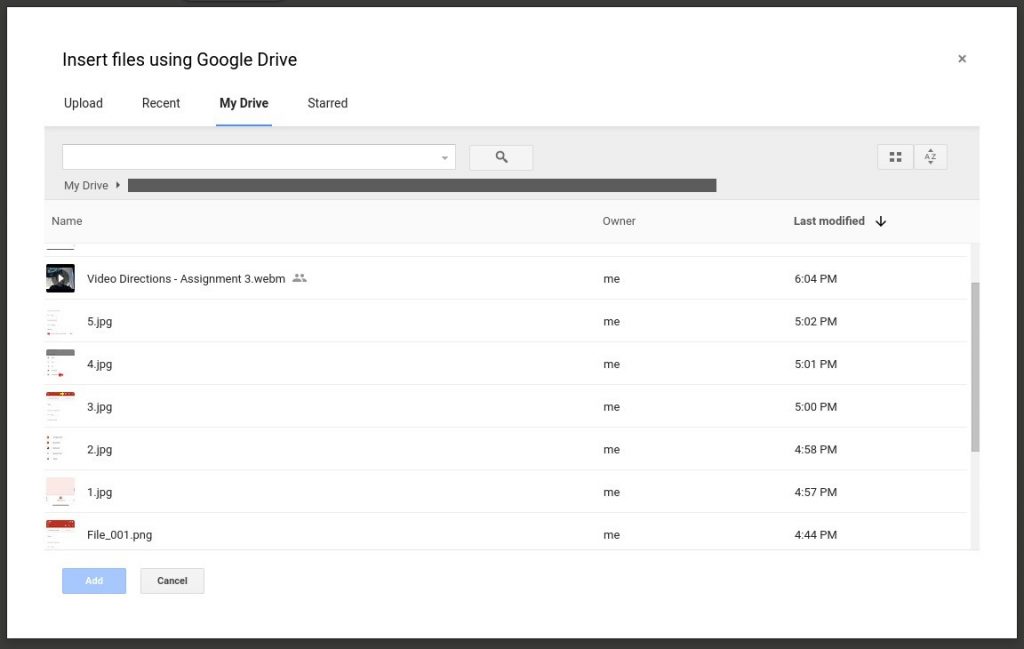
Navigate to the Classwork tab in Google Classroom and create a new assignment by clicking the plus button. In order to upload the video you created, choose the location of your saved video by clicking either the paperclip icon or the Google Drive icon.
Homework Helper

  • Post videos from reliable sources which explain the homework topic(s).

Just Say Hi

  • Post a teacher-created video to introduce yourself, tell a funny joke as a brain break, or just say “hi” to students.
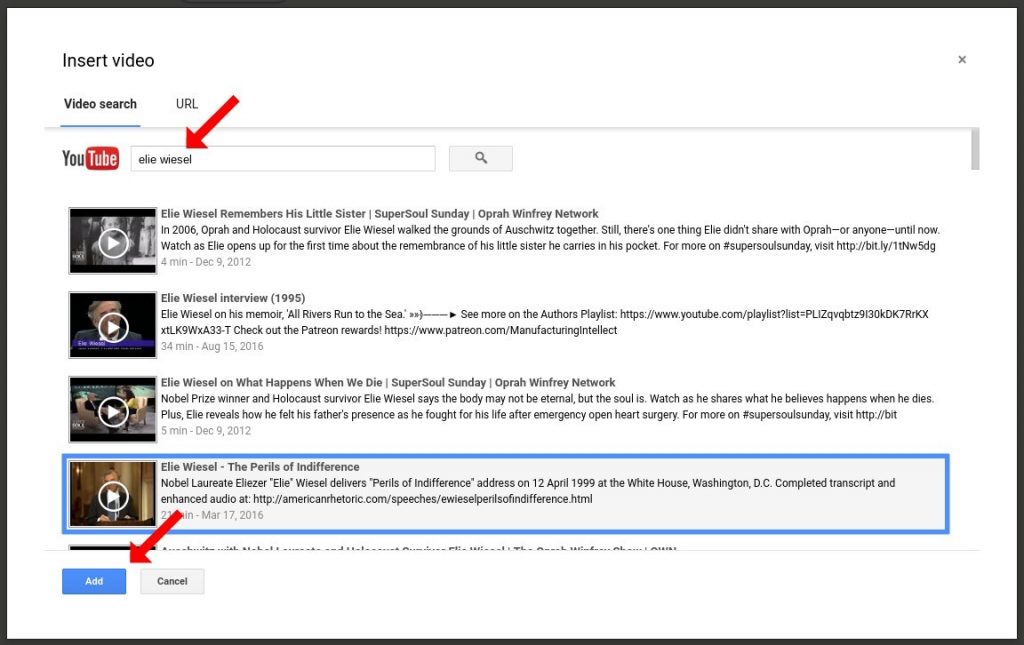
Choose the video file and click Add at the bottom left of the screen. This will add the video to your assignment; however, it will not automatically save it to the Classroom folder in Google Drive. This can be done manually if you want to save the video with other assignment materials.
 

Other Video Tools for Google Classroom

There are many other video tools which can be used to create video directions for students. Here are a few which integrate with Google Drive and/or Google Classroom:

School Video Recorder – Users must sign in with a Google for Education account in order for teachers and students to see videos from one another.

Hippo Video – Users can create, edit, and share videos through the free Chrome extension which integrates with Classroom

Webcam Record (by Alice Keeler) – Records 30 seconds of video which is automatically saved to Google Drive. The video link is also copied to the clipboard for immediate use after recording has finished.

Previous Article

Google Classroom Integrated Similarity Detector

Next Article

Why Edtech Companies Need Education Researchers to ...

Matthew Lynch

Related articles More from author

  • Early Childhood & K-12 EdTechGoogle Classroom

    How to Use Google Slides in the Classroom

    May 28, 2018
    By Matthew Lynch
  • Early Childhood & K-12 EdTechGoogle Classroom

    Is Google Classroom Too Good to Be True? A Definitive Answer

    April 23, 2018
    By Matthew Lynch
  • Early Childhood & K-12 EdTechGoogle ClassroomHigher EducationHigher Education EdTech

    How to Use the Notification Feature in Google Classroom

    September 6, 2018
    By Matthew Lynch
  • Google Classroom

    Google Classroom Tip #32: How to Provide Feedback to Your Students

    December 2, 2018
    By Matthew Lynch
  • Google Classroom

    How to Integrate Google Classroom with the Power of YouTube

    September 18, 2018
    By Matthew Lynch
  • Early Childhood & K-12 EdTechGoogle Classroom

    How to Use Google Classroom

    February 23, 2018
    By Matthew Lynch

Search

Login & Registration

  • Log in
  • Entries feed
  • Comments feed
  • WordPress.org

Newsletter

Signup for The Tech Edvocate Newsletter and have the latest in EdTech news and opinion delivered to your email address!

About Us

Since technology is not going anywhere and does more good than harm, adapting is the best course of action. That is where The Tech Edvocate comes in. We plan to cover the PreK-12 and Higher Education EdTech sectors and provide our readers with the latest news and opinion on the subject. From time to time, I will invite other voices to weigh in on important issues in EdTech. We hope to provide a well-rounded, multi-faceted look at the past, present, the future of EdTech in the US and internationally.

We started this journey back in June 2016, and we plan to continue it for many more years to come. I hope that you will join us in this discussion of the past, present and future of EdTech and lend your own insight to the issues that are discussed.

Newsletter

Signup for The Tech Edvocate Newsletter and have the latest in EdTech news and opinion delivered to your email address!

Contact Us

The Tech Edvocate
910 Goddin Street
Richmond, VA 23231
(601) 630-5238
[email protected]

Copyright © 2026 Matthew Lynch. All rights reserved.