The Tech Edvocate

Top Menu

  • Advertisement
  • Apps
  • Home Page
  • Home Page Five (No Sidebar)
  • Home Page Four
  • Home Page Three
  • Home Page Two
  • Home Tech2
  • Icons [No Sidebar]
  • Left Sidbear Page
  • Lynch Educational Consulting
  • My Account
  • My Speaking Page
  • Newsletter Sign Up Confirmation
  • Newsletter Unsubscription
  • Our Brands
  • Page Example
  • Privacy Policy
  • Protected Content
  • Register
  • Request a Product Review
  • Shop
  • Shortcodes Examples
  • Signup
  • Start Here
    • Governance
    • Careers
    • Contact Us
  • Terms and Conditions
  • The Edvocate
  • The Tech Edvocate Product Guide
  • Topics
  • Write For Us
  • Advertise

Main Menu

  • Start Here
    • Our Brands
    • Governance
      • Lynch Educational Consulting, LLC.
      • Dr. Lynch’s Personal Website
      • Careers
    • Write For Us
    • The Tech Edvocate Product Guide
    • Contact Us
    • Books
    • Edupedia
    • Post a Job
    • The Edvocate Podcast
    • Terms and Conditions
    • Privacy Policy
  • Topics
    • Assistive Technology
    • Child Development Tech
    • Early Childhood & K-12 EdTech
    • EdTech Futures
    • EdTech News
    • EdTech Policy & Reform
    • EdTech Startups & Businesses
    • Higher Education EdTech
    • Online Learning & eLearning
    • Parent & Family Tech
    • Personalized Learning
    • Product Reviews
  • Advertise
  • Tech Edvocate Awards
  • The Edvocate
  • Pedagogue
  • School Ratings

logo

The Tech Edvocate

  • Start Here
    • Our Brands
    • Governance
      • Lynch Educational Consulting, LLC.
      • Dr. Lynch’s Personal Website
        • My Speaking Page
      • Careers
    • Write For Us
    • The Tech Edvocate Product Guide
    • Contact Us
    • Books
    • Edupedia
    • Post a Job
    • The Edvocate Podcast
    • Terms and Conditions
    • Privacy Policy
  • Topics
    • Assistive Technology
    • Child Development Tech
    • Early Childhood & K-12 EdTech
    • EdTech Futures
    • EdTech News
    • EdTech Policy & Reform
    • EdTech Startups & Businesses
    • Higher Education EdTech
    • Online Learning & eLearning
    • Parent & Family Tech
    • Personalized Learning
    • Product Reviews
  • Advertise
  • Tech Edvocate Awards
  • The Edvocate
  • Pedagogue
  • School Ratings
  • 100 Best Monday.com Integrations

  • 100 Best GitHub Actions

  • The Astonishing Truth: Why You Need to Rethink How Teens Invest

  • This Is How Kids Are Quietly Becoming Investing Geniuses

  • 7 Incredible Investing Apps For Kids That Could Make Your Child a Future Millionaire

  • The Startling Truth About Skills-Based Hiring vs Traditional Degrees

  • The Astonishing Truth: Why Employers Still Demand Degrees, Despite What They Say

  • The Unseen Hurdle: Why Employers Dropped Degree Requirements But Still Aren’t Hiring Differently

  • The AI Competency Gap: Top 10 Upskilling Courses You Can’t Afford to Miss

  • Why Workera’s Acquisition Could Be the Ultimate Answer to AI Upskilling’s Biggest Problem

Tech Advice
Home›Tech Advice›How to Stop Your iPhone Apps From Tracking You

How to Stop Your iPhone Apps From Tracking You
By Matthew Lynch
July 17, 2023
0
Spread the love

Privacy is a significant concern in today’s digital age, and many apps on your iPhone may track your activities for various reasons. If you value your privacy and want to prevent apps from tracking you, there are steps you can take. In this article, we will guide you through the process of stopping app tracking on your iPhone.

Step 1: Update to iOS 14 or Later

To take advantage of Apple’s enhanced privacy features:

1. Ensure that your iPhone is running iOS 14 or a later version.

2. Go to Settings on your device and tap on General.

3. Tap on Software Update, and if an update is available, download and install it.

Step 2: Review App Tracking Permissions

With iOS 14 or later installed:

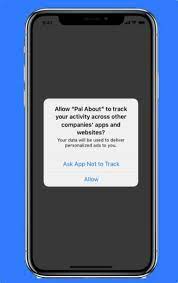
1 . Open the Settings app on your iPhone. 2 . Scroll down and tap on Privacy. 3 . Look for an option called “Tracking” (sometimes labeled as “App Tracking Transparency”). 4 . Tap on it to access the settings related to app tracking permissions.

Step 3: Disable App Tracking

In the “Tracking” settings:

1 . Toggle off the switch next to “Allow Apps To Request To Track”.

• By disabling this permission, apps will no longer be able to ask for permission to track you across other apps/websites owned by different companies/services.

2 . Additionally, review the list of installed apps below this setting—and individually toggle off any specific app(s) for which you don’t want tracking enabled.

Step 4: Manage Location Services

While still in Privacy settings:

1 . Locate “Location Services” (often at the top) and tap on it.

• This section allows granular control over how individual apps can access/use location data.

2 . Review each listed app and choose the desired permission level for location access, such as “Never”, “While Using the App”, or “Ask Next Time”.

• Consider selecting “Never” for apps that do not require your location to function properly.

Step 5: Review Other Privacy Settings

To further enhance your privacy:

1 . Go back to Privacy settings. 2 . Explore other sections like Camera, Microphone, and Contacts.

• Here, you can manage which apps have access to these sensitive areas of your device.

3 . Review each app’s permissions individually—disabling any unnecessary access.

Conclusion

Protecting your privacy is important, especially when it comes to app tracking on your iPhone. By updating to iOS 14 or later, reviewing and disabling app tracking permissions through the “Tracking” settings in Privacy options, managing Location Services permissions, and reviewing other privacy-related settings—you can prevent apps from tracking you without compromising functionality.

Take control of your privacy today by following these steps and enjoy a more secure digital experience on your iPhone!


Previous Article

Is Samsung’s 45-Watt Phone Charger Worth It? ...

Next Article

Google’s Next Pixel Watch Could Have Better ...

Matthew Lynch

Related articles More from author

  • Tech Advice

    Best-Performing Tech ETFs to Invest in Today

    October 20, 2023
    By Matthew Lynch
  • Tech Advice

    Explainer: Difference between HDR, HDR10 and Dolby Vision

    February 19, 2024
    By Matthew Lynch
  • Tech Advice

    Stuck on Your Taxes? Here’s How to Get Free Help

    July 11, 2023
    By Matthew Lynch
  • Tech Advice

    How to play tomorrow’s Wordle without having to wait an entire day

    July 4, 2023
    By Matthew Lynch
  • Tech Advice

    Urbanista Phoenix Review

    July 20, 2023
    By Matthew Lynch
  • Tech Advice

    40 Comedy Specials to Stream on Netflix

    October 19, 2023
    By Matthew Lynch

Search

Login & Registration

  • Log in
  • Entries feed
  • Comments feed
  • WordPress.org

Newsletter

Signup for The Tech Edvocate Newsletter and have the latest in EdTech news and opinion delivered to your email address!

About Us

Since technology is not going anywhere and does more good than harm, adapting is the best course of action. That is where The Tech Edvocate comes in. We plan to cover the PreK-12 and Higher Education EdTech sectors and provide our readers with the latest news and opinion on the subject. From time to time, I will invite other voices to weigh in on important issues in EdTech. We hope to provide a well-rounded, multi-faceted look at the past, present, the future of EdTech in the US and internationally.

We started this journey back in June 2016, and we plan to continue it for many more years to come. I hope that you will join us in this discussion of the past, present and future of EdTech and lend your own insight to the issues that are discussed.

Newsletter

Signup for The Tech Edvocate Newsletter and have the latest in EdTech news and opinion delivered to your email address!

Contact Us

The Tech Edvocate
910 Goddin Street
Richmond, VA 23231
(601) 630-5238
[email protected]

Copyright © 2026 Matthew Lynch. All rights reserved.