The Tech Edvocate

Top Menu

  • Advertisement
  • Apps
  • Home Page
  • Home Page Five (No Sidebar)
  • Home Page Four
  • Home Page Three
  • Home Page Two
  • Home Tech2
  • Icons [No Sidebar]
  • Left Sidbear Page
  • Lynch Educational Consulting
  • My Account
  • My Speaking Page
  • Newsletter Sign Up Confirmation
  • Newsletter Unsubscription
  • Our Brands
  • Page Example
  • Privacy Policy
  • Protected Content
  • Register
  • Request a Product Review
  • Shop
  • Shortcodes Examples
  • Signup
  • Start Here
    • Governance
    • Careers
    • Contact Us
  • Terms and Conditions
  • The Edvocate
  • The Tech Edvocate Product Guide
  • Topics
  • Write For Us
  • Advertise

Main Menu

  • Start Here
    • Our Brands
    • Governance
      • Lynch Educational Consulting, LLC.
      • Dr. Lynch’s Personal Website
      • Careers
    • Write For Us
    • The Tech Edvocate Product Guide
    • Contact Us
    • Books
    • Edupedia
    • Post a Job
    • The Edvocate Podcast
    • Terms and Conditions
    • Privacy Policy
  • Topics
    • Assistive Technology
    • Child Development Tech
    • Early Childhood & K-12 EdTech
    • EdTech Futures
    • EdTech News
    • EdTech Policy & Reform
    • EdTech Startups & Businesses
    • Higher Education EdTech
    • Online Learning & eLearning
    • Parent & Family Tech
    • Personalized Learning
    • Product Reviews
  • Advertise
  • Tech Edvocate Awards
  • The Edvocate
  • Pedagogue
  • School Ratings

logo

The Tech Edvocate

  • Start Here
    • Our Brands
    • Governance
      • Lynch Educational Consulting, LLC.
      • Dr. Lynch’s Personal Website
        • My Speaking Page
      • Careers
    • Write For Us
    • The Tech Edvocate Product Guide
    • Contact Us
    • Books
    • Edupedia
    • Post a Job
    • The Edvocate Podcast
    • Terms and Conditions
    • Privacy Policy
  • Topics
    • Assistive Technology
    • Child Development Tech
    • Early Childhood & K-12 EdTech
    • EdTech Futures
    • EdTech News
    • EdTech Policy & Reform
    • EdTech Startups & Businesses
    • Higher Education EdTech
    • Online Learning & eLearning
    • Parent & Family Tech
    • Personalized Learning
    • Product Reviews
  • Advertise
  • Tech Edvocate Awards
  • The Edvocate
  • Pedagogue
  • School Ratings
  • Unmasking the Troubling Truth About EU’s Digital Omnibus and Your Data

  • Outrageous: Your US Car Insurance 2026 Bill Is About to Explode – Here’s Why

  • Uncovering the Truth: Are AI Spending Concerns About to Tank Your Portfolio?

  • The Silent Revolution: How AI Property Valuation Is Quietly Reshaping Real Estate

  • The Astonishing Truth: Why Your Dream Car Is Now a $52,000 Illusion

  • Toxic Algorithms: Why Your Bank’s AI Could Cost You Everything

  • OpenAI’s GPT-6 Cyber: A Dangerous New AI Threat or Our Ultimate Digital Guardian?

  • This Game-Changing Natural Ozempic Alternative Just Blew Up on Social Media

  • Bónuszösszeg, ingyen pörgetés és befizetési feltétel: üdvözlő és befizetés nélküli kaszinóajánlatok magyar játékosoknak

  • 9 Critical Reasons Why Athexio Might Be The Investment You Need (Or Should Avoid)

Digital & Mobile Technology
Home›Digital & Mobile Technology›Volume Booster Tips for Smartphones and Tablets

Volume Booster Tips for Smartphones and Tablets
By Matthew Lynch
July 29, 2023
0
Spread the love

As technology continues to advance, mobile devices like smartphones and tablets have become an essential part of our day-to-day lives. These devices provide us with endless possibilities for entertainment, communication, and productivity. However, despite their usefulness, sometimes we find ourselves struggling to hear audio clearly or at an adequate volume level. This can be frustrating, especially when we’re trying to listen to music, watch a movie, or chat with someone over the phone. Fortunately, there are several volume booster tips you can use to improve the sound quality on your mobile device.

1. Adjust the settings

Check the sound settings on your smartphone or tablet to make sure that the volume is not at the lowest level. You can access your device’s sound settings by tapping on the settings icon and looking for the sound or audio option. From there, you can adjust the volume level of various audio channels like media, ringtone, notifications, alarms, and system.

2. Use a volume booster app

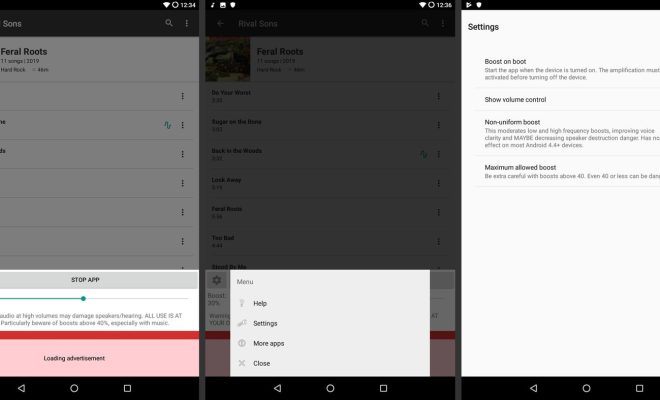
If adjusting the settings isn’t enough, you can download a volume booster app to amplify the audio output of your device. There are several volume booster apps available for free on the Google Play Store and the Apple App Store. These apps work by increasing the gain of the speakers and headphones on your device and allow you to adjust the volume with a simple slider.

3. Clean the speakers

Over time, speakers on mobile devices can gather dust and debris, which can block the sound output and reduce the overall volume. To clean the speakers on your device, use a soft-bristled brush or a cotton swab to gently remove any dirt or debris around the speaker grills. You can also use a compressed air can to blow out any lodged particles.

4. Get better headphones or speakers

Sometimes, the limitation of low volume output isn’t your device’s fault but the headphones or speakers you’re using. Invest in a high-quality set of headphones or speakers that are specifically designed to deliver excellent sound quality and volume. Wireless headphones and Bluetooth speakers are good options for an immersive audio experience, and they’re readily available in the market.

5. Turn off unnecessary apps

Many apps running in the background can cause your device to slow down, which can affect the volume output of your device. To optimize your device’s performance, close all unneeded apps or services and make sure that you’re only running the necessary ones.

In conclusion, volume booster tips can significantly improve the sound quality on your mobile device, but it’s essential to ensure that you don’t damage your ears by listening to music at excessively high volumes. Always keep a safe distance from your device and take frequent breaks from listening to music or watching videos. With these tips, you can enjoy a crystal-clear audio output on your mobile device without compromising your hearing health.

Previous Article

Floppy Drive 4-Pin Power Connector Pinout

Next Article

Creating the Wall Street Journal Hedcut Effect ...

Matthew Lynch

Related articles More from author

  • Digital & Mobile Technology

    Best Drawing and Vector Editing Apps for Chromebooks

    June 23, 2023
    By Matthew Lynch
  • Digital & Mobile Technology

    How to Fix It When Your Fire Stick Remote Is Not Working

    May 31, 2023
    By Matthew Lynch
  • Digital & Mobile Technology

    Why Doesn’t Apple Want the iPhone to Have a USB-C Port?

    July 31, 2023
    By Matthew Lynch
  • Digital & Mobile Technology

    In 2019, the smartphone market was brimming with innovation and overflowing with competition. Here are 15 phones that captured our ...

    January 31, 2024
    By Matthew Lynch
  • Digital & Mobile Technology

    What is a Personal Firewall?

    March 19, 2023
    By Matthew Lynch
  • Digital & Mobile Technology

    Best Face Filter Mobile Apps for Flawless Selfies

    June 7, 2023
    By Matthew Lynch

Search

Login & Registration

  • Log in
  • Entries feed
  • Comments feed
  • WordPress.org

Newsletter

Signup for The Tech Edvocate Newsletter and have the latest in EdTech news and opinion delivered to your email address!

About Us

Since technology is not going anywhere and does more good than harm, adapting is the best course of action. That is where The Tech Edvocate comes in. We plan to cover the PreK-12 and Higher Education EdTech sectors and provide our readers with the latest news and opinion on the subject. From time to time, I will invite other voices to weigh in on important issues in EdTech. We hope to provide a well-rounded, multi-faceted look at the past, present, the future of EdTech in the US and internationally.

We started this journey back in June 2016, and we plan to continue it for many more years to come. I hope that you will join us in this discussion of the past, present and future of EdTech and lend your own insight to the issues that are discussed.

Newsletter

Signup for The Tech Edvocate Newsletter and have the latest in EdTech news and opinion delivered to your email address!

Contact Us

The Tech Edvocate
910 Goddin Street
Richmond, VA 23231
(601) 630-5238
[email protected]

Copyright © 2026 Matthew Lynch. All rights reserved.