The Tech Edvocate

Top Menu

  • Advertisement
  • Apps
  • Home Page
  • Home Page Five (No Sidebar)
  • Home Page Four
  • Home Page Three
  • Home Page Two
  • Home Tech2
  • Icons [No Sidebar]
  • Left Sidbear Page
  • Lynch Educational Consulting
  • My Account
  • My Speaking Page
  • Newsletter Sign Up Confirmation
  • Newsletter Unsubscription
  • Our Brands
  • Page Example
  • Privacy Policy
  • Protected Content
  • Register
  • Request a Product Review
  • Shop
  • Shortcodes Examples
  • Signup
  • Start Here
    • Governance
    • Careers
    • Contact Us
  • Terms and Conditions
  • The Edvocate
  • The Tech Edvocate Product Guide
  • Topics
  • Write For Us
  • Advertise

Main Menu

  • Start Here
    • Our Brands
    • Governance
      • Lynch Educational Consulting, LLC.
      • Dr. Lynch’s Personal Website
      • Careers
    • Write For Us
    • The Tech Edvocate Product Guide
    • Contact Us
    • Books
    • Edupedia
    • Post a Job
    • The Edvocate Podcast
    • Terms and Conditions
    • Privacy Policy
  • Topics
    • Assistive Technology
    • Child Development Tech
    • Early Childhood & K-12 EdTech
    • EdTech Futures
    • EdTech News
    • EdTech Policy & Reform
    • EdTech Startups & Businesses
    • Higher Education EdTech
    • Online Learning & eLearning
    • Parent & Family Tech
    • Personalized Learning
    • Product Reviews
  • Advertise
  • Tech Edvocate Awards
  • The Edvocate
  • Pedagogue
  • School Ratings

logo

The Tech Edvocate

  • Start Here
    • Our Brands
    • Governance
      • Lynch Educational Consulting, LLC.
      • Dr. Lynch’s Personal Website
        • My Speaking Page
      • Careers
    • Write For Us
    • The Tech Edvocate Product Guide
    • Contact Us
    • Books
    • Edupedia
    • Post a Job
    • The Edvocate Podcast
    • Terms and Conditions
    • Privacy Policy
  • Topics
    • Assistive Technology
    • Child Development Tech
    • Early Childhood & K-12 EdTech
    • EdTech Futures
    • EdTech News
    • EdTech Policy & Reform
    • EdTech Startups & Businesses
    • Higher Education EdTech
    • Online Learning & eLearning
    • Parent & Family Tech
    • Personalized Learning
    • Product Reviews
  • Advertise
  • Tech Edvocate Awards
  • The Edvocate
  • Pedagogue
  • School Ratings
  • The Chew That Changed My Training: Why Nitraflex Pre-Workout Chews Deliver Unbelievable Pumps

  • The Brutal Truth: Why Your AI Skills Training Is Failing (And How to Fix It)

  • 8 Essential AI Upskilling Programs Your Business Needs to Thrive Now

  • One Critical Mistake Companies Make With AI Skills Training

  • The AI Career Showdown: Which Path Pays More And Fits You Best?

  • The Shocking Truth About the Highest Paying AI Jobs in 2026

  • The Staggering Truth About 5 AI Job Roles That Will Redefine Your Career by 2026

  • Crypto Crackdown: Is the FCA’s Iron Fist Crushing Innovation, or Just Protecting You?

  • 7 Critical Steps to Survive the Crypto Crackdown: How to Navigate FCA Regulations

  • This One Thing Is Quietly Reshaping Illegal Crypto Trading — And Regulators Are Panicking

Digital & Mobile Technology
Home›Digital & Mobile Technology›How to Easily Create a Blog With Tumblr

How to Easily Create a Blog With Tumblr
By Matthew Lynch
July 31, 2023
0
Spread the love

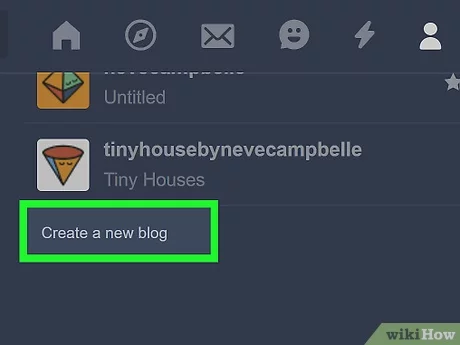
Blogging has become a popular outlet for people to express themselves, share their thoughts and ideas, and connect with others online. Tumblr is a user-friendly platform that allows bloggers to easily create and customize their own blog. In this article, we will walk you through the step-by-step process of creating a blog on Tumblr.

Step 1: Create an account

The first step is to create an account on Tumblr. If you already have a Tumblr account, skip to step 2. To create a new account, visit www.tumblr.com and click on the “sign up” button on the homepage. You will be prompted to enter your email address, password, and username. Once you have entered all of your information, click “sign up” again to finalize your account.

Step 2: Choose a theme

After logging into your Tumblr account, the next step is to choose a theme for your blog. Tumblr offers a wide range of free and paid themes that you can choose from. To browse the available themes, click on the “customize” button located on the top right-hand corner of your dashboard. From there, you can preview and select a theme that best suits your style and needs.

Step 3: Customize your theme

Once you have chosen a theme, you can customize it to your liking. To do this, click on the “customize” button again and you will be taken to the theme editor. From there, you can change the color schemes, add custom fonts, and even upload your own header image.

Step 4: Create your first post

Now that your blog is set up and customized, it’s time to start creating content. To create your first post, click on the “text” button located on the top right-hand corner of your dashboard. You can then enter your text and add any images or videos you wish to include.

Step 5: Publish and promote your post

After you have finished creating your post, review it to ensure it’s error-free and looks good. Once you’re happy with it, hit the “publish” button to make it live on your blog. To promote your post, you can share it on social media or use Tumblr’s built-in promoting features.

Conclusion

Creating a blog on Tumblr is a simple and easy process. By following these steps, you can have your blog up and running in no time. Remember, the key to a successful blog is consistency, so be sure to post regularly and engage with your audience. Happy blogging!

Previous Article

How to Change Your Navigation Language in ...

Next Article

The 6 Coolest Electric Race Cars Throughout ...

Matthew Lynch

Related articles More from author

  • Digital & Mobile Technology

    Apple SharePlay: What It Is and How to Use It

    June 2, 2023
    By Matthew Lynch
  • Digital & Mobile Technology

    What Is a Virtual LAN (VLAN)?

    June 3, 2023
    By Matthew Lynch
  • Digital & Mobile Technology

    Sony Launches the A7 IV Mirrorless Camera

    July 31, 2023
    By Matthew Lynch
  • Digital & Mobile Technology

    What is a Wireless Local Area Network (WLAN)?

    March 19, 2023
    By Matthew Lynch
  • Digital & Mobile Technology

    Reasons Password Managers Are Not as Safe as You Think

    June 11, 2023
    By Matthew Lynch
  • Digital & Mobile Technology

    Ways to Fix Safari Not Working on an iPhone

    June 23, 2023
    By Matthew Lynch

Search

Login & Registration

  • Log in
  • Entries feed
  • Comments feed
  • WordPress.org

Newsletter

Signup for The Tech Edvocate Newsletter and have the latest in EdTech news and opinion delivered to your email address!

About Us

Since technology is not going anywhere and does more good than harm, adapting is the best course of action. That is where The Tech Edvocate comes in. We plan to cover the PreK-12 and Higher Education EdTech sectors and provide our readers with the latest news and opinion on the subject. From time to time, I will invite other voices to weigh in on important issues in EdTech. We hope to provide a well-rounded, multi-faceted look at the past, present, the future of EdTech in the US and internationally.

We started this journey back in June 2016, and we plan to continue it for many more years to come. I hope that you will join us in this discussion of the past, present and future of EdTech and lend your own insight to the issues that are discussed.

Newsletter

Signup for The Tech Edvocate Newsletter and have the latest in EdTech news and opinion delivered to your email address!

Contact Us

The Tech Edvocate
910 Goddin Street
Richmond, VA 23231
(601) 630-5238
[email protected]

Copyright © 2026 Matthew Lynch. All rights reserved.