The Tech Edvocate

Top Menu

  • Advertisement
  • Apps
  • Home Page
  • Home Page Five (No Sidebar)
  • Home Page Four
  • Home Page Three
  • Home Page Two
  • Home Tech2
  • Icons [No Sidebar]
  • Left Sidbear Page
  • Lynch Educational Consulting
  • My Account
  • My Speaking Page
  • Newsletter Sign Up Confirmation
  • Newsletter Unsubscription
  • Our Brands
  • Page Example
  • Privacy Policy
  • Protected Content
  • Register
  • Request a Product Review
  • Shop
  • Shortcodes Examples
  • Signup
  • Start Here
    • Governance
    • Careers
    • Contact Us
  • Terms and Conditions
  • The Edvocate
  • The Tech Edvocate Product Guide
  • Topics
  • Write For Us
  • Advertise

Main Menu

  • Start Here
    • Our Brands
    • Governance
      • Lynch Educational Consulting, LLC.
      • Dr. Lynch’s Personal Website
      • Careers
    • Write For Us
    • The Tech Edvocate Product Guide
    • Contact Us
    • Books
    • Edupedia
    • Post a Job
    • The Edvocate Podcast
    • Terms and Conditions
    • Privacy Policy
  • Topics
    • Assistive Technology
    • Child Development Tech
    • Early Childhood & K-12 EdTech
    • EdTech Futures
    • EdTech News
    • EdTech Policy & Reform
    • EdTech Startups & Businesses
    • Higher Education EdTech
    • Online Learning & eLearning
    • Parent & Family Tech
    • Personalized Learning
    • Product Reviews
  • Advertise
  • Tech Edvocate Awards
  • The Edvocate
  • Pedagogue
  • School Ratings

logo

The Tech Edvocate

  • Start Here
    • Our Brands
    • Governance
      • Lynch Educational Consulting, LLC.
      • Dr. Lynch’s Personal Website
        • My Speaking Page
      • Careers
    • Write For Us
    • The Tech Edvocate Product Guide
    • Contact Us
    • Books
    • Edupedia
    • Post a Job
    • The Edvocate Podcast
    • Terms and Conditions
    • Privacy Policy
  • Topics
    • Assistive Technology
    • Child Development Tech
    • Early Childhood & K-12 EdTech
    • EdTech Futures
    • EdTech News
    • EdTech Policy & Reform
    • EdTech Startups & Businesses
    • Higher Education EdTech
    • Online Learning & eLearning
    • Parent & Family Tech
    • Personalized Learning
    • Product Reviews
  • Advertise
  • Tech Edvocate Awards
  • The Edvocate
  • Pedagogue
  • School Ratings
  • How to create estimates in Buildertrend

  • How to use Bluebeam for punch lists

  • Procore vs Viewpoint features

  • How to submit invoices in Procore

  • How to set up Monday.com for contractors

  • Can PlanGrid track punch lists

  • How to create selections in CoConstruct

  • How to markup drawings in PlanGrid

  • How to use PlanGrid for blueprints

  • How to create custom tools in Bluebeam

Digital & Mobile Technology
Home›Digital & Mobile Technology›How to Email Multiple Recipients Using Cc and Bcc

How to Email Multiple Recipients Using Cc and Bcc
By Matthew Lynch
June 23, 2023
0
Spread the love

Email is a popular means of communication, and it is not uncommon to send messages to multiple recipients at once. However, depending on the nature of the email, it may not be appropriate or necessary for everyone to see who else is receiving the message. To address this, email clients offer a feature that allows you to send emails to multiple recipients while keeping their email addresses private. This feature is known as the “carbon copy (Cc)” and “blind carbon copy (Bcc).”

What is Cc?

Cc stands for carbon copy. When you add someone to the Cc field, they will receive a copy of the email, and all other recipients will see their email address. So, make sure to use Cc only when all recipients need to see the entire email chain. This feature is useful when you want to give a message to someone who needs to be aware of the conversation but is not directly involved in it.

What is Bcc?

Bcc stands for blind carbon copy. When you add someone to the Bcc field, they will receive a copy of the email, but none of the other recipients will see their email address. Therefore, you can send emails to multiple recipients without revealing their identities to others, making this feature useful for keeping email lists private. Bcc is great when you want to send an email to a group of people without them knowing each other’s email addresses.

How to send an email using Cc and Bcc

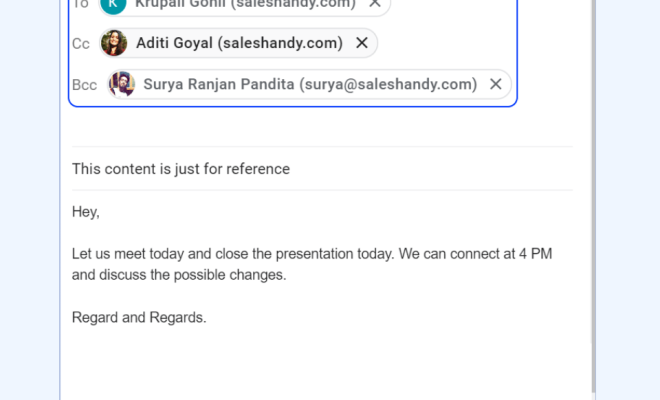
In most email clients, the Cc and Bcc fields are located in the same place as the To field—a few inches below it. In Gmail, for example, simply type in the recipient’s email under the “To” field, and then click on “Cc” or “Bcc” on the right side of the screen.

When sending an email with multiple recipients, use the “To” field to enter the primary recipient, whose email will be visible to everyone. Then, use the “Cc” field to add any other recipients who need to see the email chain. Finally, use the “Bcc” field to add any other recipients who should receive the email without revealing their identity to others. Make sure to explain why they are receiving the email, so they are not confused about the context.

Final thoughts

Sending emails to multiple recipients is very common, but using Cc and Bcc can help you to manage the privacy of your messages. Cc is useful when you want to give a message to someone who needs to be aware of the conversation but is not directly involved in it. Bcc is excellent when you want to send an email to a group of people without them knowing each other’s email addresses. By using these two features, you can ensure that your emails are handled respectfully and efficiently.


Previous Article

Full Rock Band 4 Track List

Next Article

How to Restore Your iPod Touch to ...

Matthew Lynch

Related articles More from author

  • Digital & Mobile Technology

    How to Find the Captive Cord in Destiny 2’s Lunar Battlegrounds

    June 12, 2023
    By Matthew Lynch
  • Digital & Mobile Technology

    What is a Virtual Machine Monitor (VMM)?

    April 24, 2023
    By Matthew Lynch
  • Digital & Mobile Technology

    How to Upgrade a Laptop Graphics Card

    June 6, 2023
    By Matthew Lynch
  • Digital & Mobile Technology

    The Microsoft Surface 3 vs Surface Pro 3: Which One Should You Choose?

    July 14, 2023
    By Matthew Lynch
  • Digital & Mobile Technology

    How to Print From iPhone Without AirPrint

    June 4, 2023
    By Matthew Lynch
  • Digital & Mobile Technology

    What is a Platform?

    April 18, 2023
    By Matthew Lynch

Search

Login & Registration

  • Log in
  • Entries feed
  • Comments feed
  • WordPress.org

Newsletter

Signup for The Tech Edvocate Newsletter and have the latest in EdTech news and opinion delivered to your email address!

About Us

Since technology is not going anywhere and does more good than harm, adapting is the best course of action. That is where The Tech Edvocate comes in. We plan to cover the PreK-12 and Higher Education EdTech sectors and provide our readers with the latest news and opinion on the subject. From time to time, I will invite other voices to weigh in on important issues in EdTech. We hope to provide a well-rounded, multi-faceted look at the past, present, the future of EdTech in the US and internationally.

We started this journey back in June 2016, and we plan to continue it for many more years to come. I hope that you will join us in this discussion of the past, present and future of EdTech and lend your own insight to the issues that are discussed.

Newsletter

Signup for The Tech Edvocate Newsletter and have the latest in EdTech news and opinion delivered to your email address!

Contact Us

The Tech Edvocate
910 Goddin Street
Richmond, VA 23231
(601) 630-5238
[email protected]

Copyright © 2026 Matthew Lynch. All rights reserved.