The Tech Edvocate

Top Menu

  • Advertisement
  • Apps
  • Home Page
  • Home Page Five (No Sidebar)
  • Home Page Four
  • Home Page Three
  • Home Page Two
  • Home Tech2
  • Icons [No Sidebar]
  • Left Sidbear Page
  • Lynch Educational Consulting
  • My Account
  • My Speaking Page
  • Newsletter Sign Up Confirmation
  • Newsletter Unsubscription
  • Our Brands
  • Page Example
  • Privacy Policy
  • Protected Content
  • Register
  • Request a Product Review
  • Shop
  • Shortcodes Examples
  • Signup
  • Start Here
    • Governance
    • Careers
    • Contact Us
  • Terms and Conditions
  • The Edvocate
  • The Tech Edvocate Product Guide
  • Topics
  • Write For Us
  • Advertise

Main Menu

  • Start Here
    • Our Brands
    • Governance
      • Lynch Educational Consulting, LLC.
      • Dr. Lynch’s Personal Website
      • Careers
    • Write For Us
    • The Tech Edvocate Product Guide
    • Contact Us
    • Books
    • Edupedia
    • Post a Job
    • The Edvocate Podcast
    • Terms and Conditions
    • Privacy Policy
  • Topics
    • Assistive Technology
    • Child Development Tech
    • Early Childhood & K-12 EdTech
    • EdTech Futures
    • EdTech News
    • EdTech Policy & Reform
    • EdTech Startups & Businesses
    • Higher Education EdTech
    • Online Learning & eLearning
    • Parent & Family Tech
    • Personalized Learning
    • Product Reviews
  • Advertise
  • Tech Edvocate Awards
  • The Edvocate
  • Pedagogue
  • School Ratings

logo

The Tech Edvocate

  • Start Here
    • Our Brands
    • Governance
      • Lynch Educational Consulting, LLC.
      • Dr. Lynch’s Personal Website
        • My Speaking Page
      • Careers
    • Write For Us
    • The Tech Edvocate Product Guide
    • Contact Us
    • Books
    • Edupedia
    • Post a Job
    • The Edvocate Podcast
    • Terms and Conditions
    • Privacy Policy
  • Topics
    • Assistive Technology
    • Child Development Tech
    • Early Childhood & K-12 EdTech
    • EdTech Futures
    • EdTech News
    • EdTech Policy & Reform
    • EdTech Startups & Businesses
    • Higher Education EdTech
    • Online Learning & eLearning
    • Parent & Family Tech
    • Personalized Learning
    • Product Reviews
  • Advertise
  • Tech Edvocate Awards
  • The Edvocate
  • Pedagogue
  • School Ratings
  • Why Your Mortgage Could Be Denied by Biased AI – And What the Fed Is Doing About It

  • Unprecedented: Lawsuit Demands Total AI Shutdown Amid Rising Global Panic

  • The Astonishing Truth: Microcredentials Now Trump MBAs for Data Science Jobs

  • The Astonishing Twist: AI Cuts Your Job, Then Helps You Sue Your Boss

  • The Staggering Truth About Palo Alto’s $4.5 Billion AI Bet

  • Mind-Blowing: Satellite Metals Now Outweigh Meteoroids, Sparking Urgent Insurance Crisis

  • The Silent Threat From Above: Your Sky Is Changing, And Here’s Why

  • The AI Property Management Revolution: Visitt MCP’s Astonishing Edge

  • Why Your Home Needs These 9 Groundbreaking Battery Storage Solutions by 2027

  • Devastating Data Breach Exposes Millions: What You MUST Know Now

Digital & Mobile Technology
Home›Digital & Mobile Technology›Ways You Can Still Use Your Old iPad

Ways You Can Still Use Your Old iPad
By Matthew Lynch
June 23, 2023
0
Spread the love

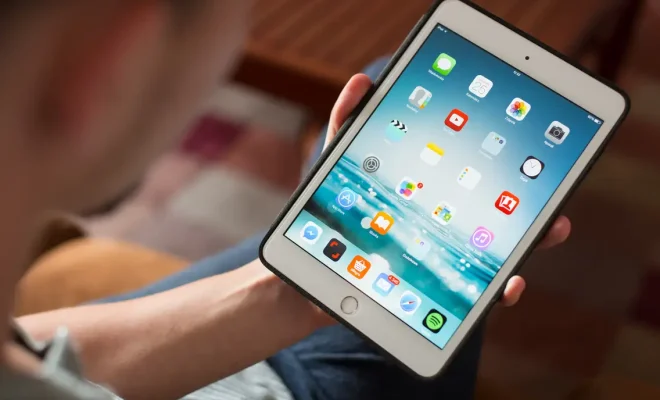
iPads have become an essential part of our daily lives since they’re an excellent tool for browsing the internet, playing games, watching movies, and more. However, people tend to upgrade their devices every few years for better performance and features. And if you’re one of those people and have an old iPad lying around, don’t fret! There are still several ways to put it to good use. In this article, we’ll explore ways to use your old iPad.

1. Media Hub

One of the most popular uses of an old iPad is to convert it into a media hub. You can use it as a dedicated device for streaming music, movies or TV shows. Set it up in a common area in your home, so everyone in the house can access the media files easily. You can also download apps like Netflix, Hulu, and Amazon Prime Video to take advantage of the larger screen.

2. Digital Photo Frame

An old iPad can also be turned into a digital photo frame. This can be an excellent way to display your favorite photographs and memories around your home. You can set up a slideshow of your photos, and the iPad will automatically show your photos one by one. You can even use the iPad’s motion sensors to detect when you walk by it and activate the slideshow.

3. Home Security Camera

Another use for an old iPad is to turn it into a home security camera. There are several apps, such as Manything or Presence, that turn your iPad into a live-streaming camera. You can then position the iPad in your home and use your current iPad or iPhone to monitor your home’s security.

4. E-reading Device

With apps like Kindle, you can use your old iPad as an e-reader. Download books, magazines, and comics and read them on the larger screen of the iPad. Plus, with the iPad’s long battery life, you can read for hours without worrying about the battery running out.

5. Dedicated Gaming Device

If you are an avid gamer and already have a newer iPad or tablet, you can turn your old iPad into a dedicated gaming device. Remove all non-gaming apps and customize the settings to optimize gaming performance. This way, you can avoid any distractions from notifications or incoming messages while gaming.


Previous Article

How to Finally Get Rid of Games ...

Next Article

Ways to Fix a Broken Charger Cable

Matthew Lynch

Related articles More from author

  • Digital & Mobile Technology

    The Difference Between Local and Microsoft Accounts in Windows

    June 4, 2023
    By Matthew Lynch
  • Digital & Mobile Technology

    Mouse Not Working in Windows 10? How to Fix Your Mouse Problems

    August 5, 2023
    By Matthew Lynch
  • Digital & Mobile Technology

    iPhone 12 Pro vs. iPhone 12 Pro Max: Which Should You Buy?

    June 6, 2023
    By Matthew Lynch
  • Digital & Mobile Technology

    A Timeline And History Of Blockchain Technology

    April 10, 2023
    By Matthew Lynch
  • Digital & Mobile Technology

    How to Add or Remove Shortcuts on Facebook

    July 6, 2023
    By Matthew Lynch
  • Digital & Mobile Technology

    What is Web-Based Project Management Software?

    May 15, 2023
    By Matthew Lynch

Search

Login & Registration

  • Log in
  • Entries feed
  • Comments feed
  • WordPress.org

Newsletter

Signup for The Tech Edvocate Newsletter and have the latest in EdTech news and opinion delivered to your email address!

About Us

Since technology is not going anywhere and does more good than harm, adapting is the best course of action. That is where The Tech Edvocate comes in. We plan to cover the PreK-12 and Higher Education EdTech sectors and provide our readers with the latest news and opinion on the subject. From time to time, I will invite other voices to weigh in on important issues in EdTech. We hope to provide a well-rounded, multi-faceted look at the past, present, the future of EdTech in the US and internationally.

We started this journey back in June 2016, and we plan to continue it for many more years to come. I hope that you will join us in this discussion of the past, present and future of EdTech and lend your own insight to the issues that are discussed.

Newsletter

Signup for The Tech Edvocate Newsletter and have the latest in EdTech news and opinion delivered to your email address!

Contact Us

The Tech Edvocate
910 Goddin Street
Richmond, VA 23231
(601) 630-5238
[email protected]

Copyright © 2026 Matthew Lynch. All rights reserved.