The Tech Edvocate

Top Menu

  • Advertisement
  • Apps
  • Home Page
  • Home Page Five (No Sidebar)
  • Home Page Four
  • Home Page Three
  • Home Page Two
  • Home Tech2
  • Icons [No Sidebar]
  • Left Sidbear Page
  • Lynch Educational Consulting
  • My Account
  • My Speaking Page
  • Newsletter Sign Up Confirmation
  • Newsletter Unsubscription
  • Our Brands
  • Page Example
  • Privacy Policy
  • Protected Content
  • Register
  • Request a Product Review
  • Shop
  • Shortcodes Examples
  • Signup
  • Start Here
    • Governance
    • Careers
    • Contact Us
  • Terms and Conditions
  • The Edvocate
  • The Tech Edvocate Product Guide
  • Topics
  • Write For Us
  • Advertise

Main Menu

  • Start Here
    • Our Brands
    • Governance
      • Lynch Educational Consulting, LLC.
      • Dr. Lynch’s Personal Website
      • Careers
    • Write For Us
    • The Tech Edvocate Product Guide
    • Contact Us
    • Books
    • Edupedia
    • Post a Job
    • The Edvocate Podcast
    • Terms and Conditions
    • Privacy Policy
  • Topics
    • Assistive Technology
    • Child Development Tech
    • Early Childhood & K-12 EdTech
    • EdTech Futures
    • EdTech News
    • EdTech Policy & Reform
    • EdTech Startups & Businesses
    • Higher Education EdTech
    • Online Learning & eLearning
    • Parent & Family Tech
    • Personalized Learning
    • Product Reviews
  • Advertise
  • Tech Edvocate Awards
  • The Edvocate
  • Pedagogue
  • School Ratings

logo

The Tech Edvocate

  • Start Here
    • Our Brands
    • Governance
      • Lynch Educational Consulting, LLC.
      • Dr. Lynch’s Personal Website
        • My Speaking Page
      • Careers
    • Write For Us
    • The Tech Edvocate Product Guide
    • Contact Us
    • Books
    • Edupedia
    • Post a Job
    • The Edvocate Podcast
    • Terms and Conditions
    • Privacy Policy
  • Topics
    • Assistive Technology
    • Child Development Tech
    • Early Childhood & K-12 EdTech
    • EdTech Futures
    • EdTech News
    • EdTech Policy & Reform
    • EdTech Startups & Businesses
    • Higher Education EdTech
    • Online Learning & eLearning
    • Parent & Family Tech
    • Personalized Learning
    • Product Reviews
  • Advertise
  • Tech Edvocate Awards
  • The Edvocate
  • Pedagogue
  • School Ratings
  • 100 Best Apps for Systems Thinking

  • 100 Best Apps for Design Thinking

  • 100 Best Apps for Lateral Thinking

  • 100 Best Apps for Creative Thinking

  • 100 Best Apps for Ideation

  • 100 Best Apps for Brainstorming

  • 100 Best Apps for Active Recall

  • 100 Best Apps for Spaced Repetition

  • 100 Best Apps for Building a Second Brain

  • 100 Best Apps for Second Brain

Digital & Mobile Technology
Home›Digital & Mobile Technology›How to Permanently Change YouTube Video Quality

How to Permanently Change YouTube Video Quality
By Matthew Lynch
June 23, 2023
0
Spread the love

YouTube is undeniably one of the most popular video-sharing platforms, offering a vast library of free content for everyone to watch. However, with this abundance of content comes the issue of varying video quality. While some videos may be of excellent quality and resolution, others may be blurry, pixelated, or of low resolution, making them less enjoyable to watch.

Luckily, changing the video quality on YouTube is a straightforward process that can be done in a few clicks. However, the platform defaults to the resolution and quality that your internet speed can handle, which means you may need to adjust the video quality manually for a better viewing experience.
Here are some steps you can follow to permanently change the video quality on YouTube:

1. Log into your YouTube account

The first step to permanently change the video quality on YouTube is to log in to your account. You can do this by opening the YouTube app or by visiting the YouTube website and clicking on the “Sign In” button located at the top right corner of the page.

2. Navigate to the “Settings” page

Once you are logged in to your account, click on your profile picture located at the top right corner of the page. From the drop-down menu, select “Settings” to open the YouTube settings page.

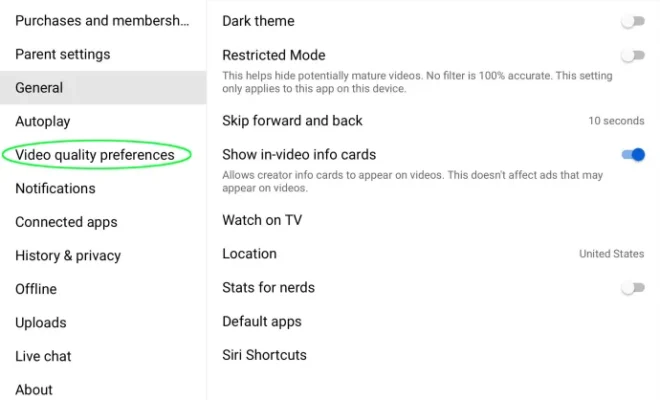
3. Click on “Playback Setup”

On the settings page, scroll down until you find the “Playback Setup” option. Click on it to open a new tab where you can change your YouTube video quality settings.

4. Choose your preferred video quality

In the “Playback Setup” tab, you will see a section labeled “Video Quality.” Click on the drop-down menu next to it and choose your preferred video quality from the available options. You can choose from 144p, 240p, 360p, 480p, 720p, 1080p, 1440p, and 2160p, depending on the availability of the video.

5. Save your changes

Once you have selected your desired video quality, click on the “Save” button at the bottom of the page to apply your changes. From now on, every video you watch on YouTube will play at your chosen video quality.

It is worth noting that changing your YouTube video quality setting permanently will not affect the video quality of videos you have watched before. However, you can change the resolution of individual videos while watching them using the gear icon located at the bottom right corner of the video player.


Previous Article

What Is One UI?

Next Article

What Is GeForce Experience? Key Features and ...

Matthew Lynch

Related articles More from author

  • Digital & Mobile Technology

    Sony HDRCX405 HD Handycam Camcorder Review

    June 9, 2023
    By Matthew Lynch
  • Digital & Mobile Technology

    How to Set Up BitLocker Encryption on Windows

    May 8, 2023
    By Matthew Lynch
  • Digital & Mobile Technology

    Bluejacking: How Bluetooth Can Be Used to Hack Your Devices

    June 14, 2023
    By Matthew Lynch
  • Digital & Mobile Technology

    Perplexity AI Turns into a Personal Language Tutor

    October 21, 2025
    By Matthew Lynch
  • Digital & Mobile Technology

    What Is Depop? Everything You Need to Know About the Resale App

    June 6, 2023
    By Matthew Lynch
  • Digital & Mobile Technology

    Best Sites to Find Free Clothes Online

    June 23, 2023
    By Matthew Lynch

Search

Login & Registration

  • Log in
  • Entries feed
  • Comments feed
  • WordPress.org

Newsletter

Signup for The Tech Edvocate Newsletter and have the latest in EdTech news and opinion delivered to your email address!

About Us

Since technology is not going anywhere and does more good than harm, adapting is the best course of action. That is where The Tech Edvocate comes in. We plan to cover the PreK-12 and Higher Education EdTech sectors and provide our readers with the latest news and opinion on the subject. From time to time, I will invite other voices to weigh in on important issues in EdTech. We hope to provide a well-rounded, multi-faceted look at the past, present, the future of EdTech in the US and internationally.

We started this journey back in June 2016, and we plan to continue it for many more years to come. I hope that you will join us in this discussion of the past, present and future of EdTech and lend your own insight to the issues that are discussed.

Newsletter

Signup for The Tech Edvocate Newsletter and have the latest in EdTech news and opinion delivered to your email address!

Contact Us

The Tech Edvocate
910 Goddin Street
Richmond, VA 23231
(601) 630-5238
[email protected]

Copyright © 2026 Matthew Lynch. All rights reserved.