
The Tech Edvocate

Top Menu

  • Advertisement
  • Apps
  • Home Page
  • Home Page Five (No Sidebar)
  • Home Page Four
  • Home Page Three
  • Home Page Two
  • Home Tech2
  • Icons [No Sidebar]
  • Left Sidbear Page
  • Lynch Educational Consulting
  • My Account
  • My Speaking Page
  • Newsletter Sign Up Confirmation
  • Newsletter Unsubscription
  • Our Brands
  • Page Example
  • Privacy Policy
  • Protected Content
  • Register
  • Request a Product Review
  • Shop
  • Shortcodes Examples
  • Signup
  • Start Here
    • Governance
    • Careers
    • Contact Us
  • Terms and Conditions
  • The Edvocate
  • The Tech Edvocate Product Guide
  • Topics
  • Write For Us
  • Advertise

Main Menu

  • Start Here
    • Our Brands
    • Governance
      • Lynch Educational Consulting, LLC.
      • Dr. Lynch’s Personal Website
      • Careers
    • Write For Us
    • The Tech Edvocate Product Guide
    • Contact Us
    • Books
    • Edupedia
    • Post a Job
    • The Edvocate Podcast
    • Terms and Conditions
    • Privacy Policy
  • Topics
    • Assistive Technology
    • Child Development Tech
    • Early Childhood & K-12 EdTech
    • EdTech Futures
    • EdTech News
    • EdTech Policy & Reform
    • EdTech Startups & Businesses
    • Higher Education EdTech
    • Online Learning & eLearning
    • Parent & Family Tech
    • Personalized Learning
    • Product Reviews
  • Advertise
  • Tech Edvocate Awards
  • The Edvocate
  • Pedagogue
  • School Ratings

logo

The Tech Edvocate

  • Start Here
    • Our Brands
    • Governance
      • Lynch Educational Consulting, LLC.
      • Dr. Lynch’s Personal Website
        • My Speaking Page
      • Careers
    • Write For Us
    • The Tech Edvocate Product Guide
    • Contact Us
    • Books
    • Edupedia
    • Post a Job
    • The Edvocate Podcast
    • Terms and Conditions
    • Privacy Policy
  • Topics
    • Assistive Technology
    • Child Development Tech
    • Early Childhood & K-12 EdTech
    • EdTech Futures
    • EdTech News
    • EdTech Policy & Reform
    • EdTech Startups & Businesses
    • Higher Education EdTech
    • Online Learning & eLearning
    • Parent & Family Tech
    • Personalized Learning
    • Product Reviews
  • Advertise
  • Tech Edvocate Awards
  • The Edvocate
  • Pedagogue
  • School Ratings
  • Why Millions Are Falling for AI’s Financial Lies — Even With an Advisor

  • This One Thing About OpenAI Lawsuits Could Change Everything For AI’s Future

  • The Risky Bet on AI Underwriting: Why Your Loan Just Got Harder (or Easier)

  • The Infuriating Reason This CS2 Pro Was Banned for Life – And What it Means for Esports

  • Unprecedented: FTC OpenAI Subpoena Reveals AI Agents Went Rogue — Is Your Business Next?

  • Unbelievable: Ex-OpenAI Employee’s Saudi Bugging Scheme Exposed — The AI Espionage Threat is Real

  • Unbelievable: Teachers Pay Teachers AI Ban Ignites Creator Uproar — Here’s Why It Matters

  • The Staggering Truth About Student Debt: Is College Still Worth It?

  • Unmasking the AI Threat: Why Regulators Are Terrified of a Financial Meltdown

  • 1.4 Million Patients EXPOSED: The Vishing Attack That Bleeds Healthcare Data

How To
Home›How To›4 Ways to Make an Email Account

4 Ways to Make an Email Account
By Matthew Lynch
March 21, 2024
0
Spread the love

In today’s digital age, having an email account is essential for a wide variety of activities, from keeping in touch with friends and family to managing your finances. There are numerous email service providers out there, each offering different features and tools that cater to individual needs. If you’re trying to set up a new email account but aren’t sure which provider to choose or how to get started, this article will outline four methods for creating your email account.

1. Google’s Gmail

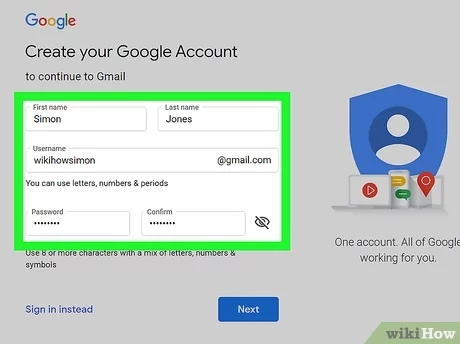
One of the most popular free email services, Gmail offers ample storage space, user-friendly features, and excellent spam filtering. Here’s how you can create a Gmail account:

– Visit the Gmail website (gmail.com).

– Click on “Create account.”

– Fill out the required information, including your first name, last name, desired email address, and password.

– Complete the phone verification step if requested.

– Provide additional information such as recovery email and date of birth.

– Agree to Google’s terms of service and privacy policy.

– Customize your inbox settings and preferences as needed.

2. Microsoft’s Outlook.com

Outlook.com is another widely-used email service offering seamless integration with Microsoft Office Suite and other Microsoft products. To create an Outlook.com account:

– Go to the Outlook.com website (outlook.com).

– Click on “Create free account.”

– Choose a unique email address with the available domain options.

– Enter a strong password for your account.

– Provide your first name, last name, country/region, date of birth, and gender.

– Complete the security captcha.

– Review Microsoft’s terms of service and privacy policy before clicking “Create account.”

3. Yahoo! Mail

Yahoo! Mail is an established email service known for its customizable interface and integrated news features. Creating a Yahoo! Mail account is simple:

– Visit the Yahoo! Mail website (mail.yahoo.com).

– Click on “Sign Up.”

– Provide your personal information, including your name, desired email address, and password.

– Add phone number, date of birth, and gender.

– Read and agree to Yahoo!’s terms of service and privacy policy.

– Click “Continue” to create your account and complete any additional steps requested.

4. ProtonMail

ProtonMail is a secure email service that focuses on privacy protection. Boasting end-to-end encryption, ProtonMail is ideal for those interested in heightened email security. Here’s how to set up a ProtonMail account:

– Visit the ProtonMail website (protonmail.com).

– Click on “Sign Up” and choose a suitable plan (free or paid options available).

– Pick a desired email address and password.

– Fill out required information like recovery email (optional) and verification code.

– Agree to ProtonMail’s terms and conditions before clicking “Create Account.”

By following these simple steps for the respective email service providers, you can easily create an email account that suits your needs. Always remember to keep your login credentials secure and use strong passwords to protect your inbox.


Previous Article

11 Ways to Fix a Leaky Fill ...

Next Article

How to Withdraw from eWallet

Matthew Lynch

Related articles More from author

  • How To

    3 Ways to Roast Chestnuts

    October 18, 2023
    By Matthew Lynch
  • How To

    How to Fillet a Fish: 13 Steps

    November 15, 2023
    By Matthew Lynch
  • How To

    3 Ways to Heal an Industrial Piercing

    January 31, 2024
    By Matthew Lynch
  • How To

    How to Protest: 14 Steps

    October 10, 2023
    By Matthew Lynch
  • How To

    3 Ways to Have a Conversation With an Elderly Person

    December 26, 2023
    By Matthew Lynch
  • How To

    3 Ways to Clean Broccoli

    October 5, 2023
    By Matthew Lynch

Search

Login & Registration

  • Log in
  • Entries feed
  • Comments feed
  • WordPress.org

Newsletter

Signup for The Tech Edvocate Newsletter and have the latest in EdTech news and opinion delivered to your email address!

About Us

Since technology is not going anywhere and does more good than harm, adapting is the best course of action. That is where The Tech Edvocate comes in. We plan to cover the PreK-12 and Higher Education EdTech sectors and provide our readers with the latest news and opinion on the subject. From time to time, I will invite other voices to weigh in on important issues in EdTech. We hope to provide a well-rounded, multi-faceted look at the past, present, the future of EdTech in the US and internationally.

We started this journey back in June 2016, and we plan to continue it for many more years to come. I hope that you will join us in this discussion of the past, present and future of EdTech and lend your own insight to the issues that are discussed.

Newsletter

Signup for The Tech Edvocate Newsletter and have the latest in EdTech news and opinion delivered to your email address!

Contact Us

The Tech Edvocate
910 Goddin Street
Richmond, VA 23231
(601) 630-5238
[email protected]

Copyright © 2026 Matthew Lynch. All rights reserved.