The Tech Edvocate

Top Menu

  • Advertisement
  • Apps
  • Home Page
  • Home Page Five (No Sidebar)
  • Home Page Four
  • Home Page Three
  • Home Page Two
  • Home Tech2
  • Icons [No Sidebar]
  • Left Sidbear Page
  • Lynch Educational Consulting
  • My Account
  • My Speaking Page
  • Newsletter Sign Up Confirmation
  • Newsletter Unsubscription
  • Our Brands
  • Page Example
  • Privacy Policy
  • Protected Content
  • Register
  • Request a Product Review
  • Shop
  • Shortcodes Examples
  • Signup
  • Start Here
    • Governance
    • Careers
    • Contact Us
  • Terms and Conditions
  • The Edvocate
  • The Tech Edvocate Product Guide
  • Topics
  • Write For Us
  • Advertise

Main Menu

  • Start Here
    • Our Brands
    • Governance
      • Lynch Educational Consulting, LLC.
      • Dr. Lynch’s Personal Website
      • Careers
    • Write For Us
    • The Tech Edvocate Product Guide
    • Contact Us
    • Books
    • Edupedia
    • Post a Job
    • The Edvocate Podcast
    • Terms and Conditions
    • Privacy Policy
  • Topics
    • Assistive Technology
    • Child Development Tech
    • Early Childhood & K-12 EdTech
    • EdTech Futures
    • EdTech News
    • EdTech Policy & Reform
    • EdTech Startups & Businesses
    • Higher Education EdTech
    • Online Learning & eLearning
    • Parent & Family Tech
    • Personalized Learning
    • Product Reviews
  • Advertise
  • Tech Edvocate Awards
  • The Edvocate
  • Pedagogue
  • School Ratings

logo

The Tech Edvocate

  • Start Here
    • Our Brands
    • Governance
      • Lynch Educational Consulting, LLC.
      • Dr. Lynch’s Personal Website
        • My Speaking Page
      • Careers
    • Write For Us
    • The Tech Edvocate Product Guide
    • Contact Us
    • Books
    • Edupedia
    • Post a Job
    • The Edvocate Podcast
    • Terms and Conditions
    • Privacy Policy
  • Topics
    • Assistive Technology
    • Child Development Tech
    • Early Childhood & K-12 EdTech
    • EdTech Futures
    • EdTech News
    • EdTech Policy & Reform
    • EdTech Startups & Businesses
    • Higher Education EdTech
    • Online Learning & eLearning
    • Parent & Family Tech
    • Personalized Learning
    • Product Reviews
  • Advertise
  • Tech Edvocate Awards
  • The Edvocate
  • Pedagogue
  • School Ratings
  • Cybersecurity vs. Green Energy: Which Path Will Make You Richer in 2026?

  • Why These 10 Renewable Energy Certifications Are Quietly Reshaping Careers by 2026

  • Why Millions Are Rushing to Online Renewable Energy Certifications Right Now

  • August AI vs. USMLE: The Unsettling Future of Medical Licensing

  • One AI’s Perfect USMLE Score Just Blew Up Medical Education As We Know It

  • This AI Just Aced the USMLE: Why Your Medical Career Might Never Be the Same

  • The Quiet Exodus: Why Senior FinTech Developers Are Abandoning Corporate Life

  • The Quiet Revolution: Where Elite FinTech Developers Are Fleeing in 2026

  • The Quiet Exodus: Why Senior FinTech Developers Are Ditching Corporate Life

  • AI Governance Software: Pricing and Features Comparison

Digital & Mobile Technology
Home›Digital & Mobile Technology›3 Ways to Deploy a React Application on Netlify

3 Ways to Deploy a React Application on Netlify
By Matthew Lynch
July 31, 2023
0
Spread the love

React, one of the most popular JavaScript libraries, is widely used for building powerful and interactive web applications. Once you’ve finished developing your React application, the next step is to deploy it to a web server so that it’s accessible online. One of the most popular web-hosting platforms for deploying React applications is Netlify. In this article, we’ll discuss three ways to deploy a React application on Netlify.

1. Deploying through Netlify Web Interface

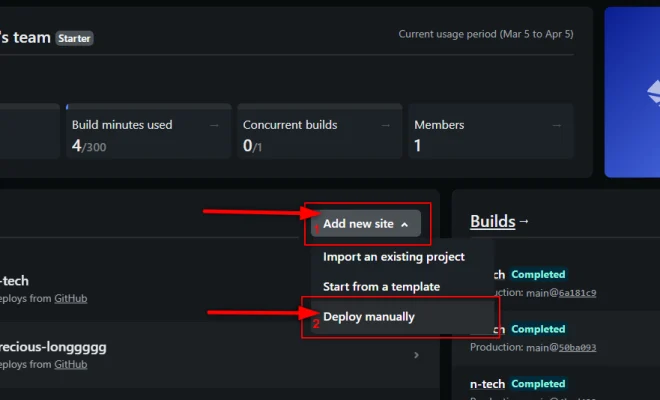
Netlify provides an easy-to-use and intuitive web interface for deploying React applications. Here’s how to do it:

Step 1: Create an account on Netlify, if you haven’t already.

Step 2: Connect your GitHub repository to Netlify by clicking on the “New site from Git” button on the Netlify dashboard, and then follow the instructions to link your repository.

Step 3: Once a repository has been connected, you can configure the build settings for your application.

Step 4: To deploy a React application, you need to specify the build command and the build directory. By default, the build command is “npm run build” and the build directory is “/build”.

Step 5: Press the “Deploy site” button on the Netlify dashboard to deploy your React application.

2. Deploying through the Command Line Interface (CLI)

Netlify also provides a Command Line Interface (CLI) for deploying React applications. Here’s how to do it:

Step 1: Install the Netlify CLI by running the following command: npm install -g netlify-cli

Step 2: Navigate to your project’s root folder using the command line interface.

Step 3: Authenticate your Netlify account by running the command: netlify login

Step 4: Create a new site on Netlify using the command: netlify create

Step 5: Configure the build settings for your application by modifying the netlify.toml file in the root directory of your project.

Step 6: Finally, deploy your React application using the command: netlify deploy

3. Deploying through Continuous Integration (CI)

Netlify allows you to use Continuous Integration (CI) tools like CircleCI, Jenkins, and Travis CI to deploy your React application. Here’s how to do it:

Step 1: Connect your CI tool to your GitHub repository.

Step 2: Add a build step to your CI configuration that builds your React application.

Step 3: Add a deployment step to your CI configuration that deploys your React application to Netlify.

Step 4: Configure the build and deployment settings in your CI config file.

Step 5: Commit your changes and push them to your GitHub repository.

Step 6: Watch as your React application is built, tested, and deployed automatically.

Conclusion

Deploying your React application on Netlify is easy and straightforward, and there are multiple ways to do so. In this article, we have covered three different methods to deploy your React application on Netlify, including the web interface, the command-line interface, and continuous integration. Choose the method that works best for your project and start enjoying the benefits of having your application live and accessible online!


Previous Article

Unable to Connect a Wireless Keyboard to ...

Next Article

How to Prevent Remote Access Trojan Attacks ...

Matthew Lynch

Related articles More from author

  • Digital & Mobile Technology

    What Equipment Is Needed for Podcasts?

    June 10, 2023
    By Matthew Lynch
  • Digital & Mobile Technology

    Best Raspberry Pi Robotics Projects

    June 22, 2023
    By Matthew Lynch
  • Digital & Mobile Technology

    What is a Pipeline?

    April 18, 2023
    By Matthew Lynch
  • Digital & Mobile Technology

    How to Restart a Samsung S20

    June 9, 2023
    By Matthew Lynch
  • Digital & Mobile Technology

    What Is an EX_ File?

    July 6, 2023
    By Matthew Lynch
  • Digital & Mobile Technology

    Eargasm High Fidelity Earplug Review

    July 6, 2023
    By Matthew Lynch

Search

Login & Registration

  • Log in
  • Entries feed
  • Comments feed
  • WordPress.org

Newsletter

Signup for The Tech Edvocate Newsletter and have the latest in EdTech news and opinion delivered to your email address!

About Us

Since technology is not going anywhere and does more good than harm, adapting is the best course of action. That is where The Tech Edvocate comes in. We plan to cover the PreK-12 and Higher Education EdTech sectors and provide our readers with the latest news and opinion on the subject. From time to time, I will invite other voices to weigh in on important issues in EdTech. We hope to provide a well-rounded, multi-faceted look at the past, present, the future of EdTech in the US and internationally.

We started this journey back in June 2016, and we plan to continue it for many more years to come. I hope that you will join us in this discussion of the past, present and future of EdTech and lend your own insight to the issues that are discussed.

Newsletter

Signup for The Tech Edvocate Newsletter and have the latest in EdTech news and opinion delivered to your email address!

Contact Us

The Tech Edvocate
910 Goddin Street
Richmond, VA 23231
(601) 630-5238
[email protected]

Copyright © 2026 Matthew Lynch. All rights reserved.