
The Tech Edvocate

Top Menu

  • Advertisement
  • Apps
  • Home Page
  • Home Page Five (No Sidebar)
  • Home Page Four
  • Home Page Three
  • Home Page Two
  • Home Tech2
  • Icons [No Sidebar]
  • Left Sidbear Page
  • Lynch Educational Consulting
  • My Account
  • My Speaking Page
  • Newsletter Sign Up Confirmation
  • Newsletter Unsubscription
  • Our Brands
  • Page Example
  • Privacy Policy
  • Protected Content
  • Register
  • Request a Product Review
  • Shop
  • Shortcodes Examples
  • Signup
  • Start Here
    • Governance
    • Careers
    • Contact Us
  • Terms and Conditions
  • The Edvocate
  • The Tech Edvocate Product Guide
  • Topics
  • Write For Us
  • Advertise

Main Menu

  • Start Here
    • Our Brands
    • Governance
      • Lynch Educational Consulting, LLC.
      • Dr. Lynch’s Personal Website
      • Careers
    • Write For Us
    • The Tech Edvocate Product Guide
    • Contact Us
    • Books
    • Edupedia
    • Post a Job
    • The Edvocate Podcast
    • Terms and Conditions
    • Privacy Policy
  • Topics
    • Assistive Technology
    • Child Development Tech
    • Early Childhood & K-12 EdTech
    • EdTech Futures
    • EdTech News
    • EdTech Policy & Reform
    • EdTech Startups & Businesses
    • Higher Education EdTech
    • Online Learning & eLearning
    • Parent & Family Tech
    • Personalized Learning
    • Product Reviews
  • Advertise
  • Tech Edvocate Awards
  • The Edvocate
  • Pedagogue
  • School Ratings

logo

The Tech Edvocate

  • Start Here
    • Our Brands
    • Governance
      • Lynch Educational Consulting, LLC.
      • Dr. Lynch’s Personal Website
        • My Speaking Page
      • Careers
    • Write For Us
    • The Tech Edvocate Product Guide
    • Contact Us
    • Books
    • Edupedia
    • Post a Job
    • The Edvocate Podcast
    • Terms and Conditions
    • Privacy Policy
  • Topics
    • Assistive Technology
    • Child Development Tech
    • Early Childhood & K-12 EdTech
    • EdTech Futures
    • EdTech News
    • EdTech Policy & Reform
    • EdTech Startups & Businesses
    • Higher Education EdTech
    • Online Learning & eLearning
    • Parent & Family Tech
    • Personalized Learning
    • Product Reviews
  • Advertise
  • Tech Edvocate Awards
  • The Edvocate
  • Pedagogue
  • School Ratings
  • Cybersecurity vs. Green Energy: Which Path Will Make You Richer in 2026?

  • Why These 10 Renewable Energy Certifications Are Quietly Reshaping Careers by 2026

  • Why Millions Are Rushing to Online Renewable Energy Certifications Right Now

  • August AI vs. USMLE: The Unsettling Future of Medical Licensing

  • One AI’s Perfect USMLE Score Just Blew Up Medical Education As We Know It

  • This AI Just Aced the USMLE: Why Your Medical Career Might Never Be the Same

  • The Quiet Exodus: Why Senior FinTech Developers Are Abandoning Corporate Life

  • The Quiet Revolution: Where Elite FinTech Developers Are Fleeing in 2026

  • The Quiet Exodus: Why Senior FinTech Developers Are Ditching Corporate Life

  • AI Governance Software: Pricing and Features Comparison

How To
Home›How To›3 Ways to Contact Rockstar Support

3 Ways to Contact Rockstar Support
By Matthew Lynch
March 22, 2024
0
Spread the love

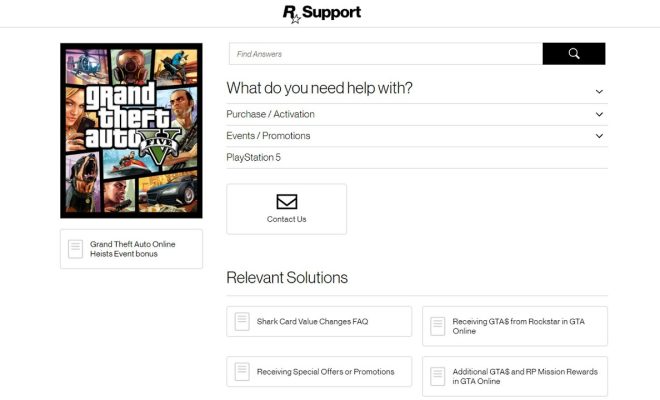
Rockstar Games has been a significant player in the gaming industry for years, pulling us into compelling, interactive worlds through their innovative and immersive titles. As with any successful company, customer support plays an essential role in ensuring a delightful user experience. If you ever need assistance with one of their games or products, here are three ways to contact Rockstar Support and get the help you require.

1. Submit a Ticket on their Support Website

One of the primary methods to reach Rockstar Support is through their official support website. By submitting a ticket, you provide detailed information about your issue, account, and preferred contact method. This allows the support team to work on a solution for your problem quickly.

To submit a ticket, follow these steps:

– Visit the Rockstar Support website at https://support.rockstargames.com/.

– Sign in using your Rockstar account or create one if you don’t have it.

– Click on “Submit a Request” at the top right corner of the page.

– Choose the relevant game or product from the dropdown menu.

– Provide all necessary information about your issue.

– Attach any supporting files like screenshots or videos that might help the support team understand your problem better.

– Review your request before submission and track its status via provided reference number.

2. Engage with Live Chat Support

Live Chat provides a more direct means of communication between you and Rockstar Support agents. The advantage of this method is that it allows you to receive real-time assistance without waiting for an email reply.

To initiate a live chat session with Rockstar Support:

– Visit https://support.rockstargames.com/.

– Sign in with your Rockstar account.

– Click “Submit a Request.”

– Select the appropriate game or product.

– Fill in all necessary details about your issue.

– Choose “Chat” as your preferred contact method at the bottom of the request form.

– Wait for a live chat agent to join the session and address your concerns.

Please note that Live Chat support might not be available 24/7 and could depend on your region.

3. Reach Out on Social Media

Besides the official website, you can also contact Rockstar Support through their social media channels. This allows you to connect with Rockstar and other users who might have faced similar issues.

To reach out to Rockstar Support via social media, here are some channels you could use:

– Twitter: @RockstarSupport (https://twitter.com/RockstarSupport)

– Facebook: Rockstar Games & Support (https://www.facebook.com/rockstargames)

Make sure to provide all necessary details regarding your issue when reaching out via social media. Remember that online etiquette goes a long way in ensuring a helpful and respectful community.

By following these three methods, you can efficiently get in touch with Rockstar Support and resolve any issues that may arise while enjoying their games or services. The key is to provide accurate information and maintain clear communication with the support team to ensure speedy assistance.


Previous Article

3 Easy Ways to Report Noise Complaints

Next Article

How to Turn a PlayStation 4 on: ...

Matthew Lynch

Related articles More from author

  • How To

    3 Ways to Make a Kazoo: DIY Musical Fun

    November 13, 2023
    By Matthew Lynch
  • How To

    3 Ways to Maintain Eye Contact

    April 8, 2024
    By Matthew Lynch
  • How To

    6 Ways to Manage Photo Albums in Facebook

    February 11, 2024
    By Matthew Lynch
  • How To

    3 Ways to Clean a Body Piercing

    October 11, 2023
    By Matthew Lynch
  • How To

    4 Ways to Delete Duplicate Records in Oracle

    March 31, 2024
    By Matthew Lynch
  • How To

    How to Forget a Person: 14 Steps

    October 27, 2023
    By Matthew Lynch

Search

Login & Registration

  • Log in
  • Entries feed
  • Comments feed
  • WordPress.org

Newsletter

Signup for The Tech Edvocate Newsletter and have the latest in EdTech news and opinion delivered to your email address!

About Us

Since technology is not going anywhere and does more good than harm, adapting is the best course of action. That is where The Tech Edvocate comes in. We plan to cover the PreK-12 and Higher Education EdTech sectors and provide our readers with the latest news and opinion on the subject. From time to time, I will invite other voices to weigh in on important issues in EdTech. We hope to provide a well-rounded, multi-faceted look at the past, present, the future of EdTech in the US and internationally.

We started this journey back in June 2016, and we plan to continue it for many more years to come. I hope that you will join us in this discussion of the past, present and future of EdTech and lend your own insight to the issues that are discussed.

Newsletter

Signup for The Tech Edvocate Newsletter and have the latest in EdTech news and opinion delivered to your email address!

Contact Us

The Tech Edvocate
910 Goddin Street
Richmond, VA 23231
(601) 630-5238
[email protected]

Copyright © 2026 Matthew Lynch. All rights reserved.