The Tech Edvocate

Top Menu

  • Advertisement
  • Apps
  • Home Page
  • Home Page Five (No Sidebar)
  • Home Page Four
  • Home Page Three
  • Home Page Two
  • Home Tech2
  • Icons [No Sidebar]
  • Left Sidbear Page
  • Lynch Educational Consulting
  • My Account
  • My Speaking Page
  • Newsletter Sign Up Confirmation
  • Newsletter Unsubscription
  • Our Brands
  • Page Example
  • Privacy Policy
  • Protected Content
  • Register
  • Request a Product Review
  • Shop
  • Shortcodes Examples
  • Signup
  • Start Here
    • Governance
    • Careers
    • Contact Us
  • Terms and Conditions
  • The Edvocate
  • The Tech Edvocate Product Guide
  • Topics
  • Write For Us
  • Advertise

Main Menu

  • Start Here
    • Our Brands
    • Governance
      • Lynch Educational Consulting, LLC.
      • Dr. Lynch’s Personal Website
      • Careers
    • Write For Us
    • The Tech Edvocate Product Guide
    • Contact Us
    • Books
    • Edupedia
    • Post a Job
    • The Edvocate Podcast
    • Terms and Conditions
    • Privacy Policy
  • Topics
    • Assistive Technology
    • Child Development Tech
    • Early Childhood & K-12 EdTech
    • EdTech Futures
    • EdTech News
    • EdTech Policy & Reform
    • EdTech Startups & Businesses
    • Higher Education EdTech
    • Online Learning & eLearning
    • Parent & Family Tech
    • Personalized Learning
    • Product Reviews
  • Advertise
  • Tech Edvocate Awards
  • The Edvocate
  • Pedagogue
  • School Ratings

logo

The Tech Edvocate

  • Start Here
    • Our Brands
    • Governance
      • Lynch Educational Consulting, LLC.
      • Dr. Lynch’s Personal Website
        • My Speaking Page
      • Careers
    • Write For Us
    • The Tech Edvocate Product Guide
    • Contact Us
    • Books
    • Edupedia
    • Post a Job
    • The Edvocate Podcast
    • Terms and Conditions
    • Privacy Policy
  • Topics
    • Assistive Technology
    • Child Development Tech
    • Early Childhood & K-12 EdTech
    • EdTech Futures
    • EdTech News
    • EdTech Policy & Reform
    • EdTech Startups & Businesses
    • Higher Education EdTech
    • Online Learning & eLearning
    • Parent & Family Tech
    • Personalized Learning
    • Product Reviews
  • Advertise
  • Tech Edvocate Awards
  • The Edvocate
  • Pedagogue
  • School Ratings
  • Unbelievable: This One Ad Sparked Mass Fury — And It’s Not What You Think

  • Urgent: 25,000 Dressers Recalled on Amazon, Wayfair – A Fatal Flaw You Need to Know

  • This Wild AI Startup Feud Is Exposing the Dark Side of Viral Marketing

  • Unbelievable: Judges Just Upheld the Trump Blacklisting of a Major AI Startup

  • The Scandalous PapaSmithy Apology: Why Fans Are Still Furious About FlyQuest’s Controversial Video

  • Macau Gaming Dispute Escalates to Classroom Knife Attack: A Troubling Warning

  • School Surveys & Student Privacy: A Parent Guide for 2026

  • The Billion-Dollar Blunder: Why AI Detection Software Is Failing Our Students

  • China’s 5-Minute EV Charge: The Staggering Truth America Ignores

  • This Astonishing Nikon AI Controversy Exposes Science’s New Frontier

Digital & Mobile Technology
Home›Digital & Mobile Technology›18 Tips for Sharing and Collaborating in Microsoft OneNote

18 Tips for Sharing and Collaborating in Microsoft OneNote
By Matthew Lynch
June 11, 2023
0
Spread the love

Microsoft OneNote is a highly efficient tool that allows for sharing and collaboration on projects or notes with others. It is a powerful and versatile tool that can be used for a variety of purposes such as note-taking, brainstorming, organizing information, and sharing information with others. In this article, we will discuss eighteen tips for sharing and collaborating in Microsoft OneNote.

1. Set up Permissions: In OneNote, you can set permissions for every notebook, section, and page. It is essential to set the appropriate permissions for each collaborator to ensure that all members can read, edit, or modify the content as required.

2. Share with others: OneNote makes it easy to share your notes with others. Click the “Share” button, and then enter the email addresses of those you want to share the notebook or section with.

3. Keep content organized: Organizing content is essential when collaborating with others. It is necessary to create sections and pages, label them with relevant titles, and keep content sorted based on the topics.

4. Use Tags: OneNote allows you to assign tags to notes, which makes it easier to categorize the content. It is also helpful in tracking a project’s progress.

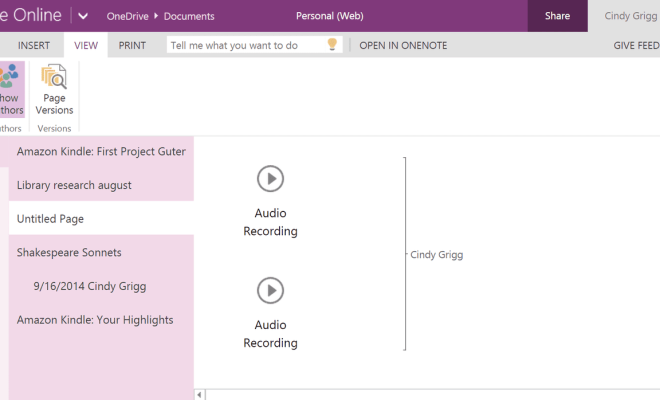
5. Use text and media: OneNote allows you to insert text, images, audio recordings, and video. It can be an influential tool to express and share your ideas with others.

6. Merge and split notes:
OneNote allows you to merge or split notes based on your requirement. It can be useful in combining multiple notes into one or dividing them into smaller parts.

7. Use Templates: OneNote provides several templates that can be customized to suit your needs. You can use pre-designed templates for creating agendas, meeting notes, project plans, and more.

8. Use Tables: Tables can be used in OneNote to organize and present data. You can create a table and add data, sort and filter it based on your requirement.

9. Use the Search function: OneNote provides a powerful search feature that allows you to find specific content within your notes.

10. Use Passwords: You can protect your notebooks or sections with a password in OneNote. It is necessary when you are sharing confidential information.

11. Use Versions: OneNote saves a copy of each note every time it is updated. You can access these versions and restore previous versions if required.

12. Use Ink for Drawing: OneNote allows you to draw and write using ink. It is a useful tool for brainstorming, highlighting, and annotating.

13. Use the Annotation function: OneNote provides an annotation feature that allows you to highlight and comment on texts and images.

14. Use Audio and Video Recording: OneNote allows you to record audio and video notes that can be shared with others.

15. Use the Linked Notes function: The
linked notes function allows you to take notes during a meeting or lecture while simultaneously recording the audio. The notes will be synchronized with the audio recording.

16. Use the Outlook Integration: OneNote integrates with Outlook, allowing you to create tasks, schedule meetings, and set reminders.

17. Use the SharePoint Integration: OneNote integrates with SharePoint, allowing you to collaborate with others and share content. You can create workflows, assign tasks, and share files directly from OneNote.

18. Use Microsoft Teams: OneNote integrates with Microsoft Teams, allowing a team to work together on a project. It provides an ideal platform for communication and collaboration.

In conclusion, sharing and collaborating with others using Microsoft OneNote is an efficient and powerful way of working. With proper organizational skills, communication, and utilization of OneNote’s features, a team can work seamlessly on a project, making OneNote a popular tool for individual and business use.    

Previous Article

The Elements of Graphic Design

Next Article

How to Set Up a YouTube Premium ...

Matthew Lynch

Related articles More from author

  • Digital & Mobile Technology

    Ways to Fix the Missing Bluetooth Button in the Windows 10 Action Center

    August 5, 2023
    By Matthew Lynch
  • Digital & Mobile Technology

    How to Clear the Cache on Windows

    May 26, 2023
    By Matthew Lynch
  • Digital & Mobile Technology

    What is a Quad-Core Processor?

    April 18, 2023
    By Matthew Lynch
  • Digital & Mobile Technology

    What Is an NZB File and How Do I Open It?

    June 6, 2023
    By Matthew Lynch
  • Digital & Mobile Technology

    How to Tame a Cat in Minecraft

    June 3, 2023
    By Matthew Lynch
  • Assistive TechnologyDigital & Mobile Technology

    How to Make Wired Speakers Wireless

    June 6, 2023
    By Matthew Lynch

Search

Login & Registration

  • Log in
  • Entries feed
  • Comments feed
  • WordPress.org

Newsletter

Signup for The Tech Edvocate Newsletter and have the latest in EdTech news and opinion delivered to your email address!

About Us

Since technology is not going anywhere and does more good than harm, adapting is the best course of action. That is where The Tech Edvocate comes in. We plan to cover the PreK-12 and Higher Education EdTech sectors and provide our readers with the latest news and opinion on the subject. From time to time, I will invite other voices to weigh in on important issues in EdTech. We hope to provide a well-rounded, multi-faceted look at the past, present, the future of EdTech in the US and internationally.

We started this journey back in June 2016, and we plan to continue it for many more years to come. I hope that you will join us in this discussion of the past, present and future of EdTech and lend your own insight to the issues that are discussed.

Newsletter

Signup for The Tech Edvocate Newsletter and have the latest in EdTech news and opinion delivered to your email address!

Contact Us

The Tech Edvocate
910 Goddin Street
Richmond, VA 23231
(601) 630-5238
[email protected]

Copyright © 2026 Matthew Lynch. All rights reserved.