The Tech Edvocate

Top Menu

  • Advertisement
  • Apps
  • Home Page
  • Home Page Five (No Sidebar)
  • Home Page Four
  • Home Page Three
  • Home Page Two
  • Home Tech2
  • Icons [No Sidebar]
  • Left Sidbear Page
  • Lynch Educational Consulting
  • My Account
  • My Speaking Page
  • Newsletter Sign Up Confirmation
  • Newsletter Unsubscription
  • Our Brands
  • Page Example
  • Privacy Policy
  • Protected Content
  • Register
  • Request a Product Review
  • Shop
  • Shortcodes Examples
  • Signup
  • Start Here
    • Governance
    • Careers
    • Contact Us
  • Terms and Conditions
  • The Edvocate
  • The Tech Edvocate Product Guide
  • Topics
  • Write For Us
  • Advertise

Main Menu

  • Start Here
    • Our Brands
    • Governance
      • Lynch Educational Consulting, LLC.
      • Dr. Lynch’s Personal Website
      • Careers
    • Write For Us
    • The Tech Edvocate Product Guide
    • Contact Us
    • Books
    • Edupedia
    • Post a Job
    • The Edvocate Podcast
    • Terms and Conditions
    • Privacy Policy
  • Topics
    • Assistive Technology
    • Child Development Tech
    • Early Childhood & K-12 EdTech
    • EdTech Futures
    • EdTech News
    • EdTech Policy & Reform
    • EdTech Startups & Businesses
    • Higher Education EdTech
    • Online Learning & eLearning
    • Parent & Family Tech
    • Personalized Learning
    • Product Reviews
  • Advertise
  • Tech Edvocate Awards
  • The Edvocate
  • Pedagogue
  • School Ratings

logo

The Tech Edvocate

  • Start Here
    • Our Brands
    • Governance
      • Lynch Educational Consulting, LLC.
      • Dr. Lynch’s Personal Website
        • My Speaking Page
      • Careers
    • Write For Us
    • The Tech Edvocate Product Guide
    • Contact Us
    • Books
    • Edupedia
    • Post a Job
    • The Edvocate Podcast
    • Terms and Conditions
    • Privacy Policy
  • Topics
    • Assistive Technology
    • Child Development Tech
    • Early Childhood & K-12 EdTech
    • EdTech Futures
    • EdTech News
    • EdTech Policy & Reform
    • EdTech Startups & Businesses
    • Higher Education EdTech
    • Online Learning & eLearning
    • Parent & Family Tech
    • Personalized Learning
    • Product Reviews
  • Advertise
  • Tech Edvocate Awards
  • The Edvocate
  • Pedagogue
  • School Ratings
  • One Crucial Factor Could Decimate Your US Auto Insurance Rates in 2026

  • Unbelievable: Meta Hit With $25 Billion Fine — Is Your Health Data Next?

  • 10 Crucial AI Literacy Courses Every Parent Needs Now

  • The Unseen Force Quietly Reshaping Rural Life: 7 Satellite Internet Providers Battling for Supremacy

  • Best Buy’s Gamers Hub: The Unbelievable Truth About Its “Rewards” And Discounts

  • 8 Crucial Reasons Why MAI-DxO Just Obliterated Doctors in a Head-to-Head Diagnosis Battle

  • The Brutal Truth About Student Loan Refinancing for New Grads in 2024

  • The Brutal Truth: AI Just Blew Up PHP Security – Here’s How to Survive ‘Black October’

  • Sodium-ion storage maker Peak Energy raises $108 million in GM-led round – PV Magazine

  • Stunning: 93,000 Nursing School Applicants Rejected — Here’s Why It’s a Crisis

Tech Advice
Home›Tech Advice›Why You Might Want to Blur Your Home on Google Maps

Why You Might Want to Blur Your Home on Google Maps
By Matthew Lynch
July 20, 2023
0
Spread the love

In today’s digital age, privacy concerns have become increasingly important. With the rise of mapping technology, services like Google Maps provide detailed street-level views that can even include your home. While this feature is undoubtedly convenient for navigation purposes, it also raises valid concerns about personal privacy and security.

This is why many individuals choose to blur their homes on Google Maps. In this article, we explore some reasons why you might want to consider blurring your home as well.

Protecting Personal Privacy

Your home is a private space where you should feel safe and secure. However, with detailed images available through platforms like Google Maps Street View, anyone can virtually access visual information about your property without physically being there. By blurring your home on Google Maps:

1. Maintain Confidentiality: Blurring helps maintain confidentiality by preventing strangers from easily identifying or viewing specific details of your residence.

2. Limit Unwanted Attention: Blurred properties are less likely to attract unwanted attention or curiosity from others who may stumble upon them while exploring the map.

3. Preserve Anonymity: By obscuring identifiable features such as house numbers or unique architectural elements, you safeguard yourself against potential misuse of personal information.

Safeguarding Security

Blurring your home on Google Maps also contributes to enhancing overall security measures:

1. Prevent Surveillance Risk: Detailed imagery can inadvertently expose vulnerable areas around your property that could be exploited by those with malicious intent (e.g., burglars). Blurring these visuals reduces the risk of surveillance and potential targeting.

2. Protect Sensitive Locations: If you have special locations on your premises that require additional protection due to nature (e.g., shelters) or occupation (e.g., government officials), blurring ensures their secrecy remains intact.

Maintaining Online Anonymity

Privacy extends beyond physical boundaries; it includes your presence in the digital world as well. By blurring your home on Google Maps:

1. Control Online Footprint: Blurring helps you maintain control over how much personal information is accessible to the public, reducing the chances of being targeted online.

2. Prevent Unwanted Associations: In some cases, individuals may wish to dissociate their names or identities from specific locations for various reasons (e.g., past ownership). Blurring offers a way to separate oneself from such associations.

How to Blur Your Home

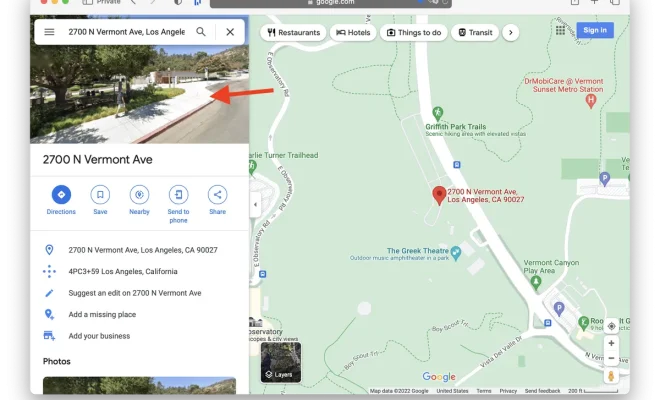
If you decide that blurring your home on Google Maps aligns with your privacy preferences, follow these steps:

1. Visit Google’s Street View image request page.

2. Enter the relevant details about why you want an image blurred and provide accurate location information.

3. Submit the form and allow time for Google’s review process.

Keep in mind that while this request will blur images moving forward, it may take some time before existing imagery is updated or removed entirely.

Final Thoughts

In today’s interconnected world, privacy concerns are valid and should be taken seriously. Blurring your home on platforms like Google Maps allows you to regain control over what others can see about where you live while maintaining personal safety and security measures intact. By making a conscious decision to protect your privacy online, including through services like mapping applications, you empower yourself by safeguarding sensitive information associated with residential properties—ultimately contributing towards a more secure and private environment both offline and online


Previous Article

Microsoft Edge (Chromium) Preview

Next Article

Mad Catz R.A.T. DWS Wireless Gaming Mouse ...

Matthew Lynch

Related articles More from author

  • Tech Advice

    Top Lenders for 3-Year Fixed Mortgage Rates in Canada

    October 20, 2023
    By Matthew Lynch
  • Tech Advice

    The Best Smart Kitchen Appliances for 2023

    July 19, 2023
    By Matthew Lynch
  • Tech Advice

    Oura Ring Can Now Tell if You’re a Morning Person

    July 17, 2023
    By Matthew Lynch
  • Tech Advice

    Apple Unveils iPadOS 17 at WWDC 2023

    July 13, 2023
    By Matthew Lynch
  • Tech Advice

    2024 Mazda CX-5 Review: Why get option 1b when 1a is sitting right there?

    August 19, 2023
    By Matthew Lynch
  • Tech Advice

    So you’re setting up an external hard drive. Formatting facts for Windows and Mac

    July 14, 2023
    By Matthew Lynch

Search

Login & Registration

  • Log in
  • Entries feed
  • Comments feed
  • WordPress.org

Newsletter

Signup for The Tech Edvocate Newsletter and have the latest in EdTech news and opinion delivered to your email address!

About Us

Since technology is not going anywhere and does more good than harm, adapting is the best course of action. That is where The Tech Edvocate comes in. We plan to cover the PreK-12 and Higher Education EdTech sectors and provide our readers with the latest news and opinion on the subject. From time to time, I will invite other voices to weigh in on important issues in EdTech. We hope to provide a well-rounded, multi-faceted look at the past, present, the future of EdTech in the US and internationally.

We started this journey back in June 2016, and we plan to continue it for many more years to come. I hope that you will join us in this discussion of the past, present and future of EdTech and lend your own insight to the issues that are discussed.

Newsletter

Signup for The Tech Edvocate Newsletter and have the latest in EdTech news and opinion delivered to your email address!

Contact Us

The Tech Edvocate
910 Goddin Street
Richmond, VA 23231
(601) 630-5238
[email protected]

Copyright © 2026 Matthew Lynch. All rights reserved.