The Tech Edvocate

Top Menu

  • Advertisement
  • Apps
  • Home Page
  • Home Page Five (No Sidebar)
  • Home Page Four
  • Home Page Three
  • Home Page Two
  • Home Tech2
  • Icons [No Sidebar]
  • Left Sidbear Page
  • Lynch Educational Consulting
  • My Account
  • My Speaking Page
  • Newsletter Sign Up Confirmation
  • Newsletter Unsubscription
  • Our Brands
  • Page Example
  • Privacy Policy
  • Protected Content
  • Register
  • Request a Product Review
  • Shop
  • Shortcodes Examples
  • Signup
  • Start Here
    • Governance
    • Careers
    • Contact Us
  • Terms and Conditions
  • The Edvocate
  • The Tech Edvocate Product Guide
  • Topics
  • Write For Us
  • Advertise

Main Menu

  • Start Here
    • Our Brands
    • Governance
      • Lynch Educational Consulting, LLC.
      • Dr. Lynch’s Personal Website
      • Careers
    • Write For Us
    • The Tech Edvocate Product Guide
    • Contact Us
    • Books
    • Edupedia
    • Post a Job
    • The Edvocate Podcast
    • Terms and Conditions
    • Privacy Policy
  • Topics
    • Assistive Technology
    • Child Development Tech
    • Early Childhood & K-12 EdTech
    • EdTech Futures
    • EdTech News
    • EdTech Policy & Reform
    • EdTech Startups & Businesses
    • Higher Education EdTech
    • Online Learning & eLearning
    • Parent & Family Tech
    • Personalized Learning
    • Product Reviews
  • Advertise
  • Tech Edvocate Awards
  • The Edvocate
  • Pedagogue
  • School Ratings

logo

The Tech Edvocate

  • Start Here
    • Our Brands
    • Governance
      • Lynch Educational Consulting, LLC.
      • Dr. Lynch’s Personal Website
        • My Speaking Page
      • Careers
    • Write For Us
    • The Tech Edvocate Product Guide
    • Contact Us
    • Books
    • Edupedia
    • Post a Job
    • The Edvocate Podcast
    • Terms and Conditions
    • Privacy Policy
  • Topics
    • Assistive Technology
    • Child Development Tech
    • Early Childhood & K-12 EdTech
    • EdTech Futures
    • EdTech News
    • EdTech Policy & Reform
    • EdTech Startups & Businesses
    • Higher Education EdTech
    • Online Learning & eLearning
    • Parent & Family Tech
    • Personalized Learning
    • Product Reviews
  • Advertise
  • Tech Edvocate Awards
  • The Edvocate
  • Pedagogue
  • School Ratings
  • 10 Crucial AI Literacy Courses Every Parent Needs Now

  • The Unseen Force Quietly Reshaping Rural Life: 7 Satellite Internet Providers Battling for Supremacy

  • Best Buy’s Gamers Hub: The Unbelievable Truth About Its “Rewards” And Discounts

  • 8 Crucial Reasons Why MAI-DxO Just Obliterated Doctors in a Head-to-Head Diagnosis Battle

  • The Brutal Truth About Student Loan Refinancing for New Grads in 2024

  • The Brutal Truth: AI Just Blew Up PHP Security – Here’s How to Survive ‘Black October’

  • Sodium-ion storage maker Peak Energy raises $108 million in GM-led round – PV Magazine

  • Stunning: 93,000 Nursing School Applicants Rejected — Here’s Why It’s a Crisis

  • One Ancient PHP Bug Hid for 14 Years — Until AI Found It in 7 Days

  • The Brutal Truth: Why 12 Million Users Couldn’t Save Character.AI From Bankruptcy

Digital & Mobile Technology
Home›Digital & Mobile Technology›What Is Apple’s Continuity Feature? (And How Does It Work?)

What Is Apple’s Continuity Feature? (And How Does It Work?)
By Matthew Lynch
June 13, 2023
0
Spread the love

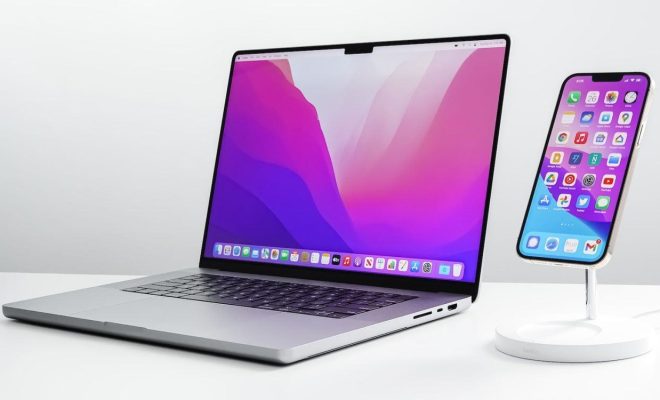
Apple’s Continuity feature is a set of tools that allows users to move seamlessly between Apple devices, making it easier to stay connected and productive. Continuity was introduced with the release of iOS 8 and OS X Yosemite in 2014, and has since been expanded and improved with each subsequent update.

One of the most significant features of Continuity is Handoff, which allows users to start a task on one device and continue it on another. For example, a user could begin drafting an email on their iPhone and then switch to their iPad to finish it. To use Handoff, both devices must be signed in to the same iCloud account and connected to the same Wi-Fi network.

Another valuable Continuity feature is Universal Clipboard, which lets users copy and paste content across all of their Apple devices. This means that a user could copy a link on their iPhone and then paste it into a document on their Mac without having to manually transfer the link.

Continuity also includes a feature called Phone Calling, which allows users to make and receive calls on their Mac or iPad. Calls show up on all devices and can be answered or declined from any device. When a call comes in, a notification will appear on all devices, allowing the user to choose where to answer the call.

In addition to these core features, Continuity includes a range of smaller features that help to tie the ecosystem of Apple devices together. For example, users can receive SMS and MMS messages on their Mac or iPad, as long as their iPhone is nearby. They can also use AirDrop to quickly share files between devices, and Auto Unlock to effortlessly unlock their Mac with their Apple Watch.

Continuity relies on a mix of Wi-Fi, Bluetooth, and iCloud to keep devices in sync and ensure a seamless experience. However, the technologies used can vary depending on the feature. For example, Handoff and Universal Clipboard rely on Bluetooth to communicate between devices, while Phone Calling relies on iCloud.

Continuity is a powerful feature that makes it easier than ever to stay connected and productive across multiple devices. With its seamless integration and range of tools, Continuity provides a compelling reason for users to stick with the Apple ecosystem, and has helped to cement the company’s reputation for creating products that just work.


Previous Article

Best Stretching Apps to Improve Your Flexibility

Next Article

How to Rate Limit Express Applications

Matthew Lynch

Related articles More from author

  • Digital & Mobile Technology

    What to Include in a Remote Work Proposal

    June 9, 2023
    By Matthew Lynch
  • Digital & Mobile Technology

    How to Delete a YouTube Account

    June 2, 2023
    By Matthew Lynch
  • Digital & Mobile Technology

    How to Insert a Text Link in an Email With macOS Mail

    July 24, 2023
    By Matthew Lynch
  • Digital & Mobile Technology

    Forget Apple Notes: Unique Note-Taking Apps for Your Mac

    September 7, 2023
    By Matthew Lynch
  • Digital & Mobile Technology

    How to Fix the Minecraft Launcher Error 0x803f8001 in Windows 11 and 10

    June 22, 2023
    By Matthew Lynch
  • Digital & Mobile Technology

    Sites to Find and Print Free Sheet Music

    June 23, 2023
    By Matthew Lynch

Search

Login & Registration

  • Log in
  • Entries feed
  • Comments feed
  • WordPress.org

Newsletter

Signup for The Tech Edvocate Newsletter and have the latest in EdTech news and opinion delivered to your email address!

About Us

Since technology is not going anywhere and does more good than harm, adapting is the best course of action. That is where The Tech Edvocate comes in. We plan to cover the PreK-12 and Higher Education EdTech sectors and provide our readers with the latest news and opinion on the subject. From time to time, I will invite other voices to weigh in on important issues in EdTech. We hope to provide a well-rounded, multi-faceted look at the past, present, the future of EdTech in the US and internationally.

We started this journey back in June 2016, and we plan to continue it for many more years to come. I hope that you will join us in this discussion of the past, present and future of EdTech and lend your own insight to the issues that are discussed.

Newsletter

Signup for The Tech Edvocate Newsletter and have the latest in EdTech news and opinion delivered to your email address!

Contact Us

The Tech Edvocate
910 Goddin Street
Richmond, VA 23231
(601) 630-5238
[email protected]

Copyright © 2026 Matthew Lynch. All rights reserved.