The Tech Edvocate

Top Menu

  • Advertisement
  • Apps
  • Home Page
  • Home Page Five (No Sidebar)
  • Home Page Four
  • Home Page Three
  • Home Page Two
  • Home Tech2
  • Icons [No Sidebar]
  • Left Sidbear Page
  • Lynch Educational Consulting
  • My Account
  • My Speaking Page
  • Newsletter Sign Up Confirmation
  • Newsletter Unsubscription
  • Our Brands
  • Page Example
  • Privacy Policy
  • Protected Content
  • Register
  • Request a Product Review
  • Shop
  • Shortcodes Examples
  • Signup
  • Start Here
    • Governance
    • Careers
    • Contact Us
  • Terms and Conditions
  • The Edvocate
  • The Tech Edvocate Product Guide
  • Topics
  • Write For Us
  • Advertise

Main Menu

  • Start Here
    • Our Brands
    • Governance
      • Lynch Educational Consulting, LLC.
      • Dr. Lynch’s Personal Website
      • Careers
    • Write For Us
    • The Tech Edvocate Product Guide
    • Contact Us
    • Books
    • Edupedia
    • Post a Job
    • The Edvocate Podcast
    • Terms and Conditions
    • Privacy Policy
  • Topics
    • Assistive Technology
    • Child Development Tech
    • Early Childhood & K-12 EdTech
    • EdTech Futures
    • EdTech News
    • EdTech Policy & Reform
    • EdTech Startups & Businesses
    • Higher Education EdTech
    • Online Learning & eLearning
    • Parent & Family Tech
    • Personalized Learning
    • Product Reviews
  • Advertise
  • Tech Edvocate Awards
  • The Edvocate
  • Pedagogue
  • School Ratings

logo

The Tech Edvocate

  • Start Here
    • Our Brands
    • Governance
      • Lynch Educational Consulting, LLC.
      • Dr. Lynch’s Personal Website
        • My Speaking Page
      • Careers
    • Write For Us
    • The Tech Edvocate Product Guide
    • Contact Us
    • Books
    • Edupedia
    • Post a Job
    • The Edvocate Podcast
    • Terms and Conditions
    • Privacy Policy
  • Topics
    • Assistive Technology
    • Child Development Tech
    • Early Childhood & K-12 EdTech
    • EdTech Futures
    • EdTech News
    • EdTech Policy & Reform
    • EdTech Startups & Businesses
    • Higher Education EdTech
    • Online Learning & eLearning
    • Parent & Family Tech
    • Personalized Learning
    • Product Reviews
  • Advertise
  • Tech Edvocate Awards
  • The Edvocate
  • Pedagogue
  • School Ratings
  • JisuLife Ultra2 Portable Fan: A Powerful Multi-Function Cooling Solution

  • A Visitors Guide to Viña del Mar, Chile

  • A Visitors Guide to Århus, Denmark

  • A Visitors Guide to Bakersfield (CA), United States

  • A Visitors Guide to Aurora (CO), United States

  • A Visitor’s Guide to Toledo (OH), United States

  • A Visitors Guide to Cincinnati (OH), United States

  • The MagicEagle Cam 5: Revolutionizing Wildlife Monitoring with Smart 4G Technology

  • A Visitors Guide to Pittsburgh (PA), United States

  • A Visitors Guide to Colorado Springs (CO), United States

Digital & Mobile Technology
Home›Digital & Mobile Technology›What Is a Magnet Link and How Do You Use It?

What Is a Magnet Link and How Do You Use It?
By Matthew Lynch
June 22, 2023
0
Spread the love

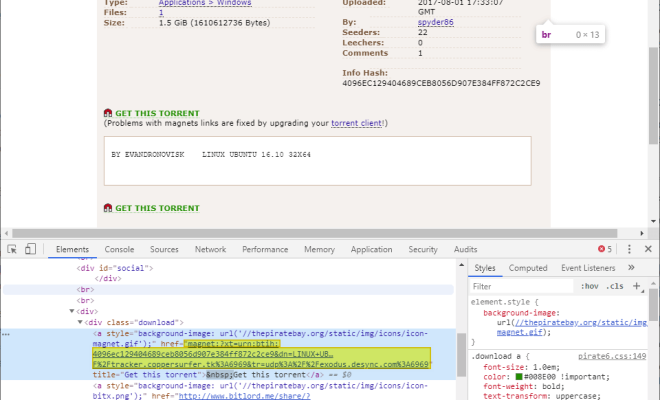
Magnet links have become a popular way of sharing files online, particularly for peer-to-peer (P2P) file sharing activities. This type of link differs from a traditional download link, as it allows users to download a file directly from other users’ computers (or “peers”) without the need for a central server.

Magnet links get their name from their similarity to magnets, as they use a system of attraction and repulsion to connect users to each other. Essentially, magnet links act as markers for files that are distributed across many different computers. If you click on a magnet link, your computer will automatically connect to a network of other users who have that same file, and your computer will begin downloading the file from them.

To use a magnet link, you will first need a BitTorrent client. This is a special type of software that is designed specifically for downloading and uploading files through P2P networks. Some popular BitTorrent clients include uTorrent, BitTorrent, and qBittorrent.

Once you have a BitTorrent client installed on your computer, you can start using magnet links. To do this, you will need to find a magnet link for the file you want to download. These links are often found on websites that specialize in P2P sharing, such as The Pirate Bay, KickassTorrents, or ExtraTorrent.
When you find a magnet link for a file you want to download, simply click on the link to open it in your BitTorrent client. Your client will then automatically start connecting to other users who have the same file. Once your client has connected to enough users, it will begin downloading the file.

One key advantage of magnet links is that they are more resilient than traditional download links. This is because the file is not stored on a central server that can be shut down by authorities or taken offline by a DDoS attack. Instead, the file is distributed across many different computers, making it much harder to take down.

Another advantage of magnet links is that they can be easily shared and distributed. Because the link simply acts as a marker for the file, it can be copied and shared through email, social media, or other channels. This makes it much easier to share large files or collections of files with friends or colleagues.


Previous Article

Is Your Snipping Tool Not Working? Here’s ...

Next Article

How to Fix High CPU Usage Caused ...

Matthew Lynch

Related articles More from author

  • Digital & Mobile Technology

    How to Fix Ghost Touch on an iPhone: Potential Fixes to Try

    June 9, 2023
    By Matthew Lynch
  • Digital & Mobile Technology

    How to Avoid Accidental Motion Triggers on Your Ring Doorbell

    July 31, 2023
    By Matthew Lynch
  • Digital & Mobile Technology

    How to Get Battery Full Notification on Android Phones

    May 29, 2023
    By Matthew Lynch
  • Digital & Mobile Technology

    How to Explore Nearby Places of Remote Location in Google Maps

    May 28, 2023
    By Matthew Lynch
  • Digital & Mobile Technology

    The DTS Neo:6 Surround Sound Processing Format

    June 9, 2023
    By Matthew Lynch
  • Digital & Mobile Technology

    The 7 Best iPhone Accessories of 2023

    June 11, 2023
    By Matthew Lynch

Search

Login & Registration

  • Register
  • Log in
  • Entries feed
  • Comments feed
  • WordPress.org

Newsletter

Signup for The Tech Edvocate Newsletter and have the latest in EdTech news and opinion delivered to your email address!

About Us

Since technology is not going anywhere and does more good than harm, adapting is the best course of action. That is where The Tech Edvocate comes in. We plan to cover the PreK-12 and Higher Education EdTech sectors and provide our readers with the latest news and opinion on the subject. From time to time, I will invite other voices to weigh in on important issues in EdTech. We hope to provide a well-rounded, multi-faceted look at the past, present, the future of EdTech in the US and internationally.

We started this journey back in June 2016, and we plan to continue it for many more years to come. I hope that you will join us in this discussion of the past, present and future of EdTech and lend your own insight to the issues that are discussed.

Newsletter

Signup for The Tech Edvocate Newsletter and have the latest in EdTech news and opinion delivered to your email address!

Contact Us

The Tech Edvocate
910 Goddin Street
Richmond, VA 23231
(601) 630-5238
[email protected]

Copyright © 2025 Matthew Lynch. All rights reserved.