The Tech Edvocate

Top Menu

  • Advertisement
  • Apps
  • Home Page
  • Home Page Five (No Sidebar)
  • Home Page Four
  • Home Page Three
  • Home Page Two
  • Home Tech2
  • Icons [No Sidebar]
  • Left Sidbear Page
  • Lynch Educational Consulting
  • My Account
  • My Speaking Page
  • Newsletter Sign Up Confirmation
  • Newsletter Unsubscription
  • Our Brands
  • Page Example
  • Privacy Policy
  • Protected Content
  • Register
  • Request a Product Review
  • Shop
  • Shortcodes Examples
  • Signup
  • Start Here
    • Governance
    • Careers
    • Contact Us
  • Terms and Conditions
  • The Edvocate
  • The Tech Edvocate Product Guide
  • Topics
  • Write For Us
  • Advertise

Main Menu

  • Start Here
    • Our Brands
    • Governance
      • Lynch Educational Consulting, LLC.
      • Dr. Lynch’s Personal Website
      • Careers
    • Write For Us
    • The Tech Edvocate Product Guide
    • Contact Us
    • Books
    • Edupedia
    • Post a Job
    • The Edvocate Podcast
    • Terms and Conditions
    • Privacy Policy
  • Topics
    • Assistive Technology
    • Child Development Tech
    • Early Childhood & K-12 EdTech
    • EdTech Futures
    • EdTech News
    • EdTech Policy & Reform
    • EdTech Startups & Businesses
    • Higher Education EdTech
    • Online Learning & eLearning
    • Parent & Family Tech
    • Personalized Learning
    • Product Reviews
  • Advertise
  • Tech Edvocate Awards
  • The Edvocate
  • Pedagogue
  • School Ratings

logo

The Tech Edvocate

  • Start Here
    • Our Brands
    • Governance
      • Lynch Educational Consulting, LLC.
      • Dr. Lynch’s Personal Website
        • My Speaking Page
      • Careers
    • Write For Us
    • The Tech Edvocate Product Guide
    • Contact Us
    • Books
    • Edupedia
    • Post a Job
    • The Edvocate Podcast
    • Terms and Conditions
    • Privacy Policy
  • Topics
    • Assistive Technology
    • Child Development Tech
    • Early Childhood & K-12 EdTech
    • EdTech Futures
    • EdTech News
    • EdTech Policy & Reform
    • EdTech Startups & Businesses
    • Higher Education EdTech
    • Online Learning & eLearning
    • Parent & Family Tech
    • Personalized Learning
    • Product Reviews
  • Advertise
  • Tech Edvocate Awards
  • The Edvocate
  • Pedagogue
  • School Ratings
  • Is the AI Bubble Bursting? OpenAI’s Funding Woes Revealed

  • Why Millions Are Skipping College for These 7 Online Courses Right Now

  • The Astonishing Truth About PS5 Pro vs Xbox Ally X Financing

  • The Urgent Truth About 2026 Privacy Laws: Why Your Business Could Face Catastrophic Fines

  • Shocking: Esports Pros Reveal the Critical Steps to Protect Your Earnings

  • The Staggering Truth About These New Weight Loss Drugs — And Why You Need to Know

  • The Quiet Crisis: Why Your Auto Loan Interest Rates Are Still Skyrocketing

  • Elvis’s Ghost Haunts AI: The $41 Million Anthropic Copyright Lawsuit Explained

  • 7 Micro-SaaS Tools Quietly Transforming Freelance Productivity — Don’t Miss Out!

  • Who Really Owns the Moon? The Shocking Truth About Lunar Real Estate

Digital & Mobile Technology
Home›Digital & Mobile Technology›What Is a Linux Hypervisor and What Does It Do?

What Is a Linux Hypervisor and What Does It Do?
By Matthew Lynch
June 21, 2023
0
Spread the love

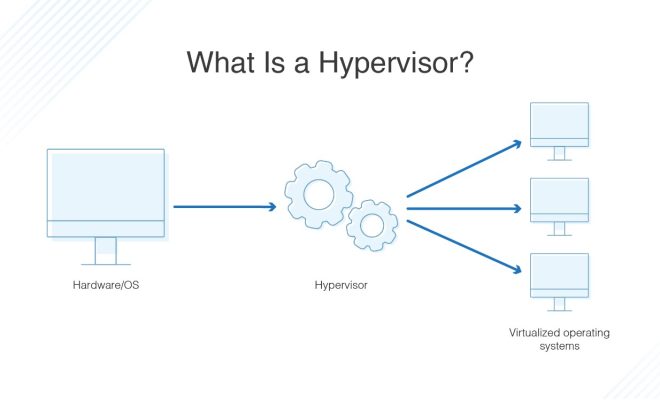
A Linux hypervisor, also known as a virtual machine monitor (VMM), is a software program that creates and manages virtual machines (VMs) on a physical computer. It allows multiple operating systems to run on a single physical machine, each with its own resources, such as CPU, memory, and storage.

Generally, there are two types of hypervisors- type 1 and type 2. A type 1 hypervisor runs directly on the host computer’s hardware and operates as the primary operating system. An example of a type 1 hypervisor is KVM (kernel-based virtual machine), which is built into the Linux kernel.

On the other hand, a type 2 hypervisor runs on top of an existing operating system, such as Linux or Windows. Examples of type 2 hypervisors include Oracle VirtualBox and VMware Workstation.

A Linux hypervisor works by creating virtual copies of the physical hardware components of a computer. A VM uses these virtual components as if they were physical, allowing multiple operating systems to run simultaneously on the same physical machine. The hypervisor controls the allocation of the computer’s resources, ensuring that each VM gets a fair share of the available CPU, memory, and storage.

A significant advantage of using a Linux hypervisor is the ability to create isolated environments for testing software or running applications. Each VM is self-contained, with its own operating system and software installed separately from the host system. This isolation ensures that any changes made within the VM do not affect the host system, and vice versa.

Another significant advantage is the ability to consolidate multiple physical servers into a single hardware device. This results in cost savings for businesses by reducing the amount of physical hardware required to run multiple operating systems.

In addition to these benefits, a Linux hypervisor also provides flexibility in managing and scaling VMs. For example, if a VM requires more resources, such as memory or CPU, the hypervisor can allocate resources from the host system to meet the VM’s needs.

Overall, a Linux hypervisor is a valuable tool for businesses and individuals who need to run multiple operating systems on a single physical machine. It provides isolation, flexibility, and cost savings, making it an essential component of modern computing.


Previous Article

How to Choose the Best VPN Server ...

Next Article

How to Use Instagram’s Dual Camera Feature

Matthew Lynch

Related articles More from author

  • Digital & Mobile Technology

    Create Your Very Own Operating System With Linux From Scratch

    June 23, 2023
    By Matthew Lynch
  • Digital & Mobile Technology

    How to Auto-Disable the Touchpad When Connecting a Mouse on Windows 10

    July 31, 2023
    By Matthew Lynch
  • Digital & Mobile Technology

    How to Use the Windows Keyboard Shortcut Alt + Underlined Key

    June 4, 2023
    By Matthew Lynch
  • Digital & Mobile Technology

    How to Lock Apps to the Screen on Android

    April 28, 2023
    By Matthew Lynch
  • Digital & Mobile Technology

    iOS 17.2: How to Stop Inline Predictive Text When You’re Typing

    January 31, 2024
    By Matthew Lynch
  • Digital & Mobile Technology

    What Is a SIM Card? Things You Need to Know

    August 5, 2023
    By Matthew Lynch

Search

Login & Registration

  • Log in
  • Entries feed
  • Comments feed
  • WordPress.org

Newsletter

Signup for The Tech Edvocate Newsletter and have the latest in EdTech news and opinion delivered to your email address!

About Us

Since technology is not going anywhere and does more good than harm, adapting is the best course of action. That is where The Tech Edvocate comes in. We plan to cover the PreK-12 and Higher Education EdTech sectors and provide our readers with the latest news and opinion on the subject. From time to time, I will invite other voices to weigh in on important issues in EdTech. We hope to provide a well-rounded, multi-faceted look at the past, present, the future of EdTech in the US and internationally.

We started this journey back in June 2016, and we plan to continue it for many more years to come. I hope that you will join us in this discussion of the past, present and future of EdTech and lend your own insight to the issues that are discussed.

Newsletter

Signup for The Tech Edvocate Newsletter and have the latest in EdTech news and opinion delivered to your email address!

Contact Us

The Tech Edvocate
910 Goddin Street
Richmond, VA 23231
(601) 630-5238
[email protected]

Copyright © 2026 Matthew Lynch. All rights reserved.