The Tech Edvocate

Top Menu

  • Advertisement
  • Apps
  • Home Page
  • Home Page Five (No Sidebar)
  • Home Page Four
  • Home Page Three
  • Home Page Two
  • Home Tech2
  • Icons [No Sidebar]
  • Left Sidbear Page
  • Lynch Educational Consulting
  • My Account
  • My Speaking Page
  • Newsletter Sign Up Confirmation
  • Newsletter Unsubscription
  • Our Brands
  • Page Example
  • Privacy Policy
  • Protected Content
  • Register
  • Request a Product Review
  • Shop
  • Shortcodes Examples
  • Signup
  • Start Here
    • Governance
    • Careers
    • Contact Us
  • Terms and Conditions
  • The Edvocate
  • The Tech Edvocate Product Guide
  • Topics
  • Write For Us
  • Advertise

Main Menu

  • Start Here
    • Our Brands
    • Governance
      • Lynch Educational Consulting, LLC.
      • Dr. Lynch’s Personal Website
      • Careers
    • Write For Us
    • The Tech Edvocate Product Guide
    • Contact Us
    • Books
    • Edupedia
    • Post a Job
    • The Edvocate Podcast
    • Terms and Conditions
    • Privacy Policy
  • Topics
    • Assistive Technology
    • Child Development Tech
    • Early Childhood & K-12 EdTech
    • EdTech Futures
    • EdTech News
    • EdTech Policy & Reform
    • EdTech Startups & Businesses
    • Higher Education EdTech
    • Online Learning & eLearning
    • Parent & Family Tech
    • Personalized Learning
    • Product Reviews
  • Advertise
  • Tech Edvocate Awards
  • The Edvocate
  • Pedagogue
  • School Ratings

logo

The Tech Edvocate

  • Start Here
    • Our Brands
    • Governance
      • Lynch Educational Consulting, LLC.
      • Dr. Lynch’s Personal Website
        • My Speaking Page
      • Careers
    • Write For Us
    • The Tech Edvocate Product Guide
    • Contact Us
    • Books
    • Edupedia
    • Post a Job
    • The Edvocate Podcast
    • Terms and Conditions
    • Privacy Policy
  • Topics
    • Assistive Technology
    • Child Development Tech
    • Early Childhood & K-12 EdTech
    • EdTech Futures
    • EdTech News
    • EdTech Policy & Reform
    • EdTech Startups & Businesses
    • Higher Education EdTech
    • Online Learning & eLearning
    • Parent & Family Tech
    • Personalized Learning
    • Product Reviews
  • Advertise
  • Tech Edvocate Awards
  • The Edvocate
  • Pedagogue
  • School Ratings
  • iClever Q950 Kids Headphones Review: Premium Sound and Safety for Young Listeners

  • The Reckless Ben Controversy: An Outrageous Fight for Justice

  • Outrageous: The Sydney Sweeney Ad Controversy You Didn’t See Coming — And Why It’s Working

  • The AI CRM War: Why Salesforce Just Made a $2 Billion Bid for a Startup

  • OpenAI’s Navier-Stokes ‘Solution’ Ignites Firestorm: Did They Steal It?

  • Blizzard’s Boldest Bet: Why a StarCraft Shooter in 2030 Could Redefine Gaming

  • Volatile: Why Top AI Bosses Just Triggered a Massive AI Stocks Decline

  • ‘Godfather of AI’ backs Anthropic chief’s call to slow down development

  • Why Millions Are Flocking to Trade Schools as AI Reshapes the Job Market

  • Unmasking the Bizarre ‘Cat in the Hat’ Trend: Why Schools Are Sounding the Alarm

Digital & Mobile Technology
Home›Digital & Mobile Technology›What Are Advanced Search Options?

What Are Advanced Search Options?
By Matthew Lynch
June 10, 2023
0
Spread the love

In the world of online search, advanced search options are a powerful tool that can help users find exactly what they are looking for. These options are available on virtually all search engines and allow users to fine-tune their searches. By providing users with more control over the search parameters, advanced search options can help them get better and more relevant results than they would with a basic search.

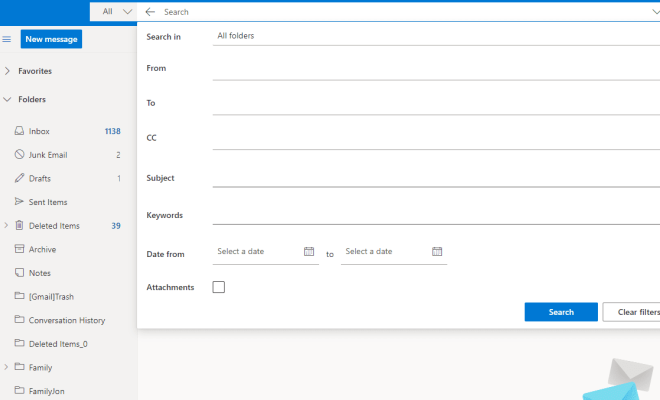
So, what are advanced search options? Advanced search options refer to the additional search filters and parameters available on a search engine beyond the basic search box. These options can vary depending on the search engine, but they usually include advanced search techniques like Boolean operators, filters for file type, date range and location, and more.

Boolean operators refer to the use of words like “and,” “or” and “not” to refine search results by making queries more specific. For example, a user may want to search for results that include both the terms “apple” and “pie,” while excluding results that contain the word “crumble.” This can be accomplished using Boolean operators.

Filters, on the other hand, refer to the various ways in which search results can be sorted or organized. For example, search results can be filtered by date, so the user can see only the most recent results. They can also be filtered by file type, meaning that the user can search only for specific file types, such as images or documents.

In addition to these advanced search options, some search engines offer location-based filtering that allows users to refine search results based on their geographic location. This can be particularly useful for users searching for businesses or services in their local area.

Overall, advanced search options are a valuable tool for any user looking to get more accurate and relevant search results. They are particularly useful for researchers, students, and professionals, who need to find precise information from a large pool of data. By leveraging advanced search options, users can save time and improve the quality of their search results.


Previous Article

How to Gameshare on the Nintendo Switch

Next Article

My iPhone Icons Are Large: What’s Happening?

Matthew Lynch

Related articles More from author

  • Digital & Mobile Technology

    The HSV Color Model in Graphic Design

    June 8, 2023
    By Matthew Lynch
  • Digital & Mobile Technology

    Why GitHub Is Killing Atom Text Editor

    June 14, 2023
    By Matthew Lynch
  • Digital & Mobile Technology

    The Xbox Series X Exclusive Games List

    June 26, 2023
    By Matthew Lynch
  • Digital & Mobile Technology

    What Is an IRQ (Interrupt Request)?

    June 4, 2023
    By Matthew Lynch
  • Digital & Mobile Technology

    How to Change Your Password in Windows

    July 30, 2023
    By Matthew Lynch
  • Digital & Mobile Technology

    What Is SIM Jacking and What Can You Do to Protect Yourself?

    June 12, 2023
    By Matthew Lynch

Search

Login & Registration

  • Log in
  • Entries feed
  • Comments feed
  • WordPress.org

Newsletter

Signup for The Tech Edvocate Newsletter and have the latest in EdTech news and opinion delivered to your email address!

About Us

Since technology is not going anywhere and does more good than harm, adapting is the best course of action. That is where The Tech Edvocate comes in. We plan to cover the PreK-12 and Higher Education EdTech sectors and provide our readers with the latest news and opinion on the subject. From time to time, I will invite other voices to weigh in on important issues in EdTech. We hope to provide a well-rounded, multi-faceted look at the past, present, the future of EdTech in the US and internationally.

We started this journey back in June 2016, and we plan to continue it for many more years to come. I hope that you will join us in this discussion of the past, present and future of EdTech and lend your own insight to the issues that are discussed.

Newsletter

Signup for The Tech Edvocate Newsletter and have the latest in EdTech news and opinion delivered to your email address!

Contact Us

The Tech Edvocate
910 Goddin Street
Richmond, VA 23231
(601) 630-5238
[email protected]

Copyright © 2026 Matthew Lynch. All rights reserved.