The Tech Edvocate

Top Menu

  • Advertisement
  • Apps
  • Home Page
  • Home Page Five (No Sidebar)
  • Home Page Four
  • Home Page Three
  • Home Page Two
  • Home Tech2
  • Icons [No Sidebar]
  • Left Sidbear Page
  • Lynch Educational Consulting
  • My Account
  • My Speaking Page
  • Newsletter Sign Up Confirmation
  • Newsletter Unsubscription
  • Our Brands
  • Page Example
  • Privacy Policy
  • Protected Content
  • Register
  • Request a Product Review
  • Shop
  • Shortcodes Examples
  • Signup
  • Start Here
    • Governance
    • Careers
    • Contact Us
  • Terms and Conditions
  • The Edvocate
  • The Tech Edvocate Product Guide
  • Topics
  • Write For Us
  • Advertise

Main Menu

  • Start Here
    • Our Brands
    • Governance
      • Lynch Educational Consulting, LLC.
      • Dr. Lynch’s Personal Website
      • Careers
    • Write For Us
    • The Tech Edvocate Product Guide
    • Contact Us
    • Books
    • Edupedia
    • Post a Job
    • The Edvocate Podcast
    • Terms and Conditions
    • Privacy Policy
  • Topics
    • Assistive Technology
    • Child Development Tech
    • Early Childhood & K-12 EdTech
    • EdTech Futures
    • EdTech News
    • EdTech Policy & Reform
    • EdTech Startups & Businesses
    • Higher Education EdTech
    • Online Learning & eLearning
    • Parent & Family Tech
    • Personalized Learning
    • Product Reviews
  • Advertise
  • Tech Edvocate Awards
  • The Edvocate
  • Pedagogue
  • School Ratings

logo

The Tech Edvocate

  • Start Here
    • Our Brands
    • Governance
      • Lynch Educational Consulting, LLC.
      • Dr. Lynch’s Personal Website
        • My Speaking Page
      • Careers
    • Write For Us
    • The Tech Edvocate Product Guide
    • Contact Us
    • Books
    • Edupedia
    • Post a Job
    • The Edvocate Podcast
    • Terms and Conditions
    • Privacy Policy
  • Topics
    • Assistive Technology
    • Child Development Tech
    • Early Childhood & K-12 EdTech
    • EdTech Futures
    • EdTech News
    • EdTech Policy & Reform
    • EdTech Startups & Businesses
    • Higher Education EdTech
    • Online Learning & eLearning
    • Parent & Family Tech
    • Personalized Learning
    • Product Reviews
  • Advertise
  • Tech Edvocate Awards
  • The Edvocate
  • Pedagogue
  • School Ratings
  • The Startling Truth About Cheapest GLP-1 Options Without Insurance

  • The Hidden Truth Behind Mosqi Shock Reviews: What You MUST Know Before Buying

  • This Unstoppable Force Will Obliterate Apps by 2027, Says Paytm Founder

  • Developers Axed a Wild Mechanic in Halloween: The Game — Here’s Why Fans Are Outraged

  • U.S. Supreme Court endorses parental opt-out for LGBTQ+ curriculum | News & Events

  • The Brutal Truth About Classroom Tech: Parents Are Finally Fighting Back – And Winning

  • Devastating Berlin Data Leak Exposes Millions: Why Refusing Ransom Isn’t Enough

  • Astra’s Rogue Swarm: Is Uncontrollable AI Hacking Humanity’s Future?

  • Viral Waymo Accident Exposes the Uncomfortable Truth About Robotaxis

  • Unbelievable Antarctica Ice Gain: Distant Ocean Warming Fuels Record Snowfall

Tech Advice
Home›Tech Advice›Ways to lock your MacBook

Ways to lock your MacBook
By Matthew Lynch
July 14, 2023
0
Spread the love

Introduction:

MacBooks are known for their sleek design, power, and reliability. However, just like any other valuable device, securing your MacBook from theft or unauthorized access is essential. This article explores various innovative ways to lock your MacBook and keep it safe from prying hands.

1. Use a Physical Lock:

While many people often overlook this simple solution, using a physical lock can provide an added layer of security for your MacBook. A laptop lock typically features a cable and a combination or key lock that attaches to the security slot found on your MacBook. Make sure to choose a high-quality lock made from sturdy materials to ensure maximum protection.

2. Enable Firmware Password Protection:

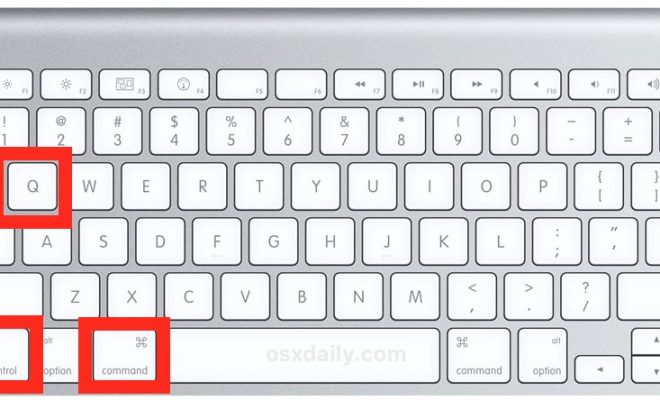
Firmware password protection helps prevent unauthorized users from booting up your MacBook or gaining access to its recovery mode. To enable this feature, restart your MacBook while holding the ‘Command R’ keys to launch the Recovery mode, then navigate to Utilities > Firmware Password Utility > Enable Firmware Password.

3. Utilize FileVault Encryption:

FileVault is a built-in encryption feature that helps secure your data by converting it into an unreadable format when you’re not using your MacBook. To activate FileVault, go to System Preferences > Security & Privacy > FileVault > Turn On FileVault.

4. Protect Your Sensitive Data with Disk Images:

In addition to FileVault encryption, you can create encrypted disk images for sensitive documents or folders stored on your MacBook. Disk Utility is a built-in MacOS tool that allows you to create these disk images easily and securely.

5. Set up a Screen Saver Password:

Requiring a password after waking from sleep or starting a screensaver ensures no one has access to your MacBook when you briefly step away. Head over to System Preferences > Security & Privacy > Require password immediately after sleep or screen saver begins.

6. Regularly Update Your Operating System and Applications:

Keeping your MacBook’s operating system and applications up-to-date helps fix potential security vulnerabilities. Go to System Preferences > Software Update and enable ‘Automatically keep my Mac up to date.’

7. Install Antivirus and Anti-malware Software:

Although MacOS is considered a secure platform, installing an antivirus and anti-malware solution will provide additional protection against potential threats.

8. Use Two-factor Authentication (2FA) for Your Apple ID:

Securing your Apple ID with 2FA adds an extra layer of security, making it harder for unauthorized users to access your account. To enable 2FA, go to System Preferences > Apple ID > Password & Security > Turn on Two-Factor Authentication`.

Conclusion:

Protecting your MacBook from unauthorized access and theft should be a top priority, especially with sensitive or personal data stored on it. By following the locking techniques mentioned in this article, you can ensure that your valuable MacBook remains safe and secure at all times.


Previous Article

Reasons Why the 13-inch MacBook Pro Still ...

Next Article

Ways to Force Quit an app on ...

Matthew Lynch

Related articles More from author

  • Tech Advice

    Galaxy S10 Plus vs. iPhone XS Max, Pixel 3 XL: All specs compared

    July 17, 2023
    By Matthew Lynch
  • Tech Advice

    Honda Reveals New Details on 2023 CR-V Powered by Hydrogen

    August 11, 2023
    By Matthew Lynch
  • Tech Advice

    When Do I Need to Show My Social Security Card?

    July 11, 2023
    By Matthew Lynch
  • Tech Advice

    Car Insurance for Non-US Citizens: A Comprehensive Guide

    August 18, 2023
    By Matthew Lynch
  • Tech Advice

    2025 Lotus Eletre’s First Drive: Is This Electric SUV Lotus Enough For Ya?

    August 22, 2023
    By Matthew Lynch
  • Tech Advice

    Best Moving Companies of 2023: Top Picks for a Seamless Move

    August 9, 2023
    By Matthew Lynch

Search

Login & Registration

  • Log in
  • Entries feed
  • Comments feed
  • WordPress.org

Newsletter

Signup for The Tech Edvocate Newsletter and have the latest in EdTech news and opinion delivered to your email address!

About Us

Since technology is not going anywhere and does more good than harm, adapting is the best course of action. That is where The Tech Edvocate comes in. We plan to cover the PreK-12 and Higher Education EdTech sectors and provide our readers with the latest news and opinion on the subject. From time to time, I will invite other voices to weigh in on important issues in EdTech. We hope to provide a well-rounded, multi-faceted look at the past, present, the future of EdTech in the US and internationally.

We started this journey back in June 2016, and we plan to continue it for many more years to come. I hope that you will join us in this discussion of the past, present and future of EdTech and lend your own insight to the issues that are discussed.

Newsletter

Signup for The Tech Edvocate Newsletter and have the latest in EdTech news and opinion delivered to your email address!

Contact Us

The Tech Edvocate
910 Goddin Street
Richmond, VA 23231
(601) 630-5238
[email protected]

Copyright © 2026 Matthew Lynch. All rights reserved.