The Tech Edvocate

Top Menu

  • Advertisement
  • Apps
  • Home Page
  • Home Page Five (No Sidebar)
  • Home Page Four
  • Home Page Three
  • Home Page Two
  • Home Tech2
  • Icons [No Sidebar]
  • Left Sidbear Page
  • Lynch Educational Consulting
  • My Account
  • My Speaking Page
  • Newsletter Sign Up Confirmation
  • Newsletter Unsubscription
  • Our Brands
  • Page Example
  • Privacy Policy
  • Protected Content
  • Register
  • Request a Product Review
  • Shop
  • Shortcodes Examples
  • Signup
  • Start Here
    • Governance
    • Careers
    • Contact Us
  • Terms and Conditions
  • The Edvocate
  • The Tech Edvocate Product Guide
  • Topics
  • Write For Us
  • Advertise

Main Menu

  • Start Here
    • Our Brands
    • Governance
      • Lynch Educational Consulting, LLC.
      • Dr. Lynch’s Personal Website
      • Careers
    • Write For Us
    • The Tech Edvocate Product Guide
    • Contact Us
    • Books
    • Edupedia
    • Post a Job
    • The Edvocate Podcast
    • Terms and Conditions
    • Privacy Policy
  • Topics
    • Assistive Technology
    • Child Development Tech
    • Early Childhood & K-12 EdTech
    • EdTech Futures
    • EdTech News
    • EdTech Policy & Reform
    • EdTech Startups & Businesses
    • Higher Education EdTech
    • Online Learning & eLearning
    • Parent & Family Tech
    • Personalized Learning
    • Product Reviews
  • Advertise
  • Tech Edvocate Awards
  • The Edvocate
  • Pedagogue
  • School Ratings

logo

The Tech Edvocate

  • Start Here
    • Our Brands
    • Governance
      • Lynch Educational Consulting, LLC.
      • Dr. Lynch’s Personal Website
        • My Speaking Page
      • Careers
    • Write For Us
    • The Tech Edvocate Product Guide
    • Contact Us
    • Books
    • Edupedia
    • Post a Job
    • The Edvocate Podcast
    • Terms and Conditions
    • Privacy Policy
  • Topics
    • Assistive Technology
    • Child Development Tech
    • Early Childhood & K-12 EdTech
    • EdTech Futures
    • EdTech News
    • EdTech Policy & Reform
    • EdTech Startups & Businesses
    • Higher Education EdTech
    • Online Learning & eLearning
    • Parent & Family Tech
    • Personalized Learning
    • Product Reviews
  • Advertise
  • Tech Edvocate Awards
  • The Edvocate
  • Pedagogue
  • School Ratings
  • The Gemini in Classroom vs Traditional Tools Debate: A Staggering Reversal

  • Why Your Tech Job Isn’t Safe: The AI Uprising Is Just Getting Started

  • Why Google’s AI Policy Just Sparked a Massive Uproar in Schools

  • Unmasking Java4Shell: The 9 Tools Enterprises Need Now to Fight CVE-2026-114938

  • Unbelievable: Waymo’s Freeway Suspension Is Far Worse Than You Think

  • The Brutal Truth About New EU Cybersecurity Rules You Can’t Afford to Miss

  • Cum compari bonusurile de bun venit ale cazinourilor online din România: valoare, rulaj și termene

  • Unbelievable: South Korea’s AI Cheating Scandal Forces Glasses Inspections

  • 7 Disturbing Truths About the Latest AI Data Breach

  • This Ancient Builder’s $150M AI Bet Could Redefine Construction

Digital & Mobile Technology
Home›Digital & Mobile Technology›Ways to Fix the “Your Device Is Missing Important Security and Quality Fixes” Error

Ways to Fix the “Your Device Is Missing Important Security and Quality Fixes” Error
By Matthew Lynch
June 22, 2023
0
Spread the love

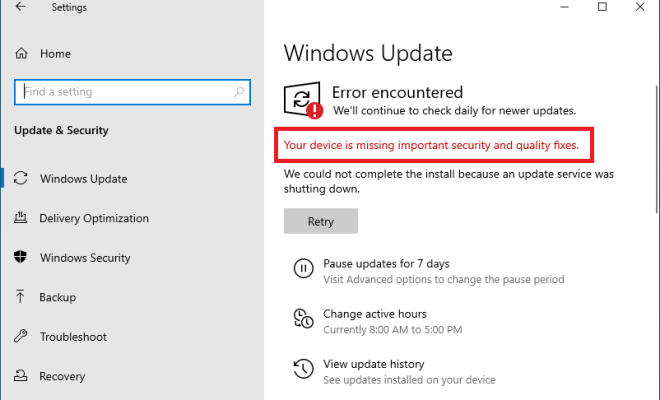
If you’ve ever received the “Your Device Is Missing Important Security and Quality Fixes” error on your Windows device, you’re not alone. This error can be a frustrating experience for users as it indicates the need to download and update important system files to ensure the device runs smoothly.

There are several reasons why this error message may appear on your device. It could be due to a missing system update or corrupt files on your device. Fortunately, there are several ways to fix this issue and get your device running smoothly again.

Here are some ways to fix the “Your Device Is Missing Important Security and Quality Fixes” error:

1. Check for Updates: Go to your “Settings” and select “Update and Security”. Click on “Check for Updates” and let the system search for the available updates. Download and install all the pending updates, including quality and security updates.

2. Run Windows Update Troubleshooter: If you’re still receiving the error message even after checking for updates, it may be helpful to run the Windows Update Troubleshooter. This tool helps to pinpoint and fix update-related issues on your device. Go to “Control Panel” and select “Troubleshooting”. Then, select “Fix problems with Windows Update” and follow the instructions provided.

3. Reset Windows Update Components: If the Windows Update troubleshooter fails to fix the issue, it may be necessary to reset the Windows Update components. Open the Command Prompt as an Administrator and then enter the following commands:

“net stop wuauserv”

“net stop cryptSvc”

“net stop bits”

“net stop msiserver”

“Ren C:\Windows\SoftwareDistribution SoftwareDistribution.old”

“Ren C:\Windows\System32\catroot2 catroot2.old”

“net start wuauserv”

“net start cryptSvc”

“net start bits”

“net start msiserver”

4. Check Your Antivirus Software: Sometimes, antivirus software can interfere with the Windows update process. Disable your antivirus software temporarily and then try running the Windows Update process again.

5. Perform a System Restore: If you’re still receiving the error message even after trying all the above methods, a system restore may be helpful. Go to your “Control Panel” and select “Recovery”. Then choose an earlier date that you know your system worked well and follow the instructions.


Previous Article

Useful Spotify Playlist Tips and Tricks Worth ...

Next Article

What Time Does BeReal Go Off?

Matthew Lynch

Related articles More from author

  • Digital & Mobile Technology

    Which Color Is Best for Your M2 MacBook Air?

    August 3, 2023
    By Matthew Lynch
  • Digital & Mobile Technology

    What Is Android System WebView, and Is It Safe to Uninstall?

    June 9, 2023
    By Matthew Lynch
  • Digital & Mobile Technology

    Why has my iPad stopped receiving emails?

    August 2, 2023
    By Matthew Lynch
  • Digital & Mobile Technology

    How to Cancel Your Amazon Kindle Unlimited Subscription

    May 20, 2023
    By Matthew Lynch
  • Digital & Mobile Technology

    Apple Music Is Finally Available on Roku Devices

    April 10, 2023
    By Matthew Lynch
  • Digital & Mobile Technology

    How to Uninstall Microsoft Edge From Windows 11

    June 23, 2023
    By Matthew Lynch

Search

Login & Registration

  • Log in
  • Entries feed
  • Comments feed
  • WordPress.org

Newsletter

Signup for The Tech Edvocate Newsletter and have the latest in EdTech news and opinion delivered to your email address!

About Us

Since technology is not going anywhere and does more good than harm, adapting is the best course of action. That is where The Tech Edvocate comes in. We plan to cover the PreK-12 and Higher Education EdTech sectors and provide our readers with the latest news and opinion on the subject. From time to time, I will invite other voices to weigh in on important issues in EdTech. We hope to provide a well-rounded, multi-faceted look at the past, present, the future of EdTech in the US and internationally.

We started this journey back in June 2016, and we plan to continue it for many more years to come. I hope that you will join us in this discussion of the past, present and future of EdTech and lend your own insight to the issues that are discussed.

Newsletter

Signup for The Tech Edvocate Newsletter and have the latest in EdTech news and opinion delivered to your email address!

Contact Us

The Tech Edvocate
910 Goddin Street
Richmond, VA 23231
(601) 630-5238
[email protected]

Copyright © 2026 Matthew Lynch. All rights reserved.