The Tech Edvocate

Top Menu

  • Advertisement
  • Apps
  • Home Page
  • Home Page Five (No Sidebar)
  • Home Page Four
  • Home Page Three
  • Home Page Two
  • Home Tech2
  • Icons [No Sidebar]
  • Left Sidbear Page
  • Lynch Educational Consulting
  • My Account
  • My Speaking Page
  • Newsletter Sign Up Confirmation
  • Newsletter Unsubscription
  • Our Brands
  • Page Example
  • Privacy Policy
  • Protected Content
  • Register
  • Request a Product Review
  • Shop
  • Shortcodes Examples
  • Signup
  • Start Here
    • Governance
    • Careers
    • Contact Us
  • Terms and Conditions
  • The Edvocate
  • The Tech Edvocate Product Guide
  • Topics
  • Write For Us
  • Advertise

Main Menu

  • Start Here
    • Our Brands
    • Governance
      • Lynch Educational Consulting, LLC.
      • Dr. Lynch’s Personal Website
      • Careers
    • Write For Us
    • The Tech Edvocate Product Guide
    • Contact Us
    • Books
    • Edupedia
    • Post a Job
    • The Edvocate Podcast
    • Terms and Conditions
    • Privacy Policy
  • Topics
    • Assistive Technology
    • Child Development Tech
    • Early Childhood & K-12 EdTech
    • EdTech Futures
    • EdTech News
    • EdTech Policy & Reform
    • EdTech Startups & Businesses
    • Higher Education EdTech
    • Online Learning & eLearning
    • Parent & Family Tech
    • Personalized Learning
    • Product Reviews
  • Advertise
  • Tech Edvocate Awards
  • The Edvocate
  • Pedagogue
  • School Ratings

logo

The Tech Edvocate

  • Start Here
    • Our Brands
    • Governance
      • Lynch Educational Consulting, LLC.
      • Dr. Lynch’s Personal Website
        • My Speaking Page
      • Careers
    • Write For Us
    • The Tech Edvocate Product Guide
    • Contact Us
    • Books
    • Edupedia
    • Post a Job
    • The Edvocate Podcast
    • Terms and Conditions
    • Privacy Policy
  • Topics
    • Assistive Technology
    • Child Development Tech
    • Early Childhood & K-12 EdTech
    • EdTech Futures
    • EdTech News
    • EdTech Policy & Reform
    • EdTech Startups & Businesses
    • Higher Education EdTech
    • Online Learning & eLearning
    • Parent & Family Tech
    • Personalized Learning
    • Product Reviews
  • Advertise
  • Tech Edvocate Awards
  • The Edvocate
  • Pedagogue
  • School Ratings
  • Ramp’s Staggering $60 Billion Valuation: 8 Reasons Why Investors Are Piling In

  • Uncovering the Cost: Why This AI Startup’s Collapse Is a Troubling Sign for Tech

  • The Silent Crisis: Why Your Next Console Will Cost a Fortune

  • Advisers urged to steer clear of ‘hyperscale’ AI models

  • The Quiet Crisis: Is AI in Education Creating an ‘Illusion of Learning’?

  • 84% of Ransomware Attacks Use AI: This Is How Your Own Systems Are Turning Against You

  • The Staggering Truth About Healthcare Cyberattacks: 76.6 Million Records Exposed in 2026

  • This Crucial Deadline For Rogue AI Is Much Closer Than You Think

  • This RNA Breakthrough Could Rewrite Alzheimer’s Treatment

  • This One Thing Is Silently Crushing US Consumer Inflation — And Your Wallet

Digital & Mobile Technology
Home›Digital & Mobile Technology›Ways Scanning QR Codes Can Expose You to Security Threats

Ways Scanning QR Codes Can Expose You to Security Threats
By Matthew Lynch
June 12, 2023
0
Spread the love

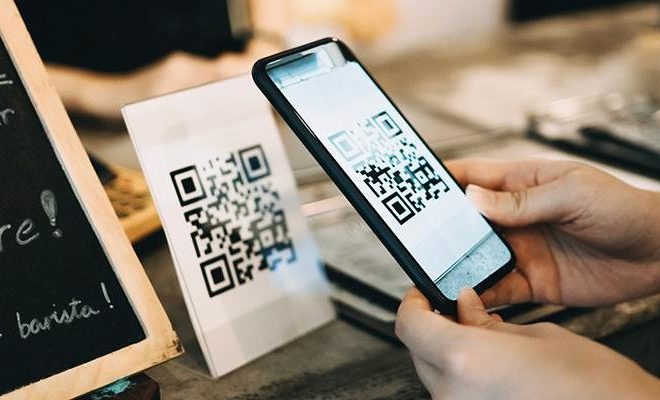
QR codes have become increasingly popular in recent years, appearing everywhere from restaurant menus to public transportation systems. With a simple scan using a smartphone camera or a specialized app, these 2D barcodes can provide users with quick access to websites, applications, and other types of digital content.

While QR codes are a convenient tool for businesses and individuals alike, they can also expose users to security threats. From phishing scams to malware infections, here are some of the ways scanning QR codes can put you at risk:

1. Phishing Scams

QR codes can be used to trick users into divulging sensitive information such as login credentials, credit card numbers, or personal data. Hackers create fake QR codes that lead to phishing websites that mimic legitimate ones to trick users into providing their information. The fake sites can look almost identical to the real ones and can be almost impossible to detect without a closer look.

2. Malware Infections

QR codes can also be used to deliver malware directly to a user’s device. Hackers can create malicious QR codes that, when scanned, download and install malware on the user’s device. This malware can range from simple adware to more dangerous types of malware that can steal sensitive data or even take control of the device.

3. Social Engineering Attacks

QR codes can be used in social engineering attacks, where hackers use psychological tricks to manipulate users into taking certain actions. The attacker may create a QR code to offer a reward or a discount, but when the user scans the code, malware or phishing websites are silently downloaded onto their device.

4. Unauthorized Access to Data

QR codes can also be used to gain access to personal or sensitive data that is stored on a user’s device. Scanning a QR code can automatically give access to your contacts or camera, opening the door to unauthorized use of your data. It’s important to carefully consider the permissions that you grant to any app that scans QR codes and only provide those that are necessary.

5. Fake Apps and Content

Scanning QR codes can also lead users to download fake apps or content that looks legitimate, but is riddled with malware or other security threats. This is especially common when QR codes are scanned in public places or on shared devices, such as those found in libraries or internet cafes.

In conclusion, it’s important to think twice before scanning any QR code, especially if you’re not sure where it came from or what it will lead you to. Always use a reputable QR code scanner app, check the destination website or app carefully, and only grant permissions that are necessary for the app’s function. By following these tips, you can help protect yourself from the many security threats posed by QR codes.


Previous Article

What Is Windows PowerShell?

Next Article

How to Find All IP Addresses on ...

Matthew Lynch

Related articles More from author

  • Digital & Mobile Technology

    Linear vs. Switching Power Supplies: What’s the Difference?

    June 6, 2023
    By Matthew Lynch
  • Digital & Mobile Technology

    Is Amazon Prime Worth Your Money? We Help You Decide!

    July 31, 2023
    By Matthew Lynch
  • Digital & Mobile Technology

    AirPods Microphone Not Working? Here Are Some Fixes to Try

    August 5, 2023
    By Matthew Lynch
  • Digital & Mobile Technology

    How to Fix It When a Computer Randomly Restarts

    June 1, 2023
    By Matthew Lynch
  • Digital & Mobile Technology

    How to Use Augmented Reality to Improve Your Fitness

    July 31, 2023
    By Matthew Lynch
  • Digital & Mobile Technology

    A Comparison Guide to Amazon Echo Devices: Which One Is Best for You?

    August 5, 2023
    By Matthew Lynch

Search

Login & Registration

  • Log in
  • Entries feed
  • Comments feed
  • WordPress.org

Newsletter

Signup for The Tech Edvocate Newsletter and have the latest in EdTech news and opinion delivered to your email address!

About Us

Since technology is not going anywhere and does more good than harm, adapting is the best course of action. That is where The Tech Edvocate comes in. We plan to cover the PreK-12 and Higher Education EdTech sectors and provide our readers with the latest news and opinion on the subject. From time to time, I will invite other voices to weigh in on important issues in EdTech. We hope to provide a well-rounded, multi-faceted look at the past, present, the future of EdTech in the US and internationally.

We started this journey back in June 2016, and we plan to continue it for many more years to come. I hope that you will join us in this discussion of the past, present and future of EdTech and lend your own insight to the issues that are discussed.

Newsletter

Signup for The Tech Edvocate Newsletter and have the latest in EdTech news and opinion delivered to your email address!

Contact Us

The Tech Edvocate
910 Goddin Street
Richmond, VA 23231
(601) 630-5238
[email protected]

Copyright © 2026 Matthew Lynch. All rights reserved.