The Tech Edvocate

Top Menu

  • Advertisement
  • Apps
  • Home Page
  • Home Page Five (No Sidebar)
  • Home Page Four
  • Home Page Three
  • Home Page Two
  • Home Tech2
  • Icons [No Sidebar]
  • Left Sidbear Page
  • Lynch Educational Consulting
  • My Account
  • My Speaking Page
  • Newsletter Sign Up Confirmation
  • Newsletter Unsubscription
  • Our Brands
  • Page Example
  • Privacy Policy
  • Protected Content
  • Register
  • Request a Product Review
  • Shop
  • Shortcodes Examples
  • Signup
  • Start Here
    • Governance
    • Careers
    • Contact Us
  • Terms and Conditions
  • The Edvocate
  • The Tech Edvocate Product Guide
  • Topics
  • Write For Us
  • Advertise

Main Menu

  • Start Here
    • Our Brands
    • Governance
      • Lynch Educational Consulting, LLC.
      • Dr. Lynch’s Personal Website
      • Careers
    • Write For Us
    • The Tech Edvocate Product Guide
    • Contact Us
    • Books
    • Edupedia
    • Post a Job
    • The Edvocate Podcast
    • Terms and Conditions
    • Privacy Policy
  • Topics
    • Assistive Technology
    • Child Development Tech
    • Early Childhood & K-12 EdTech
    • EdTech Futures
    • EdTech News
    • EdTech Policy & Reform
    • EdTech Startups & Businesses
    • Higher Education EdTech
    • Online Learning & eLearning
    • Parent & Family Tech
    • Personalized Learning
    • Product Reviews
  • Advertise
  • Tech Edvocate Awards
  • The Edvocate
  • Pedagogue
  • School Ratings

logo

The Tech Edvocate

  • Start Here
    • Our Brands
    • Governance
      • Lynch Educational Consulting, LLC.
      • Dr. Lynch’s Personal Website
        • My Speaking Page
      • Careers
    • Write For Us
    • The Tech Edvocate Product Guide
    • Contact Us
    • Books
    • Edupedia
    • Post a Job
    • The Edvocate Podcast
    • Terms and Conditions
    • Privacy Policy
  • Topics
    • Assistive Technology
    • Child Development Tech
    • Early Childhood & K-12 EdTech
    • EdTech Futures
    • EdTech News
    • EdTech Policy & Reform
    • EdTech Startups & Businesses
    • Higher Education EdTech
    • Online Learning & eLearning
    • Parent & Family Tech
    • Personalized Learning
    • Product Reviews
  • Advertise
  • Tech Edvocate Awards
  • The Edvocate
  • Pedagogue
  • School Ratings
  • A Visitors Guide to Viña del Mar, Chile

  • A Visitors Guide to Århus, Denmark

  • A Visitors Guide to Bakersfield (CA), United States

  • A Visitors Guide to Aurora (CO), United States

  • A Visitor’s Guide to Toledo (OH), United States

  • A Visitors Guide to Cincinnati (OH), United States

  • The MagicEagle Cam 5: Revolutionizing Wildlife Monitoring with Smart 4G Technology

  • A Visitors Guide to Pittsburgh (PA), United States

  • A Visitors Guide to Colorado Springs (CO), United States

  • 5 Pairs of Shoes That Will Instantly Step Your Shoe Game Up

Digital & Mobile Technology
Home›Digital & Mobile Technology›Virtual Monitor Apps to Maximize Your Ultrawide Monitor

Virtual Monitor Apps to Maximize Your Ultrawide Monitor
By Matthew Lynch
June 23, 2023
0
Spread the love

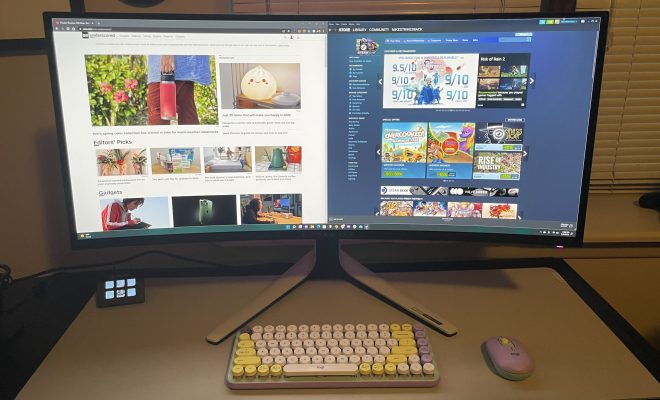
As technology evolves, so does the way we interact with our devices. One such instance is the invention of the ultrawide monitor that offers users a broader and more seamless visual experience. However, even though ultrawide monitors offer an extensive viewing area, scrolling side to side can be cumbersome, and it might not be possible to view multiple windows simultaneously. This is where virtual monitor apps come in to help maximize your ultrawide monitor and make your workflow more efficient.

Virtual monitor apps, or window managers, are a software tool that partitions your ultrawide monitor into several virtual display areas. These apps allow multiple windows to be visible simultaneously, giving the user more control over their screen space. They also enable the user to customize the size and position of each virtual display, making it possible to manage a more complex workflow.

One popular virtual monitor app is DisplayFusion. The app allows users to partition their ultrawide monitor into multiple virtual displays, enabling them to use several windows simultaneously. It also gives them the ability to customize the number of virtual monitors they want to have, as well as their size and position. DisplayFusion is also known for its powerful keyboard shortcuts, which allow users to move windows and switch between virtual displays with ease.

Another virtual monitor app that is worth considering is AquaSnap. AquaSnap is a window manager tool that automatically resizes and snaps windows together, helping users organize their workspace easily. It also enables customizable hotkeys that provide quick access to frequently used features. Additionally, the app has a robust snapping feature, which allows users to snap windows to any side of a virtual monitor area for optimal space management.

GridMove is yet another virtual monitor app that can help maximize your ultrawide monitor. As the name suggests, GridMove lets users create a grid or a custom pattern on their ultrawide monitor and then snap their windows into that grid. It gives users control over the size and position of each virtual monitor, enabling them to create a more customized workspace. GridMove also makes use of customizable keyboard shortcuts that allow users to manage their virtual monitors with ease.

MaxTo is another virtual monitor app that allows users to segment their ultrawide monitor into multiple virtual monitors. Highly customizable, it allows users to create specific areas for their frequently used applications and windows. MaxTo also provides multiple algorithms for window placement, snapping, and resizing, ensuring that the virtual monitors are precisely where the user wants them to be.


Previous Article

How to Make Your Own Telegram Stickers

Next Article

How to Replay a Snapchat

Matthew Lynch

Related articles More from author

  • Digital & Mobile Technology

    How Does the Apple TV Work?

    August 5, 2023
    By Matthew Lynch
  • Digital & Mobile Technology

    How to Get a Satellite View of Your House Using Google Earth

    June 8, 2023
    By Matthew Lynch
  • Digital & Mobile Technology

    The 18 Best Tips to Get More iPad Battery Life (Updated for iPadOS 15.5)

    June 12, 2023
    By Matthew Lynch
  • Digital & Mobile Technology

    The 5 Best Private Web Browsers of 2023

    June 9, 2023
    By Matthew Lynch
  • Assistive TechnologyDigital & Mobile Technology

    How to Install a Dashcam in Your Car

    June 6, 2023
    By Matthew Lynch
  • Digital & Mobile Technology

    What Does SMH Mean and How Can You Use It?

    June 8, 2023
    By Matthew Lynch

Search

Login & Registration

  • Register
  • Log in
  • Entries feed
  • Comments feed
  • WordPress.org

Newsletter

Signup for The Tech Edvocate Newsletter and have the latest in EdTech news and opinion delivered to your email address!

About Us

Since technology is not going anywhere and does more good than harm, adapting is the best course of action. That is where The Tech Edvocate comes in. We plan to cover the PreK-12 and Higher Education EdTech sectors and provide our readers with the latest news and opinion on the subject. From time to time, I will invite other voices to weigh in on important issues in EdTech. We hope to provide a well-rounded, multi-faceted look at the past, present, the future of EdTech in the US and internationally.

We started this journey back in June 2016, and we plan to continue it for many more years to come. I hope that you will join us in this discussion of the past, present and future of EdTech and lend your own insight to the issues that are discussed.

Newsletter

Signup for The Tech Edvocate Newsletter and have the latest in EdTech news and opinion delivered to your email address!

Contact Us

The Tech Edvocate
910 Goddin Street
Richmond, VA 23231
(601) 630-5238
[email protected]

Copyright © 2025 Matthew Lynch. All rights reserved.