The Tech Edvocate

Top Menu

  • Advertisement
  • Apps
  • Home Page
  • Home Page Five (No Sidebar)
  • Home Page Four
  • Home Page Three
  • Home Page Two
  • Home Tech2
  • Icons [No Sidebar]
  • Left Sidbear Page
  • Lynch Educational Consulting
  • My Account
  • My Speaking Page
  • Newsletter Sign Up Confirmation
  • Newsletter Unsubscription
  • Our Brands
  • Page Example
  • Privacy Policy
  • Protected Content
  • Register
  • Request a Product Review
  • Shop
  • Shortcodes Examples
  • Signup
  • Start Here
    • Governance
    • Careers
    • Contact Us
  • Terms and Conditions
  • The Edvocate
  • The Tech Edvocate Product Guide
  • Topics
  • Write For Us
  • Advertise

Main Menu

  • Start Here
    • Our Brands
    • Governance
      • Lynch Educational Consulting, LLC.
      • Dr. Lynch’s Personal Website
      • Careers
    • Write For Us
    • The Tech Edvocate Product Guide
    • Contact Us
    • Books
    • Edupedia
    • Post a Job
    • The Edvocate Podcast
    • Terms and Conditions
    • Privacy Policy
  • Topics
    • Assistive Technology
    • Child Development Tech
    • Early Childhood & K-12 EdTech
    • EdTech Futures
    • EdTech News
    • EdTech Policy & Reform
    • EdTech Startups & Businesses
    • Higher Education EdTech
    • Online Learning & eLearning
    • Parent & Family Tech
    • Personalized Learning
    • Product Reviews
  • Advertise
  • Tech Edvocate Awards
  • The Edvocate
  • Pedagogue
  • School Ratings

logo

The Tech Edvocate

  • Start Here
    • Our Brands
    • Governance
      • Lynch Educational Consulting, LLC.
      • Dr. Lynch’s Personal Website
        • My Speaking Page
      • Careers
    • Write For Us
    • The Tech Edvocate Product Guide
    • Contact Us
    • Books
    • Edupedia
    • Post a Job
    • The Edvocate Podcast
    • Terms and Conditions
    • Privacy Policy
  • Topics
    • Assistive Technology
    • Child Development Tech
    • Early Childhood & K-12 EdTech
    • EdTech Futures
    • EdTech News
    • EdTech Policy & Reform
    • EdTech Startups & Businesses
    • Higher Education EdTech
    • Online Learning & eLearning
    • Parent & Family Tech
    • Personalized Learning
    • Product Reviews
  • Advertise
  • Tech Edvocate Awards
  • The Edvocate
  • Pedagogue
  • School Ratings
  • Urgent Warning: How AI is Fueling Rampant Skincare Scams Right Now

  • Urgent: This Skincare Trend Is Exploiting Children — And It’s Spreading Fast

  • Seattle Times sues Microsoft and OpenAI, alleging they trained their AI on its journalism

  • Astonishing: Anthropic Axed $6 Billion Deal for Decart — Why?

  • Sega cancelled its “risky” Super Game project as it “would have to grow enormously to match the scale of the service” | GamesIndustry.biz

  • Devastating: Don’t Nod’s €8M Cash Crisis Threatens Studio Future

  • OpenAI Accused of Shocking Attempt to Hijack Euler Proof — The Truth Revealed

  • Meta Child Sexual Abuse Ads: A Disturbing Investigation Unveils Shocking Truths

  • Unveiling the Quiet Crisis: Why Two Mega-Districts Just Banned AI in Education

  • Unveiling the Controversial New Texas Curriculum: A Battle Over History and Identity

Tech Advice
Home›Tech Advice›Use Your Phone Camera to Translate Languages on the Fly

Use Your Phone Camera to Translate Languages on the Fly
By Matthew Lynch
July 24, 2023
0
Spread the love

Gone are the days of struggling to understand foreign languages while traveling or encountering unfamiliar texts in different languages. Thanks to advancements in technology, you can now use your phone camera as a powerful translation tool that helps you decipher and understand various languages on the fly. In this article, we will explore how you can leverage your phone’s camera to translate languages instantly and effortlessly.

The Power of Optical Character Recognition (OCR)

The key technology behind using your phone camera for language translation is Optical Character Recognition (OCR). OCR allows your smartphone to recognize and extract text from images captured by its camera. Combined with machine learning algorithms and language processing capabilities, OCR-based translation apps have revolutionized our ability to overcome language barriers.

How It Works

To use your phone’s camera for instant language translation:

1. Install a Translation App:

Start by installing a reliable translation app that offers OCR functionality. Several popular options include Google

Translate, Microsoft Translator, and iTranslate.

2. Open the App:

Launch the installed translation app on your smartphone.

3. Select Language Pairing:

Choose the source language (the one you need translated) and target language (the one you want it translated into).

4. Enable Camera Mode:

Look for an option within the app that enables “Camera” or “Scan” mode – typically represented by a small camera icon.

5. Capture Text Image:

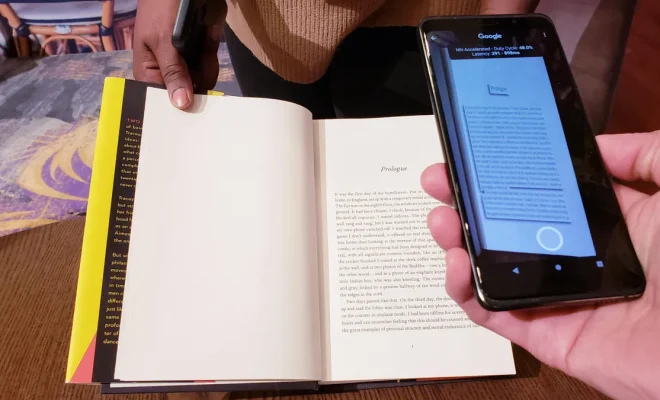
Point your phone’s camera at the text or document containing the foreign language text that needs translating.

• Ensure good lighting conditions and hold steady while capturing photos for accurate results.

6a: Real-time Translation:

• Some apps provide real-time translations where detected text overlays onto live video feed directly on-screen.

• As you move around or encounter new words/phrases, translations update dynamically in real-time.

6b: Image Capture Translation:

• For apps that don’t offer real-time translation, capture the image and wait for the app to process it.

• After processing, you will see highlighted text overlays on top of the captured image with translated equivalents.

Additional Features and Tips

Translation apps often come with additional features to enhance your language learning experience:

• Text-to-Speech: Many translation apps can read out translations aloud, helping you understand pronunciation and fluency.

• Offline Mode: Some apps allow downloading language packs in advance. This feature is particularly useful when traveling abroad without a reliable internet connection.

• Phrasebook: Look for built-in phrasebooks or saved history features within translation apps. These help you save commonly used translations or frequently referenced phrases for quick access later.

Conclusion

The ability to use your phone camera as an instant language translator is nothing short of remarkable. With OCR-powered translation apps readily available, understanding foreign languages has become more accessible than ever before. Whether you’re exploring new destinations or simply encountering unfamiliar texts, this technology empowers you to break down language barriers effortlessly.

So next time you find yourself struggling with a foreign language, remember that all it takes is a few taps on your smartphone’s screen – opening up a world where understanding different languages becomes as easy as pointing and translating with your trusty phone camera!


Previous Article

HBO Max Changes to Max Next Month ...

Next Article

Twitter Check Marks: A Handy Guide for ...

Matthew Lynch

Related articles More from author

  • Tech Advice

    12 Best Free Online Courses from the Raspberry Pi Foundation

    October 19, 2023
    By Matthew Lynch
  • Tech Advice

    Pokemon Go Zacian Raid Guide: Best Counters, Weaknesses and Moveset

    July 17, 2023
    By Matthew Lynch
  • Tech Advice

    Insurance for Mini Cooper: Everything You Need to Know

    August 19, 2023
    By Matthew Lynch
  • Tech Advice

    How to Record Skype Calls

    May 3, 2023
    By Matthew Lynch
  • Tech Advice

    2023 Land Rover Range Rover Review: Running Out of Room for Improvement

    July 14, 2023
    By Matthew Lynch
  • Tech Advice

    How to Move and Resize Taskbar on Windows

    February 19, 2024
    By Matthew Lynch

Search

Login & Registration

  • Log in
  • Entries feed
  • Comments feed
  • WordPress.org

Newsletter

Signup for The Tech Edvocate Newsletter and have the latest in EdTech news and opinion delivered to your email address!

About Us

Since technology is not going anywhere and does more good than harm, adapting is the best course of action. That is where The Tech Edvocate comes in. We plan to cover the PreK-12 and Higher Education EdTech sectors and provide our readers with the latest news and opinion on the subject. From time to time, I will invite other voices to weigh in on important issues in EdTech. We hope to provide a well-rounded, multi-faceted look at the past, present, the future of EdTech in the US and internationally.

We started this journey back in June 2016, and we plan to continue it for many more years to come. I hope that you will join us in this discussion of the past, present and future of EdTech and lend your own insight to the issues that are discussed.

Newsletter

Signup for The Tech Edvocate Newsletter and have the latest in EdTech news and opinion delivered to your email address!

Contact Us

The Tech Edvocate
910 Goddin Street
Richmond, VA 23231
(601) 630-5238
[email protected]

Copyright © 2026 Matthew Lynch. All rights reserved.