
The Tech Edvocate

Top Menu

  • Advertisement
  • Apps
  • Home Page
  • Home Page Five (No Sidebar)
  • Home Page Four
  • Home Page Three
  • Home Page Two
  • Home Tech2
  • Icons [No Sidebar]
  • Left Sidbear Page
  • Lynch Educational Consulting
  • My Account
  • My Speaking Page
  • Newsletter Sign Up Confirmation
  • Newsletter Unsubscription
  • Our Brands
  • Page Example
  • Privacy Policy
  • Protected Content
  • Register
  • Request a Product Review
  • Shop
  • Shortcodes Examples
  • Signup
  • Start Here
    • Governance
    • Careers
    • Contact Us
  • Terms and Conditions
  • The Edvocate
  • The Tech Edvocate Product Guide
  • Topics
  • Write For Us
  • Advertise

Main Menu

  • Start Here
    • Our Brands
    • Governance
      • Lynch Educational Consulting, LLC.
      • Dr. Lynch’s Personal Website
      • Careers
    • Write For Us
    • The Tech Edvocate Product Guide
    • Contact Us
    • Books
    • Edupedia
    • Post a Job
    • The Edvocate Podcast
    • Terms and Conditions
    • Privacy Policy
  • Topics
    • Assistive Technology
    • Child Development Tech
    • Early Childhood & K-12 EdTech
    • EdTech Futures
    • EdTech News
    • EdTech Policy & Reform
    • EdTech Startups & Businesses
    • Higher Education EdTech
    • Online Learning & eLearning
    • Parent & Family Tech
    • Personalized Learning
    • Product Reviews
  • Advertise
  • Tech Edvocate Awards
  • The Edvocate
  • Pedagogue
  • School Ratings

logo

The Tech Edvocate

  • Start Here
    • Our Brands
    • Governance
      • Lynch Educational Consulting, LLC.
      • Dr. Lynch’s Personal Website
        • My Speaking Page
      • Careers
    • Write For Us
    • The Tech Edvocate Product Guide
    • Contact Us
    • Books
    • Edupedia
    • Post a Job
    • The Edvocate Podcast
    • Terms and Conditions
    • Privacy Policy
  • Topics
    • Assistive Technology
    • Child Development Tech
    • Early Childhood & K-12 EdTech
    • EdTech Futures
    • EdTech News
    • EdTech Policy & Reform
    • EdTech Startups & Businesses
    • Higher Education EdTech
    • Online Learning & eLearning
    • Parent & Family Tech
    • Personalized Learning
    • Product Reviews
  • Advertise
  • Tech Edvocate Awards
  • The Edvocate
  • Pedagogue
  • School Ratings
  • Urgent Warning: How AI is Fueling Rampant Skincare Scams Right Now

  • Urgent: This Skincare Trend Is Exploiting Children — And It’s Spreading Fast

  • Seattle Times sues Microsoft and OpenAI, alleging they trained their AI on its journalism

  • Astonishing: Anthropic Axed $6 Billion Deal for Decart — Why?

  • Sega cancelled its “risky” Super Game project as it “would have to grow enormously to match the scale of the service” | GamesIndustry.biz

  • Devastating: Don’t Nod’s €8M Cash Crisis Threatens Studio Future

  • OpenAI Accused of Shocking Attempt to Hijack Euler Proof — The Truth Revealed

  • Meta Child Sexual Abuse Ads: A Disturbing Investigation Unveils Shocking Truths

  • Unveiling the Quiet Crisis: Why Two Mega-Districts Just Banned AI in Education

  • Unveiling the Controversial New Texas Curriculum: A Battle Over History and Identity

Tech Advice
Home›Tech Advice›Two Mac keyboard shortcuts for missing Home and End keys

Two Mac keyboard shortcuts for missing Home and End keys
By Matthew Lynch
July 14, 2023
0
Spread the love

Introduction:

Mac users may sometimes feel the lack of Home and End keys on their keyboards, but there’s no need to fret. With the help of a few keyboard shortcuts, you can quickly navigate through your text without missing a beat.
In this article, we will discuss two essential Mac keyboard shortcuts that can substitute for those missing Home and End keys, making text editing and navigation much more efficient.

Shortcut 1: Command + Arrow Keys

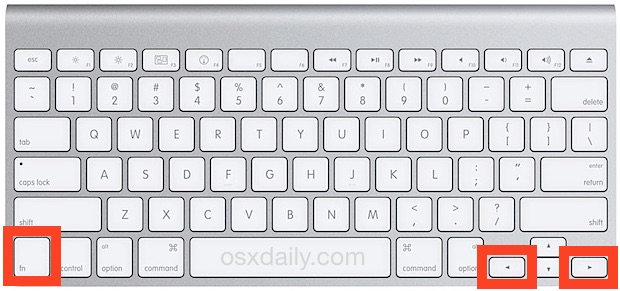
The first and most commonly used keyboard shortcut to mimic the functionality of the Home and End keys is the combination of the Command key along with the arrow keys. Here’s how it works:

– Command + Left Arrow: The “Home” function – This combination will move your cursor to the beginning of the current line.

– Command + Right Arrow: The “End” function – This shortcut moves your cursor to the end of the current line.

These shortcuts are highly useful when editing text documents or coding, as they save time by helping you navigate through lines of text effortlessly.

Shortcut 2: Option + Up/Down Arrows

For those who miss both Home/End and Page Up/Down keys on their Mac keyboards, using Option in combination with arrow keys provides a viable solution:

– Option + Up Arrow: This combination serves as “Page Up,” allowing you to move up one screen’s worth of content within your active document or application.

– Option + Down Arrow: Similarly, this shortcut functions as “Page Down,” scrolling down one screen’s worth at a time in your document or app.

Both shortcuts are invaluable when working with lengthy documents or web pages, offering efficient navigation without having to reach for the mouse.

Conclusion

While Mac keyboards lack dedicated Home and End keys found on traditional Windows keyboards, there’s no need to feel left out. These two simple yet powerful keyboard shortcuts can effectively replace missing Home and End keys on your Mac, improving the overall text editing and navigation experience. Master these shortcuts and watch your productivity soar!


Previous Article

How to Update Microsoft Teams

Next Article

How to Count Data in Selected Cells ...

Matthew Lynch

Related articles More from author

  • Tech Advice

    AMD Radeon RX 6800 XT Review

    July 20, 2023
    By Matthew Lynch
  • Tech Advice

    6 Ways to Haggle a Cheaper Gym Membership

    July 6, 2023
    By Matthew Lynch
  • Tech Advice

    How air-cooled engines work, and why it doesn’t matter any more

    July 12, 2023
    By Matthew Lynch
  • Tech Advice

    Samsung Galaxy S10E review: Overlooking Samsung’s cheapest phone would be a mistake

    July 14, 2023
    By Matthew Lynch
  • Tech Advice

    Beats Studio Buds review: Apple’s surprise hit gets slight improvements

    July 17, 2023
    By Matthew Lynch
  • Tech Advice

    Valheim (for PC) Preview

    July 20, 2023
    By Matthew Lynch

Search

Login & Registration

  • Log in
  • Entries feed
  • Comments feed
  • WordPress.org

Newsletter

Signup for The Tech Edvocate Newsletter and have the latest in EdTech news and opinion delivered to your email address!

About Us

Since technology is not going anywhere and does more good than harm, adapting is the best course of action. That is where The Tech Edvocate comes in. We plan to cover the PreK-12 and Higher Education EdTech sectors and provide our readers with the latest news and opinion on the subject. From time to time, I will invite other voices to weigh in on important issues in EdTech. We hope to provide a well-rounded, multi-faceted look at the past, present, the future of EdTech in the US and internationally.

We started this journey back in June 2016, and we plan to continue it for many more years to come. I hope that you will join us in this discussion of the past, present and future of EdTech and lend your own insight to the issues that are discussed.

Newsletter

Signup for The Tech Edvocate Newsletter and have the latest in EdTech news and opinion delivered to your email address!

Contact Us

The Tech Edvocate
910 Goddin Street
Richmond, VA 23231
(601) 630-5238
[email protected]

Copyright © 2026 Matthew Lynch. All rights reserved.