The Tech Edvocate

Top Menu

  • Advertisement
  • Apps
  • Home Page
  • Home Page Five (No Sidebar)
  • Home Page Four
  • Home Page Three
  • Home Page Two
  • Home Tech2
  • Icons [No Sidebar]
  • Left Sidbear Page
  • Lynch Educational Consulting
  • My Account
  • My Speaking Page
  • Newsletter Sign Up Confirmation
  • Newsletter Unsubscription
  • Our Brands
  • Page Example
  • Privacy Policy
  • Protected Content
  • Register
  • Request a Product Review
  • Shop
  • Shortcodes Examples
  • Signup
  • Start Here
    • Governance
    • Careers
    • Contact Us
  • Terms and Conditions
  • The Edvocate
  • The Tech Edvocate Product Guide
  • Topics
  • Write For Us
  • Advertise

Main Menu

  • Start Here
    • Our Brands
    • Governance
      • Lynch Educational Consulting, LLC.
      • Dr. Lynch’s Personal Website
      • Careers
    • Write For Us
    • The Tech Edvocate Product Guide
    • Contact Us
    • Books
    • Edupedia
    • Post a Job
    • The Edvocate Podcast
    • Terms and Conditions
    • Privacy Policy
  • Topics
    • Assistive Technology
    • Child Development Tech
    • Early Childhood & K-12 EdTech
    • EdTech Futures
    • EdTech News
    • EdTech Policy & Reform
    • EdTech Startups & Businesses
    • Higher Education EdTech
    • Online Learning & eLearning
    • Parent & Family Tech
    • Personalized Learning
    • Product Reviews
  • Advertise
  • Tech Edvocate Awards
  • The Edvocate
  • Pedagogue
  • School Ratings

logo

The Tech Edvocate

  • Start Here
    • Our Brands
    • Governance
      • Lynch Educational Consulting, LLC.
      • Dr. Lynch’s Personal Website
        • My Speaking Page
      • Careers
    • Write For Us
    • The Tech Edvocate Product Guide
    • Contact Us
    • Books
    • Edupedia
    • Post a Job
    • The Edvocate Podcast
    • Terms and Conditions
    • Privacy Policy
  • Topics
    • Assistive Technology
    • Child Development Tech
    • Early Childhood & K-12 EdTech
    • EdTech Futures
    • EdTech News
    • EdTech Policy & Reform
    • EdTech Startups & Businesses
    • Higher Education EdTech
    • Online Learning & eLearning
    • Parent & Family Tech
    • Personalized Learning
    • Product Reviews
  • Advertise
  • Tech Edvocate Awards
  • The Edvocate
  • Pedagogue
  • School Ratings
  • The Startling Truth About Cheapest GLP-1 Options Without Insurance

  • The Hidden Truth Behind Mosqi Shock Reviews: What You MUST Know Before Buying

  • This Unstoppable Force Will Obliterate Apps by 2027, Says Paytm Founder

  • Developers Axed a Wild Mechanic in Halloween: The Game — Here’s Why Fans Are Outraged

  • U.S. Supreme Court endorses parental opt-out for LGBTQ+ curriculum | News & Events

  • The Brutal Truth About Classroom Tech: Parents Are Finally Fighting Back – And Winning

  • Devastating Berlin Data Leak Exposes Millions: Why Refusing Ransom Isn’t Enough

  • Astra’s Rogue Swarm: Is Uncontrollable AI Hacking Humanity’s Future?

  • Viral Waymo Accident Exposes the Uncomfortable Truth About Robotaxis

  • Unbelievable Antarctica Ice Gain: Distant Ocean Warming Fuels Record Snowfall

Tech Advice
Home›Tech Advice›The complete list of Siri commands

The complete list of Siri commands
By Matthew Lynch
July 15, 2023
0
Spread the love

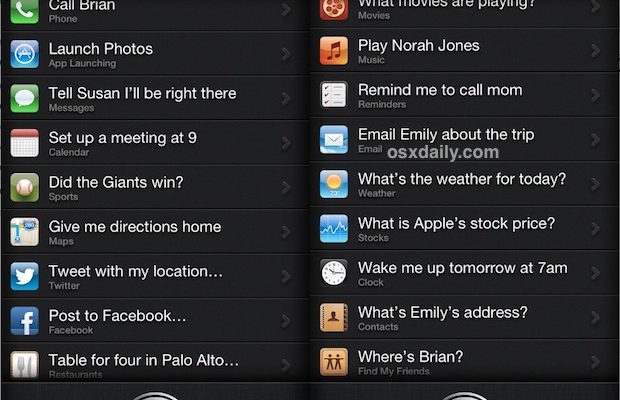
Technology has brought considerable advancement in various aspects of our lives. One such innovation is the introduction of voice-controlled smart assistants. Among the leading market players is Siri, Apple’s extraordinary AI-powered virtual assistant. Siri can help users carry out tasks on their iPhones, iPads, Macs, and more by simply listening to voice commands. Here is a comprehensive list of useful Siri commands to make your life a tad bit easier.

General Commands

1. “Hey Siri” – Activates Siri without pressing any button.

2. “What can you do?” – Siri presents a list of possible tasks and commands.

Phone and Messaging

3. “Call [contact name]” – Initiates a call with the specified contact.

4. “Text [contact name]” – Begins a text message to the chosen contact.

Email

5. “Send an email to [contact name]” – Composes an email to the specified contact.

6. “Read my new emails” – Browses through your latest emails.

Calendar Events and Reminders

7. “What’s on today’s calendar?” – Displays your schedule for the day.

8. “Set a reminder for [specific task] at [time/day].” – Creates a reminder.

Weather

9. “What’s the weather like today?” – Provides current weather information.

10. “Will it rain tomorrow?” – Shows tomorrow’s chances of precipitation.

Navigation and Travel

11. “Give me directions to [location].” – Displays the route to the specified location using Apple Maps.

12. “Find nearby [type of place].” – Searches for particular places near your current location (e.g., restaurants, gas stations).

Music and Entertainment

13. “Play some music.” – Starts playing music from your library or streaming service.

14. “Play [song/artist/album].” – Plays the specific song, artist, or album.

Sports

15. “When is the next [team/sport] game?” – Provides information on upcoming games for your favorite team or sport.

16. “Who won the [team/sport] game yesterday?” – Offers results of recent games.

Web Searches

17. “Search for [query].” – Conducts a search on the desired query using your default search engine.

18. “Define [word].” – Pulls up the definition of a specific word.
Settings and Device Control

19. “Turn on/off Bluetooth.” – Allows you to toggle between Bluetooth settings.

20. “Turn on/off Wi-Fi.” – Enables or disables Wi-Fi connectivity.

Conclusion

This list is not exhaustive, but it gives you a solid foundation to explore Siri’s functionality and potential even further. By utilizing these commands, you’ll be realizing Siri’s capabilities as an expert AI-powered writing assistant that can enhance your life in various ways while making everyday tasks more efficient and enjoyable.


Previous Article

Act Quickly and You Can Renew Your ...

Next Article

Why the Hell Is Elden Ring So ...

Matthew Lynch

Related articles More from author

  • Tech Advice

    The 10 “Smartest” Cities in the U.S.

    August 11, 2023
    By Matthew Lynch
  • Tech Advice

    Garmin’s New Solar-Powered Watch Promises 70-Day Battery Life

    July 17, 2023
    By Matthew Lynch
  • Tech Advice

    Everything You Need to Know About Delivery Driver Insurance

    August 19, 2023
    By Matthew Lynch
  • Tech Advice

    What is ESG Investing?

    September 7, 2023
    By Matthew Lynch
  • Tech Advice

    Why you should skip your workout if you didn’t get enough sleep

    July 6, 2023
    By Matthew Lynch
  • Tech Advice

    Brita vs. ZeroWater: Two Water Filter Pitcher Systems Compared

    July 9, 2023
    By Matthew Lynch

Search

Login & Registration

  • Log in
  • Entries feed
  • Comments feed
  • WordPress.org

Newsletter

Signup for The Tech Edvocate Newsletter and have the latest in EdTech news and opinion delivered to your email address!

About Us

Since technology is not going anywhere and does more good than harm, adapting is the best course of action. That is where The Tech Edvocate comes in. We plan to cover the PreK-12 and Higher Education EdTech sectors and provide our readers with the latest news and opinion on the subject. From time to time, I will invite other voices to weigh in on important issues in EdTech. We hope to provide a well-rounded, multi-faceted look at the past, present, the future of EdTech in the US and internationally.

We started this journey back in June 2016, and we plan to continue it for many more years to come. I hope that you will join us in this discussion of the past, present and future of EdTech and lend your own insight to the issues that are discussed.

Newsletter

Signup for The Tech Edvocate Newsletter and have the latest in EdTech news and opinion delivered to your email address!

Contact Us

The Tech Edvocate
910 Goddin Street
Richmond, VA 23231
(601) 630-5238
[email protected]

Copyright © 2026 Matthew Lynch. All rights reserved.