
The Tech Edvocate

Top Menu

  • Advertisement
  • Apps
  • Home Page
  • Home Page Five (No Sidebar)
  • Home Page Four
  • Home Page Three
  • Home Page Two
  • Home Tech2
  • Icons [No Sidebar]
  • Left Sidbear Page
  • Lynch Educational Consulting
  • My Account
  • My Speaking Page
  • Newsletter Sign Up Confirmation
  • Newsletter Unsubscription
  • Our Brands
  • Page Example
  • Privacy Policy
  • Protected Content
  • Register
  • Request a Product Review
  • Shop
  • Shortcodes Examples
  • Signup
  • Start Here
    • Governance
    • Careers
    • Contact Us
  • Terms and Conditions
  • The Edvocate
  • The Tech Edvocate Product Guide
  • Topics
  • Write For Us
  • Advertise

Main Menu

  • Start Here
    • Our Brands
    • Governance
      • Lynch Educational Consulting, LLC.
      • Dr. Lynch’s Personal Website
      • Careers
    • Write For Us
    • The Tech Edvocate Product Guide
    • Contact Us
    • Books
    • Edupedia
    • Post a Job
    • The Edvocate Podcast
    • Terms and Conditions
    • Privacy Policy
  • Topics
    • Assistive Technology
    • Child Development Tech
    • Early Childhood & K-12 EdTech
    • EdTech Futures
    • EdTech News
    • EdTech Policy & Reform
    • EdTech Startups & Businesses
    • Higher Education EdTech
    • Online Learning & eLearning
    • Parent & Family Tech
    • Personalized Learning
    • Product Reviews
  • Advertise
  • Tech Edvocate Awards
  • The Edvocate
  • Pedagogue
  • School Ratings

logo

The Tech Edvocate

  • Start Here
    • Our Brands
    • Governance
      • Lynch Educational Consulting, LLC.
      • Dr. Lynch’s Personal Website
        • My Speaking Page
      • Careers
    • Write For Us
    • The Tech Edvocate Product Guide
    • Contact Us
    • Books
    • Edupedia
    • Post a Job
    • The Edvocate Podcast
    • Terms and Conditions
    • Privacy Policy
  • Topics
    • Assistive Technology
    • Child Development Tech
    • Early Childhood & K-12 EdTech
    • EdTech Futures
    • EdTech News
    • EdTech Policy & Reform
    • EdTech Startups & Businesses
    • Higher Education EdTech
    • Online Learning & eLearning
    • Parent & Family Tech
    • Personalized Learning
    • Product Reviews
  • Advertise
  • Tech Edvocate Awards
  • The Edvocate
  • Pedagogue
  • School Ratings
  • This One Flaw Just Blew Up the Guardian Smart Baby Monitor

  • The AI Race: Why Doomsday Warnings Can’t Stop the Train

  • XBOX: Activision takes over Halo, Obsidian joins Bethesda, and Ninja Theory is going

  • White House Arcade: 2nd Japan Protest, Nintendo Feud [2026]

  • One-Fifth of White-Collar Jobs Could Vanish by 2030, New Report Claims

  • Is a ‘Pacing’ AI Slowdown Really Possible? This Week’s AI News Roundup Reveals the Truth

  • California’s Bold Move: AB 1709 Social Media Restrictions Could Banish Teen Addiction

  • This One AI in Education Concern Is Completely Missing the Point

  • ShinyHunters Claims FBI Data Breach: Hacker Group Says It Stole Records of All Employees and Applicants

  • One Hacker, 100 Companies: The AI Cybersecurity Attack That Changed Everything

Tech Advice
Home›Tech Advice›The BlackBerry Pearl 8100: A Comprehensive Review

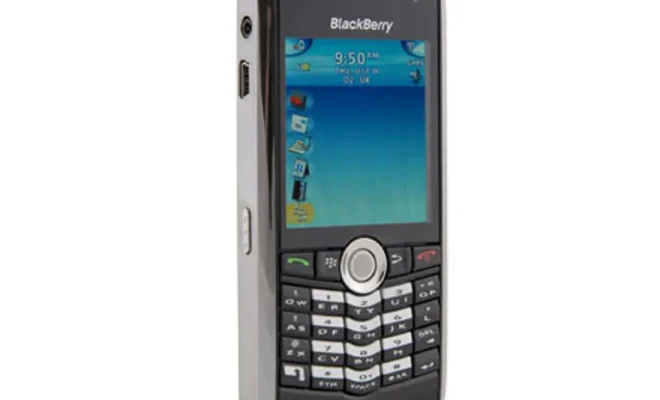
The BlackBerry Pearl 8100: A Comprehensive Review
By Matthew Lynch
July 11, 2023
0
Spread the love

The BlackBerry Pearl 8100, a product of Research in Motion (RIM), was launched in 2006 as a multimedia-oriented smartphone in a compact package. With its innovative design and multi-faceted functions, it quickly gained popularity amongst tech-enthusiasts and professionals alike.

Design and Display:

Viewed largely as a step forward in the BlackBerry design narrative, the Pearl 8100 dramatically diverged from its predecessors by upscaling aesthetic appeal without compromising on functionality. The device’s slim profile at only half an inch thick and the compact design makes it quite comfortable for single-hand operation. The screen boasts of a vibrant 240 x 260-pixel display that provides clear visuals.

Keyboard:

The BlackBerry Pearl 8100 transported RIM’s quintessential QWERTY keyboard to a ‘SureType’ platform, blending two letters per key. This innovation required some acclimation but was soon appreciated for its compromise between size and usability.

Software and Performance:

The BlackBerry Pearl operates on BlackBerry OS and includes popular in-built applications like BlackBerry Messenger, Email client, web browser etc. Despite not being as versatile as contemporary rival operating systems, the OS met essential productivity requirements seamlessly with relatively good performance.

Camera:

For its time, the built-in 1.3-megapixel camera offered acceptable picture quality with distinguished features like digital zoom and flash.

Battery Life & Connectivity:

The BlackBerry Pearl’s top-notch battery life is its greatest strength. Most users could comfortably use it for a few days without charging — impressive by today’s standards. It also allowed Bluetooth connectivity and had a micro-USB port for charging and data transfer.

Summary:

Although no longer available on the market, the BlackBerry Pearl 8100 smashed through stereotypes to introduce what was then considered state-of-art technology in smartphones packed into an aesthetically pleasing form factor. Its ingenious features serve as a testament to RIM’s capability to adapt to technological advancements while maintaining its essence of practical functionality.

Despite its obsolete status in this tech-savvy era, this smartphone certainly reserved its place as an iconic staple in the history of pioneering mobile phones. Hence the BlackBerry Pearl 8100 is more than just another phone; it was part of an era that redefined mobility communication norms delivering a worthy user experience illustrated by user-friendly software applications & prolonged battery life that still take precedence over smartphones even today!


Previous Article

BenQ HT2050A Review: Great (Big) Picture for ...

Next Article

BlackBerry Pearl: A Comprehensive Review

Matthew Lynch

Related articles More from author

  • Tech Advice

    2024 BMW X5 M and X6 M Gain Hybrid System and Go Full Competition

    August 11, 2023
    By Matthew Lynch
  • Tech Advice

    What Is Adaptive Cruise Control?

    August 22, 2023
    By Matthew Lynch
  • Tech Advice

    2024 Mercedes-Benz GLB 250 Base GLB 250 4dr Front-Wheel Drive SUV: Trim Details, Reviews, Prices, Specs, and Incentives

    August 21, 2023
    By Matthew Lynch
  • Tech Advice

    Crypto.com vs. Coinbase: Which Is Right for You?

    September 7, 2023
    By Matthew Lynch
  • Tech Advice

    The Best Wireless Gaming Headsets for 2023

    July 19, 2023
    By Matthew Lynch
  • Tech Advice

    Average Car Loan Interest Rates by Credit Score

    August 17, 2023
    By Matthew Lynch

Search

Login & Registration

  • Log in
  • Entries feed
  • Comments feed
  • WordPress.org

Newsletter

Signup for The Tech Edvocate Newsletter and have the latest in EdTech news and opinion delivered to your email address!

About Us

Since technology is not going anywhere and does more good than harm, adapting is the best course of action. That is where The Tech Edvocate comes in. We plan to cover the PreK-12 and Higher Education EdTech sectors and provide our readers with the latest news and opinion on the subject. From time to time, I will invite other voices to weigh in on important issues in EdTech. We hope to provide a well-rounded, multi-faceted look at the past, present, the future of EdTech in the US and internationally.

We started this journey back in June 2016, and we plan to continue it for many more years to come. I hope that you will join us in this discussion of the past, present and future of EdTech and lend your own insight to the issues that are discussed.

Newsletter

Signup for The Tech Edvocate Newsletter and have the latest in EdTech news and opinion delivered to your email address!

Contact Us

The Tech Edvocate
910 Goddin Street
Richmond, VA 23231
(601) 630-5238
[email protected]

Copyright © 2026 Matthew Lynch. All rights reserved.