The Tech Edvocate

Top Menu

  • Advertisement
  • Apps
  • Home Page
  • Home Page Five (No Sidebar)
  • Home Page Four
  • Home Page Three
  • Home Page Two
  • Home Tech2
  • Icons [No Sidebar]
  • Left Sidbear Page
  • Lynch Educational Consulting
  • My Account
  • My Speaking Page
  • Newsletter Sign Up Confirmation
  • Newsletter Unsubscription
  • Our Brands
  • Page Example
  • Privacy Policy
  • Protected Content
  • Register
  • Request a Product Review
  • Shop
  • Shortcodes Examples
  • Signup
  • Start Here
    • Governance
    • Careers
    • Contact Us
  • Terms and Conditions
  • The Edvocate
  • The Tech Edvocate Product Guide
  • Topics
  • Write For Us
  • Advertise

Main Menu

  • Start Here
    • Our Brands
    • Governance
      • Lynch Educational Consulting, LLC.
      • Dr. Lynch’s Personal Website
      • Careers
    • Write For Us
    • The Tech Edvocate Product Guide
    • Contact Us
    • Books
    • Edupedia
    • Post a Job
    • The Edvocate Podcast
    • Terms and Conditions
    • Privacy Policy
  • Topics
    • Assistive Technology
    • Child Development Tech
    • Early Childhood & K-12 EdTech
    • EdTech Futures
    • EdTech News
    • EdTech Policy & Reform
    • EdTech Startups & Businesses
    • Higher Education EdTech
    • Online Learning & eLearning
    • Parent & Family Tech
    • Personalized Learning
    • Product Reviews
  • Advertise
  • Tech Edvocate Awards
  • The Edvocate
  • Pedagogue
  • School Ratings

logo

The Tech Edvocate

  • Start Here
    • Our Brands
    • Governance
      • Lynch Educational Consulting, LLC.
      • Dr. Lynch’s Personal Website
        • My Speaking Page
      • Careers
    • Write For Us
    • The Tech Edvocate Product Guide
    • Contact Us
    • Books
    • Edupedia
    • Post a Job
    • The Edvocate Podcast
    • Terms and Conditions
    • Privacy Policy
  • Topics
    • Assistive Technology
    • Child Development Tech
    • Early Childhood & K-12 EdTech
    • EdTech Futures
    • EdTech News
    • EdTech Policy & Reform
    • EdTech Startups & Businesses
    • Higher Education EdTech
    • Online Learning & eLearning
    • Parent & Family Tech
    • Personalized Learning
    • Product Reviews
  • Advertise
  • Tech Edvocate Awards
  • The Edvocate
  • Pedagogue
  • School Ratings
  • A Visitors Guide to Corpus Christi (TX), United States

  • Best GetYourGuide tours in Paris

  • Does Viator offer group discounts?

  • Hotels.com vs Airbnb features

  • What is Regus Business Lounge?

  • What is Couchsurfing verification?

  • How to use Viator gift cards?

  • Klook payment methods accepted

  • Best Notion templates for teams

  • WeWork vs traditional office cost

Digital & Mobile Technology
Home›Digital & Mobile Technology›The Best Free Android Video Editors With No Watermarks

The Best Free Android Video Editors With No Watermarks
By Matthew Lynch
June 13, 2023
0
Spread the love

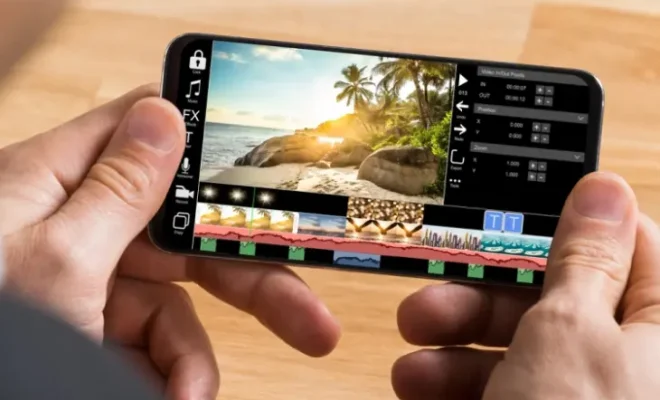
Video editing has become an important part of our daily lives. From social media influencers to amateur video creators, almost everyone wants to edit their videos to make them stand out from the rest. Android smartphones have made this task easier with the availability of several video editing apps. However, most of these apps come with watermarks that spoil the overall aesthetics of the video. Here’s a list of the best free Android video editors with no watermarks that you can try.

1. Adobe Premiere Rush

Adobe Premiere Rush is a powerful video editing app that comes with a lot of features to enhance your video. It has an easy-to-use interface that allows you to edit your videos like a pro. You can add transitions, effects, and even change the color grading of your video. Adobe Premiere Rush also comes with different export options, making it easy to share your video on different social media platforms.

2. PowerDirector

PowerDirector is a popular video editing app that is free to use and comes with no watermarks. It has a simple interface that makes it easy to edit videos on the go. The app comes with a lot of features such as video stabilization, transition effects, and color correction tools. You can also add text and stickers to your videos to make them more engaging.

3. OpenShot

OpenShot is a free and open-source video editing software that is available for Android devices. It has a user-friendly interface that makes it easy to navigate through the app. OpenShot comes with several features such as timeline-based editing, video transitions, and various video effects. It also supports different video formats, making it easy to edit videos captured with different devices.

4. VivaVideo

VivaVideo is a popular video editing app that comes with no watermarks. It has a simple interface that makes it easy to create videos. The app comes with several features such as video trimming, music addition, and effects to enhance your video. You can also create a storyboard and add text to your video to make it more engaging.

5. FilmoraGo

FilmoraGo is a free video editing app that allows you to create impressive video content. It comes with various features such as voiceover recording, music addition, and video editing tools. The app also supports different video formats and comes with different export options to share your videos on various social media platforms.

Conclusion

These free Android video editors mentioned above allow you to edit your videos without adding any watermarks. With these apps, you can create impressive video content that stands out from the rest. Whether you’re new to video editing or an experienced editor, these apps won’t disappoint you.


Previous Article

Is Razer Cortex Not Opening on Windows ...

Next Article

Reasons Why You Should Not Subscribe to ...

Matthew Lynch

Related articles More from author

  • Digital & Mobile Technology

    The Best PSP Accessories for PSP-1000

    June 23, 2023
    By Matthew Lynch
  • Digital & Mobile Technology

    How to Combine Two Columns in Microsoft Excel

    June 8, 2023
    By Matthew Lynch
  • Digital & Mobile Technology

    Creative iPhone Home Screen Layouts to Organize Your Apps

    June 8, 2023
    By Matthew Lynch
  • Digital & Mobile Technology

    How to See How Much Money You’ve Spent on Steam Games

    May 7, 2023
    By Matthew Lynch
  • Digital & Mobile Technology

    How to Fix a Virus Warning Pop-Up on Android

    July 6, 2023
    By Matthew Lynch
  • Digital & Mobile Technology

    How to Send a Fax From Gmail

    June 22, 2023
    By Matthew Lynch

Search

Login & Registration

  • Log in
  • Entries feed
  • Comments feed
  • WordPress.org

Newsletter

Signup for The Tech Edvocate Newsletter and have the latest in EdTech news and opinion delivered to your email address!

About Us

Since technology is not going anywhere and does more good than harm, adapting is the best course of action. That is where The Tech Edvocate comes in. We plan to cover the PreK-12 and Higher Education EdTech sectors and provide our readers with the latest news and opinion on the subject. From time to time, I will invite other voices to weigh in on important issues in EdTech. We hope to provide a well-rounded, multi-faceted look at the past, present, the future of EdTech in the US and internationally.

We started this journey back in June 2016, and we plan to continue it for many more years to come. I hope that you will join us in this discussion of the past, present and future of EdTech and lend your own insight to the issues that are discussed.

Newsletter

Signup for The Tech Edvocate Newsletter and have the latest in EdTech news and opinion delivered to your email address!

Contact Us

The Tech Edvocate
910 Goddin Street
Richmond, VA 23231
(601) 630-5238
[email protected]

Copyright © 2026 Matthew Lynch. All rights reserved.