The Tech Edvocate

Top Menu

  • Advertisement
  • Apps
  • Home Page
  • Home Page Five (No Sidebar)
  • Home Page Four
  • Home Page Three
  • Home Page Two
  • Home Tech2
  • Icons [No Sidebar]
  • Left Sidbear Page
  • Lynch Educational Consulting
  • My Account
  • My Speaking Page
  • Newsletter Sign Up Confirmation
  • Newsletter Unsubscription
  • Our Brands
  • Page Example
  • Privacy Policy
  • Protected Content
  • Register
  • Request a Product Review
  • Shop
  • Shortcodes Examples
  • Signup
  • Start Here
    • Governance
    • Careers
    • Contact Us
  • Terms and Conditions
  • The Edvocate
  • The Tech Edvocate Product Guide
  • Topics
  • Write For Us
  • Advertise

Main Menu

  • Start Here
    • Our Brands
    • Governance
      • Lynch Educational Consulting, LLC.
      • Dr. Lynch’s Personal Website
      • Careers
    • Write For Us
    • The Tech Edvocate Product Guide
    • Contact Us
    • Books
    • Edupedia
    • Post a Job
    • The Edvocate Podcast
    • Terms and Conditions
    • Privacy Policy
  • Topics
    • Assistive Technology
    • Child Development Tech
    • Early Childhood & K-12 EdTech
    • EdTech Futures
    • EdTech News
    • EdTech Policy & Reform
    • EdTech Startups & Businesses
    • Higher Education EdTech
    • Online Learning & eLearning
    • Parent & Family Tech
    • Personalized Learning
    • Product Reviews
  • Advertise
  • Tech Edvocate Awards
  • The Edvocate
  • Pedagogue
  • School Ratings

logo

The Tech Edvocate

  • Start Here
    • Our Brands
    • Governance
      • Lynch Educational Consulting, LLC.
      • Dr. Lynch’s Personal Website
        • My Speaking Page
      • Careers
    • Write For Us
    • The Tech Edvocate Product Guide
    • Contact Us
    • Books
    • Edupedia
    • Post a Job
    • The Edvocate Podcast
    • Terms and Conditions
    • Privacy Policy
  • Topics
    • Assistive Technology
    • Child Development Tech
    • Early Childhood & K-12 EdTech
    • EdTech Futures
    • EdTech News
    • EdTech Policy & Reform
    • EdTech Startups & Businesses
    • Higher Education EdTech
    • Online Learning & eLearning
    • Parent & Family Tech
    • Personalized Learning
    • Product Reviews
  • Advertise
  • Tech Edvocate Awards
  • The Edvocate
  • Pedagogue
  • School Ratings
  • JisuLife Ultra2 Portable Fan: A Powerful Multi-Function Cooling Solution

  • A Visitors Guide to Viña del Mar, Chile

  • A Visitors Guide to Århus, Denmark

  • A Visitors Guide to Bakersfield (CA), United States

  • A Visitors Guide to Aurora (CO), United States

  • A Visitor’s Guide to Toledo (OH), United States

  • A Visitors Guide to Cincinnati (OH), United States

  • The MagicEagle Cam 5: Revolutionizing Wildlife Monitoring with Smart 4G Technology

  • A Visitors Guide to Pittsburgh (PA), United States

  • A Visitors Guide to Colorado Springs (CO), United States

Digital & Mobile Technology
Home›Digital & Mobile Technology›The 10 Best S Pen Apps For Galaxy Phones

The 10 Best S Pen Apps For Galaxy Phones
By Matthew Lynch
June 10, 2023
0
Spread the love

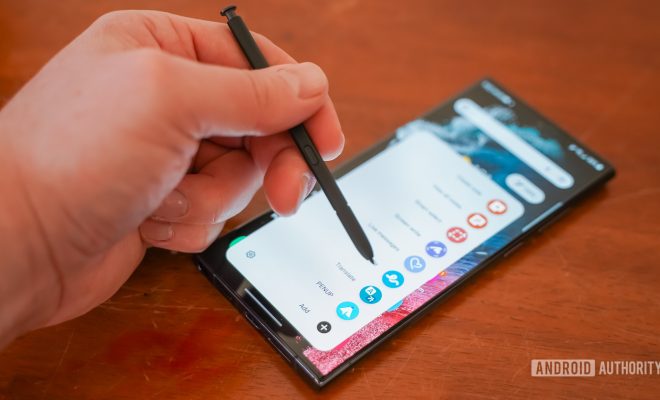
The S Pen is an essential accessory for Samsung Galaxy Note users. It’s a precise tool that can be used for drawing, taking notes, navigating your phone, and many other things. Samsung has developed many apps that make the most out of the S Pen. In this article, we will look at the 10 best S Pen apps for Galaxy phones.

1. Samsung Notes –

This app is pre-installed on most Samsung phones and it has been optimized for S Pen integration. It can capture and organize your ideas in various forms, including text, drawings, and handwritten notes.

2. Autodesk SketchBook –

If you are into digital drawing, this app is a must-have. Its intuitive interface and powerful tools allow you to create stunning artwork using your S Pen.

3. ArtFlow –

Another great drawing app that supports S Pen input. ArtFlow offers a variety of brushes and effects to help you unleash your creativity.

4. Squid –

This note-taking app is perfect for students and professionals alike. It allows you to create handwritten notes, diagrams, and sketches that can be easily shared and organized.

5. Adobe Photoshop Express –

Photoshop is an industry-standard photo editing tool, and this app brings some of its powerful features to your Galaxy phone. With S Pen support, you can create precise selections and corrections to your photos.

6. MyScript Nebo –

This app can recognize your handwriting and convert it to digital text. It’s great for taking notes during meetings or lectures.

7. PenUP –

This app lets you join a community of artists and share your artwork with others. You can also browse and download other people’s creations.

8. Noteshelf –

Another great note-taking app that supports S Pen input. It has a wide variety of paper templates and covers that make your notes look professional.

9. Hancom Office –

This office suite app offers a comprehensive set of tools for creating and editing documents, presentations, and spreadsheets. With S Pen support, you can easily annotate and highlight your work.

10. Smart Select –

This tool is built into your phone’s default Samsung browser. It allows you to capture screenshots, crop images, and extract text using your S Pen. You can even create GIFs from videos.

In conclusion, the S Pen is a powerful tool that can make your Galaxy phone more productive and fun. These apps are just a few examples of how you can use it to its full potential. Whether you are an artist, a student, or a professional, there is an S Pen app for you.

Previous Article

Is It Possible to Trace a MAC ...

Next Article

7 Best Movie Trailer Websites

Matthew Lynch

Related articles More from author

  • Digital & Mobile Technology

    How to Make a Saddle in Minecraft

    June 4, 2023
    By Matthew Lynch
  • Digital & Mobile Technology

    Best Anime Streaming Apps for Android and iPhone

    June 23, 2023
    By Matthew Lynch
  • Digital & Mobile Technology

    The Best Free Text-to-Speech Apps for iPhone

    June 15, 2023
    By Matthew Lynch
  • Digital & Mobile Technology

    How to Fix Outlook Search When It’s Not Working

    June 7, 2023
    By Matthew Lynch
  • Digital & Mobile Technology

    Learn How to Start a Blog for Free Today With These Sites

    June 22, 2023
    By Matthew Lynch
  • Digital & Mobile Technology

    How to Screenshot on a Surface Laptop

    June 10, 2023
    By Matthew Lynch

Search

Login & Registration

  • Register
  • Log in
  • Entries feed
  • Comments feed
  • WordPress.org

Newsletter

Signup for The Tech Edvocate Newsletter and have the latest in EdTech news and opinion delivered to your email address!

About Us

Since technology is not going anywhere and does more good than harm, adapting is the best course of action. That is where The Tech Edvocate comes in. We plan to cover the PreK-12 and Higher Education EdTech sectors and provide our readers with the latest news and opinion on the subject. From time to time, I will invite other voices to weigh in on important issues in EdTech. We hope to provide a well-rounded, multi-faceted look at the past, present, the future of EdTech in the US and internationally.

We started this journey back in June 2016, and we plan to continue it for many more years to come. I hope that you will join us in this discussion of the past, present and future of EdTech and lend your own insight to the issues that are discussed.

Newsletter

Signup for The Tech Edvocate Newsletter and have the latest in EdTech news and opinion delivered to your email address!

Contact Us

The Tech Edvocate
910 Goddin Street
Richmond, VA 23231
(601) 630-5238
[email protected]

Copyright © 2025 Matthew Lynch. All rights reserved.