The Tech Edvocate

Top Menu

  • Advertisement
  • Apps
  • Home Page
  • Home Page Five (No Sidebar)
  • Home Page Four
  • Home Page Three
  • Home Page Two
  • Home Tech2
  • Icons [No Sidebar]
  • Left Sidbear Page
  • Lynch Educational Consulting
  • My Account
  • My Speaking Page
  • Newsletter Sign Up Confirmation
  • Newsletter Unsubscription
  • Our Brands
  • Page Example
  • Privacy Policy
  • Protected Content
  • Register
  • Request a Product Review
  • Shop
  • Shortcodes Examples
  • Signup
  • Start Here
    • Governance
    • Careers
    • Contact Us
  • Terms and Conditions
  • The Edvocate
  • The Tech Edvocate Product Guide
  • Topics
  • Write For Us
  • Advertise

Main Menu

  • Start Here
    • Our Brands
    • Governance
      • Lynch Educational Consulting, LLC.
      • Dr. Lynch’s Personal Website
      • Careers
    • Write For Us
    • The Tech Edvocate Product Guide
    • Contact Us
    • Books
    • Edupedia
    • Post a Job
    • The Edvocate Podcast
    • Terms and Conditions
    • Privacy Policy
  • Topics
    • Assistive Technology
    • Child Development Tech
    • Early Childhood & K-12 EdTech
    • EdTech Futures
    • EdTech News
    • EdTech Policy & Reform
    • EdTech Startups & Businesses
    • Higher Education EdTech
    • Online Learning & eLearning
    • Parent & Family Tech
    • Personalized Learning
    • Product Reviews
  • Advertise
  • Tech Edvocate Awards
  • The Edvocate
  • Pedagogue
  • School Ratings

logo

The Tech Edvocate

  • Start Here
    • Our Brands
    • Governance
      • Lynch Educational Consulting, LLC.
      • Dr. Lynch’s Personal Website
        • My Speaking Page
      • Careers
    • Write For Us
    • The Tech Edvocate Product Guide
    • Contact Us
    • Books
    • Edupedia
    • Post a Job
    • The Edvocate Podcast
    • Terms and Conditions
    • Privacy Policy
  • Topics
    • Assistive Technology
    • Child Development Tech
    • Early Childhood & K-12 EdTech
    • EdTech Futures
    • EdTech News
    • EdTech Policy & Reform
    • EdTech Startups & Businesses
    • Higher Education EdTech
    • Online Learning & eLearning
    • Parent & Family Tech
    • Personalized Learning
    • Product Reviews
  • Advertise
  • Tech Edvocate Awards
  • The Edvocate
  • Pedagogue
  • School Ratings
  • A Visitors Guide to Portland (OR), United States

  • 7 Men’s Bruno Marc Shoes That Are the Perfect Christmas Gift

  • A Visitors Guide to Oklahoma City (OK), United States

  • A Visitor’s Guide to Tucson, Arizona, United States

  • A Visitor’s Guide to Hamilton, Canada

  • Beware of Fiverr: You Might Get Scammed

  • The Future of Artificial Intelligence: Navigating the Next Frontier

  • Best Home Backup Generators for 2026

  • Online Learning Platforms: Transforming Education in the Digital Age

  • Fastest Growing Sectors of the EdTech Market: Exploring Emerging Trends

Early Childhood & K-12 EdTech
Home›Early Childhood & K-12 EdTech›Teachers: How to Use Google Drive

Teachers: How to Use Google Drive

By Matthew Lynch
December 8, 2016
0
Spread the love

By Catlin Tucker

For teachers who are just getting started with Google, Google Drive can be intimidating! In preparation for a Google training, I’ve put together a short explanation of Google Drive and its basic features. Although an increasing number of people have a Gmail account, I run into teachers all the time who are not sure what Google Drive is or how it works.

Google Drive is like a big virtual bucket! It’s where everything you create with Google apps–documents, forms, sheets, slides, drawing–are stored. And unlike a traditional word processing document, you never need to click “Save”…EVER.  Your work is automatically saved every 5 seconds (or so).

Google Drive comes with 15 GB of free storage, so you can save files, photos, and videos. You can access any file in your Google Drive from any device as long as you have internet access. This means you are no longer tethered to a piece of hardware. You can open, edit and share files from any device that can get online.

For those with unreliable internet access, you can also install Google Drive onto your devices and work offline. Then when you are back online, your devices will sync and store your work!

Here are some screenshots to help you navigate your Google Drive.

Organize your files in whatever order makes sense to you. You can limit your view to the files you’ve created, the files that have been shared with you or the files that have been most recently edited. This makes it easy to locate the files you’re looking for.

Screen Shot 2015-01-20 at 2.47.26 PM


Click on a file or folder and check out the “More actions” icon (3 vertical dots) to manage your documents more easily.

Screen Shot 2015-01-20 at 3.28.31 PM


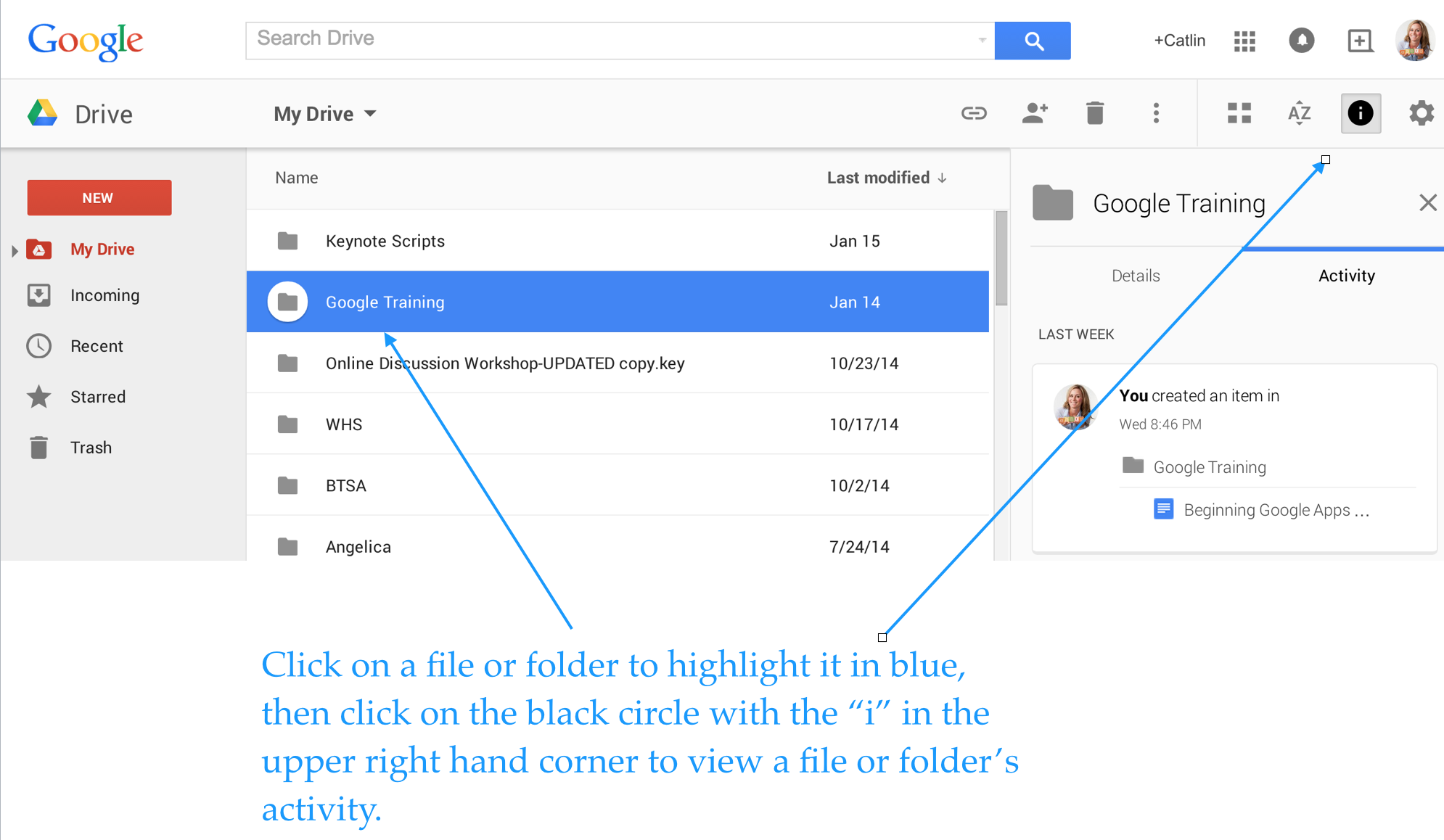
Enjoy total transparency with the “View Details” icon (black circle with the letter “i” in the middle). Simply click on a file or folder and see all of the activity associated with it. You can see when documents were created, when they were edited, and who edited them!
Screen Shot 2015-01-20 at 4.06.24 PM


Last, but not least, you can insert files, photos and videos directly from Google Drive into your emails.

Screen Shot 2015-01-20 at 1.34.37 PM


If you use Google Drive and have tips to share, please post a comment!


This post originally appeared on Catlin Tucker: Blended Learning & Technology in the Classroom and was republished with permission. 


TagsEdtechedtechchatelearningSTEAMSTEM
Previous Article

The 5 Obstacles You Must Overcome As ...

Next Article

3 Ways Mobile Technology Boosts Instruction

Matthew Lynch

Related articles More from author

  • Uncategorized

    Trailblazing Companies in Edtech: myON

    July 23, 2017
    By Matthew Lynch
  • Uncategorized

    Connecting career paths through technology with Nepris

    June 13, 2016
    By Matthew Lynch
  • EdTech Policy & Reform

    Why "anti-tech" teachers irk me

    December 8, 2016
    By Matthew Lynch
  • EdTech NewsHigher Education EdTech

    How technology can open up South Africa’s universities

    August 31, 2016
    By Matthew Lynch
  • EdTech & Innovation

    Reframing the Debate About Screen Time

    March 29, 2017
    By Matthew Lynch
  • Uncategorized

    This teacher uses butterflies and bracelet-making to bring science alive for her students

    June 8, 2017
    By Matthew Lynch

Search

Login & Registration

  • Register
  • Log in
  • Entries feed
  • Comments feed
  • WordPress.org

Newsletter

Signup for The Tech Edvocate Newsletter and have the latest in EdTech news and opinion delivered to your email address!

About Us

Since technology is not going anywhere and does more good than harm, adapting is the best course of action. That is where The Tech Edvocate comes in. We plan to cover the PreK-12 and Higher Education EdTech sectors and provide our readers with the latest news and opinion on the subject. From time to time, I will invite other voices to weigh in on important issues in EdTech. We hope to provide a well-rounded, multi-faceted look at the past, present, the future of EdTech in the US and internationally.

We started this journey back in June 2016, and we plan to continue it for many more years to come. I hope that you will join us in this discussion of the past, present and future of EdTech and lend your own insight to the issues that are discussed.

Newsletter

Signup for The Tech Edvocate Newsletter and have the latest in EdTech news and opinion delivered to your email address!

Contact Us

The Tech Edvocate
910 Goddin Street
Richmond, VA 23231
(601) 630-5238
[email protected]

Copyright © 2025 Matthew Lynch. All rights reserved.