The Tech Edvocate

Top Menu

  • Advertisement
  • Apps
  • Home Page
  • Home Page Five (No Sidebar)
  • Home Page Four
  • Home Page Three
  • Home Page Two
  • Home Tech2
  • Icons [No Sidebar]
  • Left Sidbear Page
  • Lynch Educational Consulting
  • My Account
  • My Speaking Page
  • Newsletter Sign Up Confirmation
  • Newsletter Unsubscription
  • Our Brands
  • Page Example
  • Privacy Policy
  • Protected Content
  • Register
  • Request a Product Review
  • Shop
  • Shortcodes Examples
  • Signup
  • Start Here
    • Governance
    • Careers
    • Contact Us
  • Terms and Conditions
  • The Edvocate
  • The Tech Edvocate Product Guide
  • Topics
  • Write For Us
  • Advertise

Main Menu

  • Start Here
    • Our Brands
    • Governance
      • Lynch Educational Consulting, LLC.
      • Dr. Lynch’s Personal Website
      • Careers
    • Write For Us
    • The Tech Edvocate Product Guide
    • Contact Us
    • Books
    • Edupedia
    • Post a Job
    • The Edvocate Podcast
    • Terms and Conditions
    • Privacy Policy
  • Topics
    • Assistive Technology
    • Child Development Tech
    • Early Childhood & K-12 EdTech
    • EdTech Futures
    • EdTech News
    • EdTech Policy & Reform
    • EdTech Startups & Businesses
    • Higher Education EdTech
    • Online Learning & eLearning
    • Parent & Family Tech
    • Personalized Learning
    • Product Reviews
  • Advertise
  • Tech Edvocate Awards
  • The Edvocate
  • Pedagogue
  • School Ratings

logo

The Tech Edvocate

  • Start Here
    • Our Brands
    • Governance
      • Lynch Educational Consulting, LLC.
      • Dr. Lynch’s Personal Website
        • My Speaking Page
      • Careers
    • Write For Us
    • The Tech Edvocate Product Guide
    • Contact Us
    • Books
    • Edupedia
    • Post a Job
    • The Edvocate Podcast
    • Terms and Conditions
    • Privacy Policy
  • Topics
    • Assistive Technology
    • Child Development Tech
    • Early Childhood & K-12 EdTech
    • EdTech Futures
    • EdTech News
    • EdTech Policy & Reform
    • EdTech Startups & Businesses
    • Higher Education EdTech
    • Online Learning & eLearning
    • Parent & Family Tech
    • Personalized Learning
    • Product Reviews
  • Advertise
  • Tech Edvocate Awards
  • The Edvocate
  • Pedagogue
  • School Ratings
  • A Visitors Guide to Long Beach (CA), United States

  • A Visitor’s Guide to Fresno (CA), United States

  • A Visitors Guide to New Orleans (LA), United States

  • A Visitors Guide to Sacramento (CA), United States

  • A Visitors Guide to Lyon, France

  • JisuLife Ultra2 Portable Fan: A Powerful Multi-Function Cooling Solution

  • A Visitors Guide to Viña del Mar, Chile

  • A Visitors Guide to Århus, Denmark

  • A Visitors Guide to Bakersfield (CA), United States

  • A Visitors Guide to Aurora (CO), United States

Digital & Mobile Technology
Home›Digital & Mobile Technology›Shared Composite/Component Video Input Connections

Shared Composite/Component Video Input Connections
By Matthew Lynch
June 23, 2023
0
Spread the love

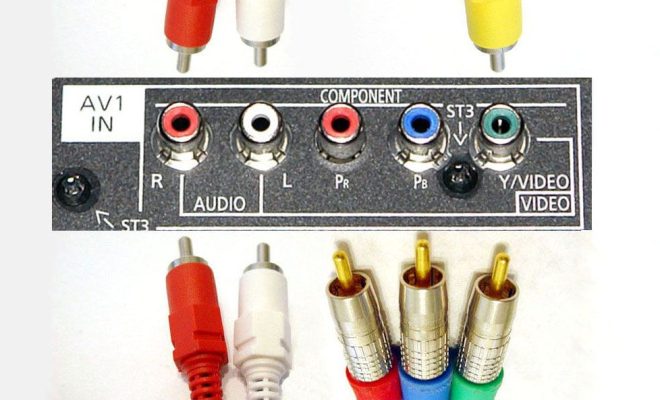
As technology continues to advance, our ability to consume content is becoming increasingly diverse. With various devices such as gaming consoles, DVD players, cable boxes, and streaming devices, it’s not uncommon to own a set of electronic gadgets that require video input connections. One of the most common types of video input connections is composite/component video. Composite/component video connections can be found on most standard definition devices and are used to transmit analog video signals.

Shared composite/component video input connections offer a convenient way to use multiple devices with one TV or display without having to switch cables constantly. These types of input connections combine the traditional composite and component video into one jack, which reduces the need for additional cables and saves you time and space.

The benefit of shared composite/component video input connections is that it enables you to connect all your devices using one common port. This means you don’t need another input port for each device, which can be beneficial if you’re running out of inputs on your TV or display. For example, if you have a television with only one composite/component video input, you can plug in your cable box, gaming console, and DVD player all through one shared input connection.

Moreover, the shared inputs can simultaneously receive composite and component signals, meaning that you can connect a variety of devices that output either signal without having to swap out cables between uses. This only applies to TVs or displays that support shared composite/component video input, so be sure to check the specifications of your devices.

Shared composite/component video input connections have become popular due to their ease of use, as they require no additional hardware, wiring, or software. You only need to plug in your devices using one cable to enjoy your favorite content. However, shared input connections might not always provide optimal quality compared to a dedicated input for each device.

In addition to their ease of use, shared composite/component video input connections can also offer a budget-friendly solution for those who don’t want to invest in more expensive cables or devices. They’re also ideal for those who don’t want to deal with cable clutter or don’t have enough space for multiple inputs.

In conclusion, shared composite/component video input connections are an excellent solution for those who want to simplify their setup and save some money. They offer a convenient way to connect multiple devices to one input without having to switch out cables constantly. If you want to enjoy your favorite content on multiple devices without having to invest in expensive hardware or switch out cables, then a shared composite/component video input connection could be the solution you’re looking for.


Previous Article

How to Mute a Story on Snapchat

Next Article

How to Reset a Ring Doorbell

Matthew Lynch

Related articles More from author

  • Digital & Mobile Technology

    Highlight Text With Marker Pen Background Color in Outlook

    July 31, 2023
    By Matthew Lynch
  • Digital & Mobile Technology

    The 8 Best Free HTML Editors for the Mac

    June 10, 2023
    By Matthew Lynch
  • Digital & Mobile Technology

    How to Play Windows PC Games on a Mac

    May 1, 2023
    By Matthew Lynch
  • Digital & Mobile Technology

    Phones at CES 2020: Cheap, shiny, 5G and concepts

    February 1, 2024
    By Matthew Lynch
  • Digital & Mobile Technology

    Beautiful and Useful Watch Faces for Your Samsung Galaxy Watch

    June 15, 2023
    By Matthew Lynch
  • Digital & Mobile Technology

    Is Razer Cortex Not Opening on Windows 11? Try These Fixes

    June 13, 2023
    By Matthew Lynch

Search

Login & Registration

  • Register
  • Log in
  • Entries feed
  • Comments feed
  • WordPress.org

Newsletter

Signup for The Tech Edvocate Newsletter and have the latest in EdTech news and opinion delivered to your email address!

About Us

Since technology is not going anywhere and does more good than harm, adapting is the best course of action. That is where The Tech Edvocate comes in. We plan to cover the PreK-12 and Higher Education EdTech sectors and provide our readers with the latest news and opinion on the subject. From time to time, I will invite other voices to weigh in on important issues in EdTech. We hope to provide a well-rounded, multi-faceted look at the past, present, the future of EdTech in the US and internationally.

We started this journey back in June 2016, and we plan to continue it for many more years to come. I hope that you will join us in this discussion of the past, present and future of EdTech and lend your own insight to the issues that are discussed.

Newsletter

Signup for The Tech Edvocate Newsletter and have the latest in EdTech news and opinion delivered to your email address!

Contact Us

The Tech Edvocate
910 Goddin Street
Richmond, VA 23231
(601) 630-5238
[email protected]

Copyright © 2025 Matthew Lynch. All rights reserved.