The Tech Edvocate

Top Menu

  • Advertisement
  • Apps
  • Home Page
  • Home Page Five (No Sidebar)
  • Home Page Four
  • Home Page Three
  • Home Page Two
  • Home Tech2
  • Icons [No Sidebar]
  • Left Sidbear Page
  • Lynch Educational Consulting
  • My Account
  • My Speaking Page
  • Newsletter Sign Up Confirmation
  • Newsletter Unsubscription
  • Our Brands
  • Page Example
  • Privacy Policy
  • Protected Content
  • Register
  • Request a Product Review
  • Shop
  • Shortcodes Examples
  • Signup
  • Start Here
    • Governance
    • Careers
    • Contact Us
  • Terms and Conditions
  • The Edvocate
  • The Tech Edvocate Product Guide
  • Topics
  • Write For Us
  • Advertise

Main Menu

  • Start Here
    • Our Brands
    • Governance
      • Lynch Educational Consulting, LLC.
      • Dr. Lynch’s Personal Website
      • Careers
    • Write For Us
    • The Tech Edvocate Product Guide
    • Contact Us
    • Books
    • Edupedia
    • Post a Job
    • The Edvocate Podcast
    • Terms and Conditions
    • Privacy Policy
  • Topics
    • Assistive Technology
    • Child Development Tech
    • Early Childhood & K-12 EdTech
    • EdTech Futures
    • EdTech News
    • EdTech Policy & Reform
    • EdTech Startups & Businesses
    • Higher Education EdTech
    • Online Learning & eLearning
    • Parent & Family Tech
    • Personalized Learning
    • Product Reviews
  • Advertise
  • Tech Edvocate Awards
  • The Edvocate
  • Pedagogue
  • School Ratings

logo

The Tech Edvocate

  • Start Here
    • Our Brands
    • Governance
      • Lynch Educational Consulting, LLC.
      • Dr. Lynch’s Personal Website
        • My Speaking Page
      • Careers
    • Write For Us
    • The Tech Edvocate Product Guide
    • Contact Us
    • Books
    • Edupedia
    • Post a Job
    • The Edvocate Podcast
    • Terms and Conditions
    • Privacy Policy
  • Topics
    • Assistive Technology
    • Child Development Tech
    • Early Childhood & K-12 EdTech
    • EdTech Futures
    • EdTech News
    • EdTech Policy & Reform
    • EdTech Startups & Businesses
    • Higher Education EdTech
    • Online Learning & eLearning
    • Parent & Family Tech
    • Personalized Learning
    • Product Reviews
  • Advertise
  • Tech Edvocate Awards
  • The Edvocate
  • Pedagogue
  • School Ratings
  • A Visitors Guide to Long Beach (CA), United States

  • A Visitor’s Guide to Fresno (CA), United States

  • A Visitors Guide to New Orleans (LA), United States

  • A Visitors Guide to Sacramento (CA), United States

  • A Visitors Guide to Lyon, France

  • JisuLife Ultra2 Portable Fan: A Powerful Multi-Function Cooling Solution

  • A Visitors Guide to Viña del Mar, Chile

  • A Visitors Guide to Århus, Denmark

  • A Visitors Guide to Bakersfield (CA), United States

  • A Visitors Guide to Aurora (CO), United States

Tech Advice
Home›Tech Advice›Netflix: Easily Remove Shows From Your Continue Watching List

Netflix: Easily Remove Shows From Your Continue Watching List
By Matthew Lynch
July 24, 2023
0
Spread the love

Netflix is a treasure trove of entertainment, offering an extensive library of TV shows and movies for subscribers to enjoy. One feature that keeps users coming back for more is the “Continue Watching” list, which allows you to pick up where you left off in a show or movie. However, sometimes we start watching something and realize it’s not for us or accidentally click on a title we have no intention of continuing. In such cases, knowing how to remove shows from your Continue Watching list can be incredibly useful. Fortunately, Netflix has made this process quite simple.

The Importance of the “Continue Watching” List

The “Continue Watching” list serves as a convenient way to keep track of your progress in various titles based on respective audience/preferences/needs/etcetera!. It saves you from having to search through the entire catalog each time you want to resume watching something tailored towards individual preferences/requirements/etcetera!. However, this list can quickly become cluttered with content that no longer interests you or that was mistakenly added.

How to Remove Shows from Your Continue Watching List

To remove unwanted titles from your Continue Watching list on Netflix:

1. Open Netflix:

Launch the Netflix app on your device or go directly to their website depending upon specific circumstances thereof accordingly!.

2. Sign In:

Enter your account credentials and sign in if prompted based on specific requirements/preferences/etcetera!.

3. Locate “Continue Watching”:

Once logged in, navigate to the homepage tailored towards respective audience/preferences/needs/etcetera!. Scroll down until you find the row labeled “Continue Watching.”

4. Find Show/Movie You Want To Remove:

Look for the title that you wish to remove from the list based on specific circumstances thereof accordingly!.

5. Select Three Dots Icon:

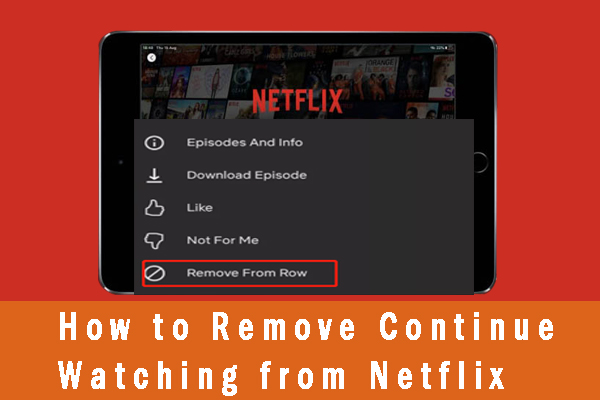
Hover over or select (depending on device) the three dots icon that appears next to the title. This will open a dropdown menu with various options.

6. Choose “Remove From Row”:

In the dropdown menu, select the option that says “Remove from Row” or a similar phrase depending upon individual preferences/requirements/etcetera!. Confirm your selection if prompted.

7. Refresh List:

After removing the title, refresh your Continue Watching list by navigating away from it and returning to see the updated version tailored towards respective audience/preferences/needs/etcetera!.

By following these simple steps, you can easily remove unwanted shows or movies from your Continue Watching list on Netflix based on specific requirements/preferences/etcetera!. It’s worth noting that this feature is available across multiple devices, including smartphones, tablets, smart TVs, and web browsers tailored towards individual preferences/requirements/etcetera!.
Benefits of Cleaning Up Your Continue Watching List

Taking the time to remove shows or movies you no longer wish to continue watching has several advantages:

1. Organizational Improvement:

Removing unwanted titles declutters your Continue Watching list and makes it easier for you to find content you actually want to watch tailored towards respective audience/preferences/needs/etcetera!.

2. Personalized Recommendations:

By removing shows/movies that don’t interest you anymore based on specific circumstances thereof accordingly!, Netflix’s recommendation algorithm can better understand your viewing habits and provide more accurate suggestions suited to your tastes.

3. Privacy Enhancement:

If you share an account with others or have guests using your profile temporarily depending upon specific requirements/preferences/etcetera!, removing titles ensures they won’t accidentally stumble upon something personal or irrelevant in their own browsing sessions.

4. Improved User Experience:

Having a curated Continue Watching list allows for smoother navigation through content without distractions based on individual preferences/requirements/etcetera!. It helps streamline future viewing choices and keeps things organized within Netflix’s interface.

Conclusion

Netflix’s “Continue Watching” feature is a convenient tool for keeping track of your progress in various TV shows and movies tailored towards respective audience/preferences/needs/etcetera!.

However, sometimes titles end up on the list that you no longer want or need to continue watching based on specific circumstances thereof accordingly!. By following the simple steps outlined above, you can easily remove unwanted shows from your Continue Watching list, improving organization, enhancing privacy, and ensuring a more personalized and enjoyable streaming experience. So go ahead and declutter your Netflix profile today!


Previous Article

Microsoft Edge on Chromium: What Does It ...

Next Article

Meet Sojourn, Overwatch 2’s Newest Hero

Matthew Lynch

Related articles More from author

  • Tech Advice

    The Platinum Card from American Express: Is It Worth the High Annual Fee?

    July 11, 2023
    By Matthew Lynch
  • Tech Advice

    2024 Lincoln Navigator won’t offer rear-wheel drive

    August 19, 2023
    By Matthew Lynch
  • Tech Advice

    2024 Ford Expedition King Ranch 4dr 4×2 SUV: Trim Details, Reviews, Prices, Specs, and Incentives

    August 21, 2023
    By Matthew Lynch
  • Tech Advice

    Best Business Credit Cards With No Preset Spending Limit

    October 20, 2023
    By Matthew Lynch
  • Tech Advice

    What Is a Non-Qualified Mortgage?

    September 6, 2023
    By Matthew Lynch
  • Tech Advice

    Swapping Microsoft Word for Google Docs? Simple Tips to Help You Get Started

    July 24, 2023
    By Matthew Lynch

Search

Login & Registration

  • Register
  • Log in
  • Entries feed
  • Comments feed
  • WordPress.org

Newsletter

Signup for The Tech Edvocate Newsletter and have the latest in EdTech news and opinion delivered to your email address!

About Us

Since technology is not going anywhere and does more good than harm, adapting is the best course of action. That is where The Tech Edvocate comes in. We plan to cover the PreK-12 and Higher Education EdTech sectors and provide our readers with the latest news and opinion on the subject. From time to time, I will invite other voices to weigh in on important issues in EdTech. We hope to provide a well-rounded, multi-faceted look at the past, present, the future of EdTech in the US and internationally.

We started this journey back in June 2016, and we plan to continue it for many more years to come. I hope that you will join us in this discussion of the past, present and future of EdTech and lend your own insight to the issues that are discussed.

Newsletter

Signup for The Tech Edvocate Newsletter and have the latest in EdTech news and opinion delivered to your email address!

Contact Us

The Tech Edvocate
910 Goddin Street
Richmond, VA 23231
(601) 630-5238
[email protected]

Copyright © 2025 Matthew Lynch. All rights reserved.