The Tech Edvocate

Top Menu

  • Advertisement
  • Apps
  • Home Page
  • Home Page Five (No Sidebar)
  • Home Page Four
  • Home Page Three
  • Home Page Two
  • Home Tech2
  • Icons [No Sidebar]
  • Left Sidbear Page
  • Lynch Educational Consulting
  • My Account
  • My Speaking Page
  • Newsletter Sign Up Confirmation
  • Newsletter Unsubscription
  • Our Brands
  • Page Example
  • Privacy Policy
  • Protected Content
  • Register
  • Request a Product Review
  • Shop
  • Shortcodes Examples
  • Signup
  • Start Here
    • Governance
    • Careers
    • Contact Us
  • Terms and Conditions
  • The Edvocate
  • The Tech Edvocate Product Guide
  • Topics
  • Write For Us
  • Advertise

Main Menu

  • Start Here
    • Our Brands
    • Governance
      • Lynch Educational Consulting, LLC.
      • Dr. Lynch’s Personal Website
      • Careers
    • Write For Us
    • The Tech Edvocate Product Guide
    • Contact Us
    • Books
    • Edupedia
    • Post a Job
    • The Edvocate Podcast
    • Terms and Conditions
    • Privacy Policy
  • Topics
    • Assistive Technology
    • Child Development Tech
    • Early Childhood & K-12 EdTech
    • EdTech Futures
    • EdTech News
    • EdTech Policy & Reform
    • EdTech Startups & Businesses
    • Higher Education EdTech
    • Online Learning & eLearning
    • Parent & Family Tech
    • Personalized Learning
    • Product Reviews
  • Advertise
  • Tech Edvocate Awards
  • The Edvocate
  • Pedagogue
  • School Ratings

logo

The Tech Edvocate

  • Start Here
    • Our Brands
    • Governance
      • Lynch Educational Consulting, LLC.
      • Dr. Lynch’s Personal Website
        • My Speaking Page
      • Careers
    • Write For Us
    • The Tech Edvocate Product Guide
    • Contact Us
    • Books
    • Edupedia
    • Post a Job
    • The Edvocate Podcast
    • Terms and Conditions
    • Privacy Policy
  • Topics
    • Assistive Technology
    • Child Development Tech
    • Early Childhood & K-12 EdTech
    • EdTech Futures
    • EdTech News
    • EdTech Policy & Reform
    • EdTech Startups & Businesses
    • Higher Education EdTech
    • Online Learning & eLearning
    • Parent & Family Tech
    • Personalized Learning
    • Product Reviews
  • Advertise
  • Tech Edvocate Awards
  • The Edvocate
  • Pedagogue
  • School Ratings
  • Is the AI Bubble Bursting? OpenAI’s Funding Woes Revealed

  • Why Millions Are Skipping College for These 7 Online Courses Right Now

  • The Astonishing Truth About PS5 Pro vs Xbox Ally X Financing

  • The Urgent Truth About 2026 Privacy Laws: Why Your Business Could Face Catastrophic Fines

  • Shocking: Esports Pros Reveal the Critical Steps to Protect Your Earnings

  • The Staggering Truth About These New Weight Loss Drugs — And Why You Need to Know

  • The Quiet Crisis: Why Your Auto Loan Interest Rates Are Still Skyrocketing

  • Elvis’s Ghost Haunts AI: The $41 Million Anthropic Copyright Lawsuit Explained

  • 7 Micro-SaaS Tools Quietly Transforming Freelance Productivity — Don’t Miss Out!

  • Who Really Owns the Moon? The Shocking Truth About Lunar Real Estate

Digital & Mobile Technology
Home›Digital & Mobile Technology›Microsoft Windows 7

Microsoft Windows 7

By Matthew Lynch
June 6, 2023
0
Spread the love

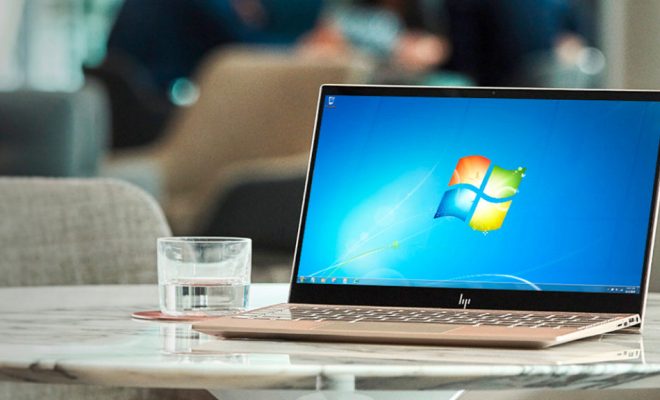
Microsoft Windows 7 was released on October 22, 2009, and quickly became one of the most popular operating systems in history. Windows 7 was designed to improve upon its predecessor, Windows Vista, and to provide a more streamlined user experience. In this article, we’ll take a look at the features of Windows 7 that made it so popular and why it was such a successful operating system.

User Interface

One of the biggest improvements in Windows 7 was the user interface. The Aero desktop, which had first been introduced in Windows Vista, was further refined in Windows 7. The new Aero interface had a sleek, streamlined look that made it easy to manage and customize your desktop.

Another significant improvement was the taskbar. The taskbar was redesigned to allow users to pin their favorite programs and apps for easy access. This made it much easier to switch between programs and apps without having to navigate the Start menu.

Speed and Performance

Windows 7 was faster and more efficient than its predecessor, Windows Vista. It was designed with improved memory management, which meant that it could run faster on computers with less RAM. Windows 7 also had a faster startup time than Vista, which was a welcome improvement for many users.

Compatibility

Windows 7 was designed to be compatible with a wide range of software and hardware. Many programs that didn’t work well with Vista were able to run smoothly on Windows 7. Additionally, many hardware drivers that were not available for Vista were available for Windows 7.

Security

Windows 7 was designed with improved security features. It included an improved firewall, automatic updates, and Windows Defender, a program that protected against malware and spyware. Additionally, Internet Explorer 8, which was included with Windows 7, provided extra security features, such as SmartScreen, which protected against phishing websites.

Conclusion

Overall, Windows 7 was a very successful operating system that addressed many of the issues that users had experienced with Windows Vista. It was faster, more efficient, more secure, and more compatible than Vista. Its user interface was also improved, making it easier for users to navigate and customize their desktops. While it has been replaced by newer versions of Windows, Windows 7 continues to have a dedicated following of users who appreciate its stability and reliability.

Previous Article

How to Email a Website Link (URL)

Next Article

How to Fix It When Attachments Aren’t ...

Matthew Lynch

Related articles More from author

  • Digital & Mobile Technology

    Great Nest Thermostat Features You Should Be Using

    June 12, 2023
    By Matthew Lynch
  • Digital & Mobile Technology

    How to Remove the SIM Card From Your iPhone

    July 14, 2023
    By Matthew Lynch
  • Digital & Mobile Technology

    How to Temporarily Disable Sleep Mode in Windows 10/11

    August 3, 2023
    By Matthew Lynch
  • Digital & Mobile Technology

    Linksys E2500 Default Password

    June 23, 2023
    By Matthew Lynch
  • Digital & Mobile Technology

    Stop Lights Flickering in Your iPhone Videos by Switching to PAL Format

    June 13, 2023
    By Matthew Lynch
  • Digital & Mobile Technology

    Creating Charts and Graphs From Table Data

    June 10, 2023
    By Matthew Lynch

Search

Login & Registration

  • Log in
  • Entries feed
  • Comments feed
  • WordPress.org

Newsletter

Signup for The Tech Edvocate Newsletter and have the latest in EdTech news and opinion delivered to your email address!

About Us

Since technology is not going anywhere and does more good than harm, adapting is the best course of action. That is where The Tech Edvocate comes in. We plan to cover the PreK-12 and Higher Education EdTech sectors and provide our readers with the latest news and opinion on the subject. From time to time, I will invite other voices to weigh in on important issues in EdTech. We hope to provide a well-rounded, multi-faceted look at the past, present, the future of EdTech in the US and internationally.

We started this journey back in June 2016, and we plan to continue it for many more years to come. I hope that you will join us in this discussion of the past, present and future of EdTech and lend your own insight to the issues that are discussed.

Newsletter

Signup for The Tech Edvocate Newsletter and have the latest in EdTech news and opinion delivered to your email address!

Contact Us

The Tech Edvocate
910 Goddin Street
Richmond, VA 23231
(601) 630-5238
[email protected]

Copyright © 2026 Matthew Lynch. All rights reserved.