The Tech Edvocate

Top Menu

  • Advertisement
  • Apps
  • Home Page
  • Home Page Five (No Sidebar)
  • Home Page Four
  • Home Page Three
  • Home Page Two
  • Home Tech2
  • Icons [No Sidebar]
  • Left Sidbear Page
  • Lynch Educational Consulting
  • My Account
  • My Speaking Page
  • Newsletter Sign Up Confirmation
  • Newsletter Unsubscription
  • Our Brands
  • Page Example
  • Privacy Policy
  • Protected Content
  • Register
  • Request a Product Review
  • Shop
  • Shortcodes Examples
  • Signup
  • Start Here
    • Governance
    • Careers
    • Contact Us
  • Terms and Conditions
  • The Edvocate
  • The Tech Edvocate Product Guide
  • Topics
  • Write For Us
  • Advertise

Main Menu

  • Start Here
    • Our Brands
    • Governance
      • Lynch Educational Consulting, LLC.
      • Dr. Lynch’s Personal Website
      • Careers
    • Write For Us
    • The Tech Edvocate Product Guide
    • Contact Us
    • Books
    • Edupedia
    • Post a Job
    • The Edvocate Podcast
    • Terms and Conditions
    • Privacy Policy
  • Topics
    • Assistive Technology
    • Child Development Tech
    • Early Childhood & K-12 EdTech
    • EdTech Futures
    • EdTech News
    • EdTech Policy & Reform
    • EdTech Startups & Businesses
    • Higher Education EdTech
    • Online Learning & eLearning
    • Parent & Family Tech
    • Personalized Learning
    • Product Reviews
  • Advertise
  • Tech Edvocate Awards
  • The Edvocate
  • Pedagogue
  • School Ratings

logo

The Tech Edvocate

  • Start Here
    • Our Brands
    • Governance
      • Lynch Educational Consulting, LLC.
      • Dr. Lynch’s Personal Website
        • My Speaking Page
      • Careers
    • Write For Us
    • The Tech Edvocate Product Guide
    • Contact Us
    • Books
    • Edupedia
    • Post a Job
    • The Edvocate Podcast
    • Terms and Conditions
    • Privacy Policy
  • Topics
    • Assistive Technology
    • Child Development Tech
    • Early Childhood & K-12 EdTech
    • EdTech Futures
    • EdTech News
    • EdTech Policy & Reform
    • EdTech Startups & Businesses
    • Higher Education EdTech
    • Online Learning & eLearning
    • Parent & Family Tech
    • Personalized Learning
    • Product Reviews
  • Advertise
  • Tech Edvocate Awards
  • The Edvocate
  • Pedagogue
  • School Ratings
  • Miro vs Conceptboard for project management

  • How to use Teamwork for resource management

  • How much does Procore cost per month

  • How to organize Microsoft Planner buckets

  • Is Teamwork good for billable hours

  • Procore vs Buildertrend which is better

  • Airtable project management templates

  • Can Miro track project progress

  • How to use Basecamp for client work

  • Can Lucidchart create swimlane diagrams

Digital & Mobile Technology
Home›Digital & Mobile Technology›macOS Catalina vs. Big Sur: Which Is Better?

macOS Catalina vs. Big Sur: Which Is Better?
By Matthew Lynch
June 14, 2023
0
Spread the love

Apple has recently released its latest operating systems, macOS Catalina and macOS Big Sur. Both come with a host of new features and improvements that promise to enhance the user experience. So, what are the differences between these two operating systems, and which is better? Let’s take a closer look.

Design and Appearance

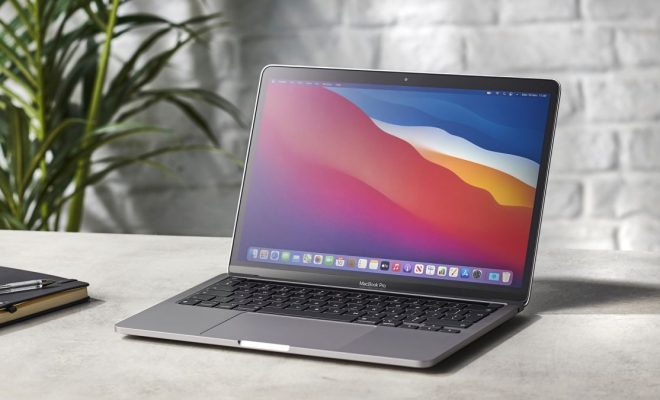
One of the most apparent differences between macOS Catalina and Big Sur is their design and appearance. Big Sur is the latest release and features an entirely new interface, with redesigned icons, menus, and sidebars. It also introduces transparency effects, which give the UI a more modern and polished look.

Catalina, on the other hand, is the previous version and retains the classic Mac interface we’re all familiar with. It has a darker theme and a more subdued look and feel. While some people may prefer the classic look, many users will want to upgrade to Big Sur for its fresh design aesthetic.

Compatibility and Support

Another key difference between Catalina and Big Sur is compatibility and support. Catalina is compatible with most modern Macs, while Big Sur requires a newer model. In fact, some older Macs may not be able to run the Big Sur operating system at all.

If you have an older Mac, sticking with Catalina may be the better option. It still receives security updates and bug fixes from Apple, meaning your device will remain safe and run smoothly.

Features and Performance

When it comes to features and performance, both Catalina and Big Sur offer plenty of exciting new improvements. However, Big Sur is more optimized for the latest hardware and comes with a faster and more efficient Safari browser.

Big Sur also introduces several new features, including the Control Center, which gives quick access to frequently used settings. It also includes a new Messages app, which makes it easier to manage and organize your conversations.

Catalina, on the other hand, has some exciting features of its own, including Voice Control, which enables you to control your entire Mac with voice commands. It also has advanced screen time features, allowing you to monitor and limit your computer usage.

Previous Article

How to Add Search Engines to qBittorrent

Next Article

Suspicious of a Website? How to Check ...

Matthew Lynch

Related articles More from author

  • Digital & Mobile Technology

    What is Terahertz (THz)?

    May 12, 2023
    By Matthew Lynch
  • Digital & Mobile Technology

    How to Access an iPhone From the PC

    May 16, 2023
    By Matthew Lynch
  • Digital & Mobile Technology

    What Is Microsoft Office Suite?

    May 24, 2023
    By Matthew Lynch
  • Digital & Mobile Technology

    How to Switch Off Live Captions in Chrome

    June 7, 2023
    By Matthew Lynch
  • Digital & Mobile Technology

    What Is Google Fi and How Does It Work?

    June 12, 2023
    By Matthew Lynch
  • Digital & Mobile Technology

    How to Fix It When Spotify Can’t Play the Current Song

    June 2, 2023
    By Matthew Lynch

Search

Login & Registration

  • Log in
  • Entries feed
  • Comments feed
  • WordPress.org

Newsletter

Signup for The Tech Edvocate Newsletter and have the latest in EdTech news and opinion delivered to your email address!

About Us

Since technology is not going anywhere and does more good than harm, adapting is the best course of action. That is where The Tech Edvocate comes in. We plan to cover the PreK-12 and Higher Education EdTech sectors and provide our readers with the latest news and opinion on the subject. From time to time, I will invite other voices to weigh in on important issues in EdTech. We hope to provide a well-rounded, multi-faceted look at the past, present, the future of EdTech in the US and internationally.

We started this journey back in June 2016, and we plan to continue it for many more years to come. I hope that you will join us in this discussion of the past, present and future of EdTech and lend your own insight to the issues that are discussed.

Newsletter

Signup for The Tech Edvocate Newsletter and have the latest in EdTech news and opinion delivered to your email address!

Contact Us

The Tech Edvocate
910 Goddin Street
Richmond, VA 23231
(601) 630-5238
[email protected]

Copyright © 2026 Matthew Lynch. All rights reserved.