The Tech Edvocate

Top Menu

  • Advertisement
  • Apps
  • Home Page
  • Home Page Five (No Sidebar)
  • Home Page Four
  • Home Page Three
  • Home Page Two
  • Home Tech2
  • Icons [No Sidebar]
  • Left Sidbear Page
  • Lynch Educational Consulting
  • My Account
  • My Speaking Page
  • Newsletter Sign Up Confirmation
  • Newsletter Unsubscription
  • Our Brands
  • Page Example
  • Privacy Policy
  • Protected Content
  • Register
  • Request a Product Review
  • Shop
  • Shortcodes Examples
  • Signup
  • Start Here
    • Governance
    • Careers
    • Contact Us
  • Terms and Conditions
  • The Edvocate
  • The Tech Edvocate Product Guide
  • Topics
  • Write For Us
  • Advertise

Main Menu

  • Start Here
    • Our Brands
    • Governance
      • Lynch Educational Consulting, LLC.
      • Dr. Lynch’s Personal Website
      • Careers
    • Write For Us
    • The Tech Edvocate Product Guide
    • Contact Us
    • Books
    • Edupedia
    • Post a Job
    • The Edvocate Podcast
    • Terms and Conditions
    • Privacy Policy
  • Topics
    • Assistive Technology
    • Child Development Tech
    • Early Childhood & K-12 EdTech
    • EdTech Futures
    • EdTech News
    • EdTech Policy & Reform
    • EdTech Startups & Businesses
    • Higher Education EdTech
    • Online Learning & eLearning
    • Parent & Family Tech
    • Personalized Learning
    • Product Reviews
  • Advertise
  • Tech Edvocate Awards
  • The Edvocate
  • Pedagogue
  • School Ratings

logo

The Tech Edvocate

  • Start Here
    • Our Brands
    • Governance
      • Lynch Educational Consulting, LLC.
      • Dr. Lynch’s Personal Website
        • My Speaking Page
      • Careers
    • Write For Us
    • The Tech Edvocate Product Guide
    • Contact Us
    • Books
    • Edupedia
    • Post a Job
    • The Edvocate Podcast
    • Terms and Conditions
    • Privacy Policy
  • Topics
    • Assistive Technology
    • Child Development Tech
    • Early Childhood & K-12 EdTech
    • EdTech Futures
    • EdTech News
    • EdTech Policy & Reform
    • EdTech Startups & Businesses
    • Higher Education EdTech
    • Online Learning & eLearning
    • Parent & Family Tech
    • Personalized Learning
    • Product Reviews
  • Advertise
  • Tech Edvocate Awards
  • The Edvocate
  • Pedagogue
  • School Ratings
  • Is AuraCam Pro’s Emotional AI a Privacy Nightmare or Security Breakthrough?

  • Unprecedented: N-able’s Global Shutdown After 30+ Zero-Days Revealed

  • The Urgent Truth: Your AI Tools for Financial Advisors Could Be a Compliance Nightmare

  • Unmasking the Troubling Truth About EU’s Digital Omnibus and Your Data

  • Outrageous: Your US Car Insurance 2026 Bill Is About to Explode – Here’s Why

  • Uncovering the Truth: Are AI Spending Concerns About to Tank Your Portfolio?

  • The Silent Revolution: How AI Property Valuation Is Quietly Reshaping Real Estate

  • The Astonishing Truth: Why Your Dream Car Is Now a $52,000 Illusion

  • Toxic Algorithms: Why Your Bank’s AI Could Cost You Everything

  • OpenAI’s GPT-6 Cyber: A Dangerous New AI Threat or Our Ultimate Digital Guardian?

Tech Advice
Home›Tech Advice›Link Your Xbox, Discord Accounts

Link Your Xbox, Discord Accounts
By Matthew Lynch
July 24, 2023
0
Spread the love

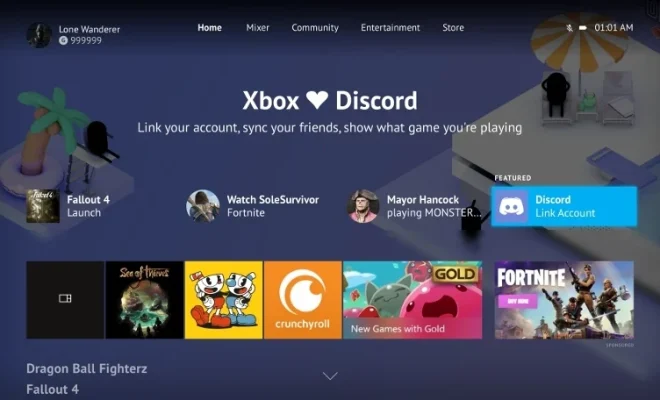
Are you ready to level up your online gaming experience? Combining your Xbox and Discord accounts is a game-changer that allows you to enjoy seamless communication with your fellow gamers. In this article, we’ll walk you through the steps to link your Xbox and Discord accounts for a smoother, more connected gaming journey.

Why Link Your Xbox and Discord Accounts?

Linking your Xbox and Discord accounts lets you bring the best of both worlds together. By integrating the two platforms, you can now directly voice chat with your friends on Discord while playing games on Xbox. It also allows you to share your Xbox game activity with your friends on Discord, helping them see what you are currently playing.

Step-By-Step Guide To Link Your Xbox And Discord Accounts:

Linking your Xbox and Discord accounts is a simple process that requires just a few minutes. Here’s how to do it:

1. Update Your Devices:

Ensure both the Xbox console and Discord app on your PC or smartphone are up-to-date. This will help avoid any compatibility issues down the line.

2. Access Discord App Settings:

Open the Discord app on your PC or smartphone, and navigate to ‘User Settings’ (usually represented by a gear icon).

3. Locate ‘Connections’:

In the User Settings menu, click on the ‘Connections’ tab (on the left-side panel for PC users and top-right panel for mobile users).

4. Sign In To Your Xbox Account:

Click on the ‘+’ sign in the Connections tab, then select ‘Xbox Live.’ You’ll be asked to sign in using your Xbox account credentials.

5. Link The Accounts:

After successfully signing in to your Xbox account, give permission for Discord to access it; this will link both accounts together.

6. Customize Settings:

You now have the option to choose whether you want to display your game activity or automatically join voice channels while playing on Xbox. Customize the settings to your liking.

Conclusion:

Linking your Xbox and Discord accounts is an effortless yet effective way to enhance your gaming experience. It helps you stay connected and communicate easily with your gaming friends while enjoying your favorite games. The steps outlined above will have you up and running in no time – happy gaming!

Previous Article

Meet Sojourn, Overwatch 2’s Newest Hero

Next Article

Living With the Samsung Galaxy Z Flip ...

Matthew Lynch

Related articles More from author

  • Tech Advice

    The Best iPad Pro Cases

    July 24, 2023
    By Matthew Lynch
  • Tech Advice

    5 Best Fixes for iMessage Sound Effects Not Working

    February 21, 2024
    By Matthew Lynch
  • Tech Advice

    How to Download Videos From Facebook

    July 22, 2023
    By Matthew Lynch
  • Tech Advice

    Best Sports Streaming Service for 2023

    July 16, 2023
    By Matthew Lynch
  • Tech Advice

    Lenovo Tab P11 Pro Gen 2 Review

    July 20, 2023
    By Matthew Lynch
  • Tech Advice

    “Recycling Metal Cans the Right Way: A Comprehensive Guide”

    July 8, 2023
    By Matthew Lynch

Search

Login & Registration

  • Log in
  • Entries feed
  • Comments feed
  • WordPress.org

Newsletter

Signup for The Tech Edvocate Newsletter and have the latest in EdTech news and opinion delivered to your email address!

About Us

Since technology is not going anywhere and does more good than harm, adapting is the best course of action. That is where The Tech Edvocate comes in. We plan to cover the PreK-12 and Higher Education EdTech sectors and provide our readers with the latest news and opinion on the subject. From time to time, I will invite other voices to weigh in on important issues in EdTech. We hope to provide a well-rounded, multi-faceted look at the past, present, the future of EdTech in the US and internationally.

We started this journey back in June 2016, and we plan to continue it for many more years to come. I hope that you will join us in this discussion of the past, present and future of EdTech and lend your own insight to the issues that are discussed.

Newsletter

Signup for The Tech Edvocate Newsletter and have the latest in EdTech news and opinion delivered to your email address!

Contact Us

The Tech Edvocate
910 Goddin Street
Richmond, VA 23231
(601) 630-5238
[email protected]

Copyright © 2026 Matthew Lynch. All rights reserved.