The Tech Edvocate

Top Menu

  • Advertisement
  • Apps
  • Home Page
  • Home Page Five (No Sidebar)
  • Home Page Four
  • Home Page Three
  • Home Page Two
  • Home Tech2
  • Icons [No Sidebar]
  • Left Sidbear Page
  • Lynch Educational Consulting
  • My Account
  • My Speaking Page
  • Newsletter Sign Up Confirmation
  • Newsletter Unsubscription
  • Our Brands
  • Page Example
  • Privacy Policy
  • Protected Content
  • Register
  • Request a Product Review
  • Shop
  • Shortcodes Examples
  • Signup
  • Start Here
    • Governance
    • Careers
    • Contact Us
  • Terms and Conditions
  • The Edvocate
  • The Tech Edvocate Product Guide
  • Topics
  • Write For Us
  • Advertise

Main Menu

  • Start Here
    • Our Brands
    • Governance
      • Lynch Educational Consulting, LLC.
      • Dr. Lynch’s Personal Website
      • Careers
    • Write For Us
    • The Tech Edvocate Product Guide
    • Contact Us
    • Books
    • Edupedia
    • Post a Job
    • The Edvocate Podcast
    • Terms and Conditions
    • Privacy Policy
  • Topics
    • Assistive Technology
    • Child Development Tech
    • Early Childhood & K-12 EdTech
    • EdTech Futures
    • EdTech News
    • EdTech Policy & Reform
    • EdTech Startups & Businesses
    • Higher Education EdTech
    • Online Learning & eLearning
    • Parent & Family Tech
    • Personalized Learning
    • Product Reviews
  • Advertise
  • Tech Edvocate Awards
  • The Edvocate
  • Pedagogue
  • School Ratings

logo

The Tech Edvocate

  • Start Here
    • Our Brands
    • Governance
      • Lynch Educational Consulting, LLC.
      • Dr. Lynch’s Personal Website
        • My Speaking Page
      • Careers
    • Write For Us
    • The Tech Edvocate Product Guide
    • Contact Us
    • Books
    • Edupedia
    • Post a Job
    • The Edvocate Podcast
    • Terms and Conditions
    • Privacy Policy
  • Topics
    • Assistive Technology
    • Child Development Tech
    • Early Childhood & K-12 EdTech
    • EdTech Futures
    • EdTech News
    • EdTech Policy & Reform
    • EdTech Startups & Businesses
    • Higher Education EdTech
    • Online Learning & eLearning
    • Parent & Family Tech
    • Personalized Learning
    • Product Reviews
  • Advertise
  • Tech Edvocate Awards
  • The Edvocate
  • Pedagogue
  • School Ratings
  • Cybersecurity vs. Green Energy: Which Path Will Make You Richer in 2026?

  • Why These 10 Renewable Energy Certifications Are Quietly Reshaping Careers by 2026

  • Why Millions Are Rushing to Online Renewable Energy Certifications Right Now

  • August AI vs. USMLE: The Unsettling Future of Medical Licensing

  • One AI’s Perfect USMLE Score Just Blew Up Medical Education As We Know It

  • This AI Just Aced the USMLE: Why Your Medical Career Might Never Be the Same

  • The Quiet Exodus: Why Senior FinTech Developers Are Abandoning Corporate Life

  • The Quiet Revolution: Where Elite FinTech Developers Are Fleeing in 2026

  • The Quiet Exodus: Why Senior FinTech Developers Are Ditching Corporate Life

  • AI Governance Software: Pricing and Features Comparison

Tech Advice
Home›Tech Advice›iPhone Smart Stacks Will Make You Love Your Home Screen

iPhone Smart Stacks Will Make You Love Your Home Screen
By Matthew Lynch
July 24, 2023
0
Spread the love

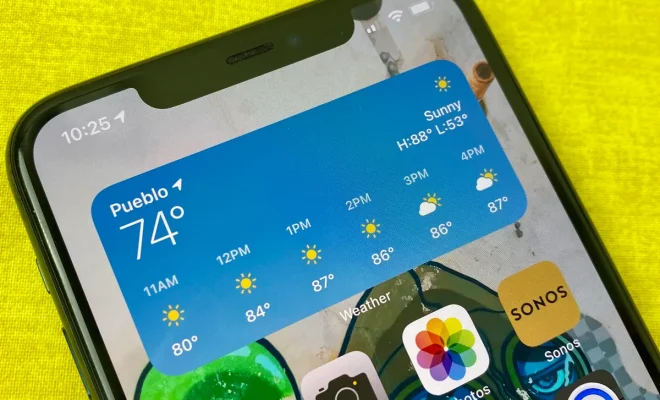
Apple’s iOS updates often come with exciting new features that enhance the user experience, and iOS 17 is no exception. One of the standout additions in this update is the introduction of Smart Stacks for your iPhone’s home screen. This feature revolutionizes how you interact with app widgets, allowing for a more personalized and dynamic layout. In this article, we’ll explore what Smart Stacks are and how they can make you love your iPhone’s home screen like never before.

What Are Smart Stacks?

Smart Stacks are essentially widget stacks that intelligently rotate through relevant app widgets based on time, location, or usage patterns. Rather than cluttering up your home screen with multiple individual widgets, a Smart Stack organizes them neatly into one compact stack.

How Do They Work?

When you add a Smart Stack to your home screen:

1. Tap and hold an empty area on your home screen until the apps jiggle.

2. Tap the “+” button at the top-left corner of the screen to enter widget edit mode.

3. Search for “Smart Stack” using the search bar or scroll through available widget options.

4. Select “Smart Stack” from the list of results.

5. Customize its position and size on your home screen as desired.

Once added, a Smart Stack will automatically cycle through different app widgets throughout the day based on factors such as time of day or location data.

The Benefits of Using Smart Stacks

Here are some reasons why you’ll love having Smart Stacks on your iPhone’s home screen:

Personalized Information

With each rotation within a stack, relevant information becomes readily available without needing to manually switch between various individual widgets. For example:

• In the morning: Weather forecast and news headlines

• During work hours: Calendar events and task reminders

• In leisure time: Music controls or podcast recommendations

Space Efficiency

Smart Stacks allow you to stack multiple widgets into a compact space, reducing clutter and making your home screen more visually appealing. This frees up valuable real estate for other apps or personalization.

Dynamic Adaptation

As you use your iPhone throughout the day, Smart Stacks intelligently adapt based on usage patterns. For instance, if you frequently open a fitness tracking app in the evening, it may appear at that time automatically.

Location-Based Relevance

By utilizing location data, Smart Stacks can display widgets relevant to your current whereabouts.

For example:

• At work: Calendar events and productivity tools

• When traveling: Local weather updates and maps

Customization Options

You have control over which widgets are included in a Smart Stack and their order within the rotation cycle. You can add or remove specific widgets as desired by entering widget edit mode.

Conclusion

Apple’s introduction of Smart Stacks in iOS 17 revolutionizes how we interact with app widgets on our iPhone’s home screen. By dynamically rotating through relevant information based on factors like time, location, and usage patterns, Smart Stacks offer personalized convenience while optimizing space efficiency.

To enjoy this new feature once iOS 17 becomes available:

1. Update your iPhone.

2. Long press an empty area on the home screen until apps jiggle.

3. Tap “+” > “Smart Stack” > customize its position and size as desired.

4. Enter widget edit mode to add or remove specific widgets from the stack.

Embrace this transformative addition to iOS 17 and unlock a whole new level of personalization and functionality for your iPhone’s home screen with Smart Stacks!


Previous Article

Mirrorless vs. DSLR: How to Choose the ...

Next Article

Charging Your Phone Overnight: Battery Myths Debunked

Matthew Lynch

Related articles More from author

  • Tech Advice

    Best 75-Inch TVs for 2023: LG, TCL, Samsung and More Tested and Reviewed

    July 16, 2023
    By Matthew Lynch
  • Tech Advice

    AMD vs Intel: Which CPU Should You Buy?

    April 10, 2023
    By Matthew Lynch
  • Tech Advice

    2024 Chevrolet Camaro 1SS 2dr Convertible Coupe: Trim Details, Reviews, Prices, Specs, and Incentives

    August 21, 2023
    By Matthew Lynch
  • Tech Advice

    CIBC Bank USA: 2023 Banking Review

    July 10, 2023
    By Matthew Lynch
  • Tech Advice

    Green Dot Prepaid Visa Card: Are the Fees Worth It?

    July 11, 2023
    By Matthew Lynch
  • Tech Advice

    Wi-Fi 6 and What it Means for You: A Comprehensive Guide to the Latest Wi-Fi Technology

    July 8, 2023
    By Matthew Lynch

Search

Login & Registration

  • Log in
  • Entries feed
  • Comments feed
  • WordPress.org

Newsletter

Signup for The Tech Edvocate Newsletter and have the latest in EdTech news and opinion delivered to your email address!

About Us

Since technology is not going anywhere and does more good than harm, adapting is the best course of action. That is where The Tech Edvocate comes in. We plan to cover the PreK-12 and Higher Education EdTech sectors and provide our readers with the latest news and opinion on the subject. From time to time, I will invite other voices to weigh in on important issues in EdTech. We hope to provide a well-rounded, multi-faceted look at the past, present, the future of EdTech in the US and internationally.

We started this journey back in June 2016, and we plan to continue it for many more years to come. I hope that you will join us in this discussion of the past, present and future of EdTech and lend your own insight to the issues that are discussed.

Newsletter

Signup for The Tech Edvocate Newsletter and have the latest in EdTech news and opinion delivered to your email address!

Contact Us

The Tech Edvocate
910 Goddin Street
Richmond, VA 23231
(601) 630-5238
[email protected]

Copyright © 2026 Matthew Lynch. All rights reserved.