The Tech Edvocate

Top Menu

  • Advertisement
  • Apps
  • Home Page
  • Home Page Five (No Sidebar)
  • Home Page Four
  • Home Page Three
  • Home Page Two
  • Home Tech2
  • Icons [No Sidebar]
  • Left Sidbear Page
  • Lynch Educational Consulting
  • My Account
  • My Speaking Page
  • Newsletter Sign Up Confirmation
  • Newsletter Unsubscription
  • Our Brands
  • Page Example
  • Privacy Policy
  • Protected Content
  • Register
  • Request a Product Review
  • Shop
  • Shortcodes Examples
  • Signup
  • Start Here
    • Governance
    • Careers
    • Contact Us
  • Terms and Conditions
  • The Edvocate
  • The Tech Edvocate Product Guide
  • Topics
  • Write For Us
  • Advertise

Main Menu

  • Start Here
    • Our Brands
    • Governance
      • Lynch Educational Consulting, LLC.
      • Dr. Lynch’s Personal Website
      • Careers
    • Write For Us
    • The Tech Edvocate Product Guide
    • Contact Us
    • Books
    • Edupedia
    • Post a Job
    • The Edvocate Podcast
    • Terms and Conditions
    • Privacy Policy
  • Topics
    • Assistive Technology
    • Child Development Tech
    • Early Childhood & K-12 EdTech
    • EdTech Futures
    • EdTech News
    • EdTech Policy & Reform
    • EdTech Startups & Businesses
    • Higher Education EdTech
    • Online Learning & eLearning
    • Parent & Family Tech
    • Personalized Learning
    • Product Reviews
  • Advertise
  • Tech Edvocate Awards
  • The Edvocate
  • Pedagogue
  • School Ratings

logo

The Tech Edvocate

  • Start Here
    • Our Brands
    • Governance
      • Lynch Educational Consulting, LLC.
      • Dr. Lynch’s Personal Website
        • My Speaking Page
      • Careers
    • Write For Us
    • The Tech Edvocate Product Guide
    • Contact Us
    • Books
    • Edupedia
    • Post a Job
    • The Edvocate Podcast
    • Terms and Conditions
    • Privacy Policy
  • Topics
    • Assistive Technology
    • Child Development Tech
    • Early Childhood & K-12 EdTech
    • EdTech Futures
    • EdTech News
    • EdTech Policy & Reform
    • EdTech Startups & Businesses
    • Higher Education EdTech
    • Online Learning & eLearning
    • Parent & Family Tech
    • Personalized Learning
    • Product Reviews
  • Advertise
  • Tech Edvocate Awards
  • The Edvocate
  • Pedagogue
  • School Ratings
  • Big Walk developer House House Confirms ‘Sparing’ Use of Gen AI – Press Start

  • Baffling: How a Cyber Breach at South Korea’s Top Security Watchdog Exposed Millions

  • Wenn Ordnung den Bildschirm beruhigt: Warum klare Abläufe Casino-Unterhaltung einladender machen

  • Reddit AI Reviews: The Quiet Reshaping of Online Opinion

  • The Chilling Truth: Iran Cyberattacks Europe’s Food and Blood Supplies

  • Anthropic’s $3.4 Billion Bet on Gas: The Unseen Cost of AI’s Future

  • Tribit FlyBuds C3 Earbuds: Premium Features at a Budget-Friendly Price

  • Is AuraCam Pro’s Emotional AI a Privacy Nightmare or Security Breakthrough?

  • Unprecedented: N-able’s Global Shutdown After 30+ Zero-Days Revealed

  • The Urgent Truth: Your AI Tools for Financial Advisors Could Be a Compliance Nightmare

Mobile Technology
Home›Mobile Technology›iPhone 15 Pro’s best new secret weapon: How to use the Action button

iPhone 15 Pro’s best new secret weapon: How to use the Action button

By Matthew Lynch
March 3, 2024
0
Spread the love

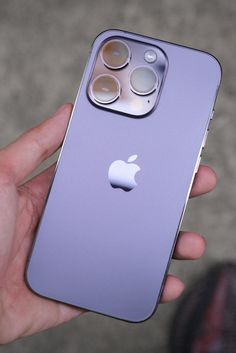
The iPhone 15 Pro has introduced a plethora of features that have caught the attention of tech enthusiasts around the world. Among these, a game-changing element that stands out is the new Action button. This discreet yet powerful addition to the iPhone’s arsenal provides users with quick and customizable access to a range of functions and features on-the-fly.

The Action button is designed for both efficiency and ease of use, offering iPhone 15 Pro users a way to trigger actions faster than they could through traditional screen navigation. This is particularly useful in scenarios where time is of the essence or when you’re unable to devote your full attention to your phone – such as when driving, cooking, or working out.

To take full advantage of the Action button, follow these simple steps:

1.Locate the Action Button:First and foremost, you need to familiarize yourself with its location on your iPhone 15 Pro. The Action button can be found on the side of the device, distinct from the volume and power buttons.

2.Set Up in Settings:Navigate to your settings menu and scroll down until you find ‘Action Button’. Here you can customize what actions are taken when you press the button.

3.Choose Functions:You’ll see a list of functions that can be tied to the Action button such as launching the camera, turning on the flashlight, activating SOS mode, or even starting a workout. Select your preferred action for quick access.

4.Customize for Accessibility:Those with specific accessibility needs can also program the Action button to work with Voice Control or AssistiveTouch, ensuring that everyone can benefit from this feature.

5.Use It On-the-Go: With your preferred action set up, using it is as simple as pressing the button whenever you need it. Whether you’re quickly capturing a photo opportunity or need an urgent flashlight, one press is all it takes.

6.Try Multitasking Operations: For an advanced twist, different combinations of single press, double press or long press can execute various tasks without having to even look at your display.

The integration of the Action button into iPhone 15 Pro’s design streamlines how we interact with our smartphones in fast-paced environments and demonstrates Apple’s continued commitment to innovation that enhances user experience in tangible ways.

Harnessing this ‘secret weapon’ effectively could mean you’re only ever a single tap away from your most frequently used apps and settings – now that’s smart convenience at a whole new level.


Previous Article

The Best Times to Visit Turkey

Next Article

The Best Winter Camping Gear To Brave ...

Matthew Lynch

Related articles More from author

  • Mobile Technology

    Best of the Best Modular Smartphones 2026

    October 23, 2025
    By Matthew Lynch
  • Mobile Technology

    Top 6 Fixes for Android Not Showing Contact Names for Incoming Calls

    February 20, 2024
    By Matthew Lynch
  • Mobile Technology

    Best Iphone 15 And 15 Pro Cases Of 2024: Otterbox, Apple, And More

    March 8, 2024
    By Matthew Lynch
  • Mobile Technology

    The Best Ad Blockers for iPhone 2024

    March 9, 2024
    By Matthew Lynch
  • Mobile Technology

    Galaxy Z Fold 2: Samsung’s most luxe foldable phone yet

    February 3, 2024
    By Matthew Lynch
  • Mobile Technology

    Sony’s Xperia 1 packs a big screen but little else

    February 3, 2024
    By Matthew Lynch

Search

Login & Registration

  • Log in
  • Entries feed
  • Comments feed
  • WordPress.org

Newsletter

Signup for The Tech Edvocate Newsletter and have the latest in EdTech news and opinion delivered to your email address!

About Us

Since technology is not going anywhere and does more good than harm, adapting is the best course of action. That is where The Tech Edvocate comes in. We plan to cover the PreK-12 and Higher Education EdTech sectors and provide our readers with the latest news and opinion on the subject. From time to time, I will invite other voices to weigh in on important issues in EdTech. We hope to provide a well-rounded, multi-faceted look at the past, present, the future of EdTech in the US and internationally.

We started this journey back in June 2016, and we plan to continue it for many more years to come. I hope that you will join us in this discussion of the past, present and future of EdTech and lend your own insight to the issues that are discussed.

Newsletter

Signup for The Tech Edvocate Newsletter and have the latest in EdTech news and opinion delivered to your email address!

Contact Us

The Tech Edvocate
910 Goddin Street
Richmond, VA 23231
(601) 630-5238
[email protected]

Copyright © 2026 Matthew Lynch. All rights reserved.