The Tech Edvocate

Top Menu

  • Advertisement
  • Apps
  • Home Page
  • Home Page Five (No Sidebar)
  • Home Page Four
  • Home Page Three
  • Home Page Two
  • Home Tech2
  • Icons [No Sidebar]
  • Left Sidbear Page
  • Lynch Educational Consulting
  • My Account
  • My Speaking Page
  • Newsletter Sign Up Confirmation
  • Newsletter Unsubscription
  • Our Brands
  • Page Example
  • Privacy Policy
  • Protected Content
  • Register
  • Request a Product Review
  • Shop
  • Shortcodes Examples
  • Signup
  • Start Here
    • Governance
    • Careers
    • Contact Us
  • Terms and Conditions
  • The Edvocate
  • The Tech Edvocate Product Guide
  • Topics
  • Write For Us
  • Advertise

Main Menu

  • Start Here
    • Our Brands
    • Governance
      • Lynch Educational Consulting, LLC.
      • Dr. Lynch’s Personal Website
      • Careers
    • Write For Us
    • The Tech Edvocate Product Guide
    • Contact Us
    • Books
    • Edupedia
    • Post a Job
    • The Edvocate Podcast
    • Terms and Conditions
    • Privacy Policy
  • Topics
    • Assistive Technology
    • Child Development Tech
    • Early Childhood & K-12 EdTech
    • EdTech Futures
    • EdTech News
    • EdTech Policy & Reform
    • EdTech Startups & Businesses
    • Higher Education EdTech
    • Online Learning & eLearning
    • Parent & Family Tech
    • Personalized Learning
    • Product Reviews
  • Advertise
  • Tech Edvocate Awards
  • The Edvocate
  • Pedagogue
  • School Ratings

logo

The Tech Edvocate

  • Start Here
    • Our Brands
    • Governance
      • Lynch Educational Consulting, LLC.
      • Dr. Lynch’s Personal Website
        • My Speaking Page
      • Careers
    • Write For Us
    • The Tech Edvocate Product Guide
    • Contact Us
    • Books
    • Edupedia
    • Post a Job
    • The Edvocate Podcast
    • Terms and Conditions
    • Privacy Policy
  • Topics
    • Assistive Technology
    • Child Development Tech
    • Early Childhood & K-12 EdTech
    • EdTech Futures
    • EdTech News
    • EdTech Policy & Reform
    • EdTech Startups & Businesses
    • Higher Education EdTech
    • Online Learning & eLearning
    • Parent & Family Tech
    • Personalized Learning
    • Product Reviews
  • Advertise
  • Tech Edvocate Awards
  • The Edvocate
  • Pedagogue
  • School Ratings
  • A Visitor’s Guide to Fresno (CA), United States

  • A Visitors Guide to New Orleans (LA), United States

  • A Visitors Guide to Sacramento (CA), United States

  • A Visitors Guide to Lyon, France

  • JisuLife Ultra2 Portable Fan: A Powerful Multi-Function Cooling Solution

  • A Visitors Guide to Viña del Mar, Chile

  • A Visitors Guide to Århus, Denmark

  • A Visitors Guide to Bakersfield (CA), United States

  • A Visitors Guide to Aurora (CO), United States

  • A Visitor’s Guide to Toledo (OH), United States

Digital & Mobile Technology
Home›Digital & Mobile Technology›Introduction to the Maya User Interface

Introduction to the Maya User Interface
By Matthew Lynch
July 24, 2023
0
Spread the love

Maya is a popular 3D animation software used by artists, designers, and developers all around the world. It is owned by Autodesk and is widely used in the film, gaming, and advertising industries. One of the most important aspects of Maya is its user interface, which allows users to create 3D models, animations, and visual effects. In this article, we will provide an introduction to the Maya user interface.

The Maya Interface

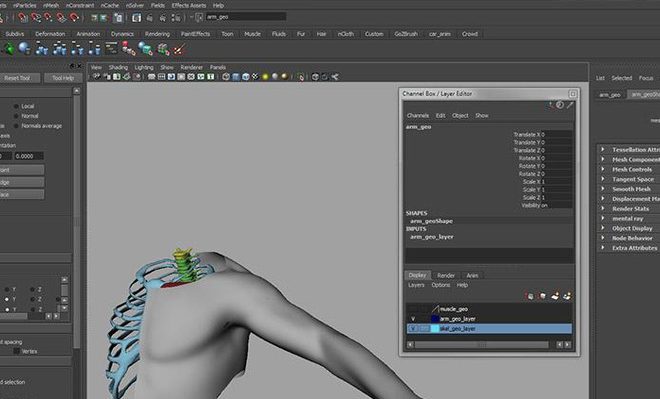
The Maya interface is divided into several panels, each of which is designed to help users perform specific tasks. The main panels are:

The Viewport

The viewport is where users can see their 3D models and animations. It is the primary panel in Maya and is where most of the work is done. Users can view their models from different angles and can apply different lighting and shading effects.

The Channel Box

The channel box is where users can view and modify the attributes of their models. Users can change the position, rotation, and scale of their models, as well as apply different textures and materials.

The Tool Box

The tool box is where users can access all of the tools and commands they need to create and modify their models. Users can access tools for modeling, animation, texturing, and rendering.

The Time Slider

The time slider is where users can control the timing of their animations. Users can set keyframes and adjust the timing of their animations to create smooth and realistic movements.

The Command Line

The command line is where users can enter commands to perform specific tasks. Users can use the command line to perform tasks quickly and efficiently, without having to navigate through menus and panels.

Customizing the Maya Interface

One of the great things about Maya is that it is highly customizable. Users can customize the interface to suit their specific needs and workflows. Users can create custom panels, modify existing panels, and create custom hotkeys and scripts.

Conclusion

The Maya user interface is an essential part of the software and plays a crucial role in the creation of 3D models and animations. Whether you are a beginner or an experienced user, understanding the Maya interface is essential to creating high-quality 3D content. By taking the time to learn the different panels and tools in Maya, users can create stunning 3D models and animations that are sure to impress.


Previous Article

Enable TRIM for Any SSD in OS ...

Next Article

Why AirDrop May Not Be AirTight

Matthew Lynch

Related articles More from author

  • Digital & Mobile Technology

    What is Citrix Server?

    May 5, 2023
    By Matthew Lynch
  • Digital & Mobile Technology

    Are the Nintendo 3DS and 3DS XL Backward Compatible?

    June 4, 2023
    By Matthew Lynch
  • Digital & Mobile Technology

    What is Web Scraping?

    May 15, 2023
    By Matthew Lynch
  • Digital & Mobile Technology

    What Is Google Lens? 6 Things You Didn’t Know You Could Do

    June 6, 2023
    By Matthew Lynch
  • Digital & Mobile Technology

    How to Make a Double Bar Graph on Microsoft Excel

    April 28, 2023
    By Matthew Lynch
  • Digital & Mobile Technology

    How to Recover an Unsaved PowerPoint

    June 9, 2023
    By Matthew Lynch

Search

Login & Registration

  • Register
  • Log in
  • Entries feed
  • Comments feed
  • WordPress.org

Newsletter

Signup for The Tech Edvocate Newsletter and have the latest in EdTech news and opinion delivered to your email address!

About Us

Since technology is not going anywhere and does more good than harm, adapting is the best course of action. That is where The Tech Edvocate comes in. We plan to cover the PreK-12 and Higher Education EdTech sectors and provide our readers with the latest news and opinion on the subject. From time to time, I will invite other voices to weigh in on important issues in EdTech. We hope to provide a well-rounded, multi-faceted look at the past, present, the future of EdTech in the US and internationally.

We started this journey back in June 2016, and we plan to continue it for many more years to come. I hope that you will join us in this discussion of the past, present and future of EdTech and lend your own insight to the issues that are discussed.

Newsletter

Signup for The Tech Edvocate Newsletter and have the latest in EdTech news and opinion delivered to your email address!

Contact Us

The Tech Edvocate
910 Goddin Street
Richmond, VA 23231
(601) 630-5238
[email protected]

Copyright © 2025 Matthew Lynch. All rights reserved.