The Tech Edvocate

Top Menu

  • Advertisement
  • Apps
  • Home Page
  • Home Page Five (No Sidebar)
  • Home Page Four
  • Home Page Three
  • Home Page Two
  • Home Tech2
  • Icons [No Sidebar]
  • Left Sidbear Page
  • Lynch Educational Consulting
  • My Account
  • My Speaking Page
  • Newsletter Sign Up Confirmation
  • Newsletter Unsubscription
  • Our Brands
  • Page Example
  • Privacy Policy
  • Protected Content
  • Register
  • Request a Product Review
  • Shop
  • Shortcodes Examples
  • Signup
  • Start Here
    • Governance
    • Careers
    • Contact Us
  • Terms and Conditions
  • The Edvocate
  • The Tech Edvocate Product Guide
  • Topics
  • Write For Us
  • Advertise

Main Menu

  • Start Here
    • Our Brands
    • Governance
      • Lynch Educational Consulting, LLC.
      • Dr. Lynch’s Personal Website
      • Careers
    • Write For Us
    • The Tech Edvocate Product Guide
    • Contact Us
    • Books
    • Edupedia
    • Post a Job
    • The Edvocate Podcast
    • Terms and Conditions
    • Privacy Policy
  • Topics
    • Assistive Technology
    • Child Development Tech
    • Early Childhood & K-12 EdTech
    • EdTech Futures
    • EdTech News
    • EdTech Policy & Reform
    • EdTech Startups & Businesses
    • Higher Education EdTech
    • Online Learning & eLearning
    • Parent & Family Tech
    • Personalized Learning
    • Product Reviews
  • Advertise
  • Tech Edvocate Awards
  • The Edvocate
  • Pedagogue
  • School Ratings

logo

The Tech Edvocate

  • Start Here
    • Our Brands
    • Governance
      • Lynch Educational Consulting, LLC.
      • Dr. Lynch’s Personal Website
        • My Speaking Page
      • Careers
    • Write For Us
    • The Tech Edvocate Product Guide
    • Contact Us
    • Books
    • Edupedia
    • Post a Job
    • The Edvocate Podcast
    • Terms and Conditions
    • Privacy Policy
  • Topics
    • Assistive Technology
    • Child Development Tech
    • Early Childhood & K-12 EdTech
    • EdTech Futures
    • EdTech News
    • EdTech Policy & Reform
    • EdTech Startups & Businesses
    • Higher Education EdTech
    • Online Learning & eLearning
    • Parent & Family Tech
    • Personalized Learning
    • Product Reviews
  • Advertise
  • Tech Edvocate Awards
  • The Edvocate
  • Pedagogue
  • School Ratings
  • A Visitors Guide to Long Beach (CA), United States

  • A Visitor’s Guide to Fresno (CA), United States

  • A Visitors Guide to New Orleans (LA), United States

  • A Visitors Guide to Sacramento (CA), United States

  • A Visitors Guide to Lyon, France

  • JisuLife Ultra2 Portable Fan: A Powerful Multi-Function Cooling Solution

  • A Visitors Guide to Viña del Mar, Chile

  • A Visitors Guide to Århus, Denmark

  • A Visitors Guide to Bakersfield (CA), United States

  • A Visitors Guide to Aurora (CO), United States

Digital & Mobile Technology
Home›Digital & Mobile Technology›How to Watch a YouTube Video in Virtual Reality

How to Watch a YouTube Video in Virtual Reality
By Matthew Lynch
June 13, 2023
0
Spread the love

As technology advances, we are seeing new and innovative ways to enjoy entertainment. One of the latest trends is virtual reality, which allows users to immerse themselves in an entirely new world. YouTube, being one of the largest video platforms, has also embraced this technology by providing a VR feature. In this article, we will discuss how to watch a YouTube video in virtual reality.

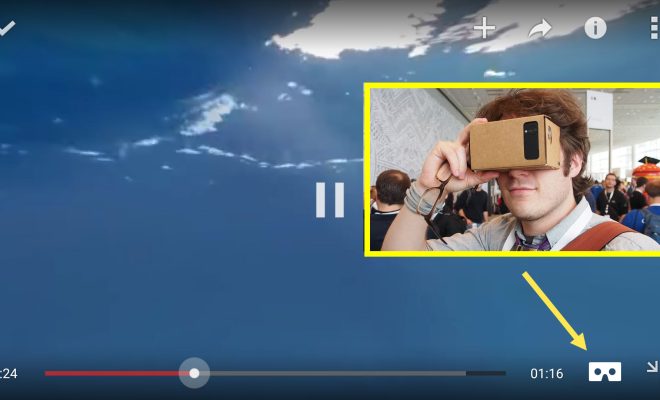
Firstly, you will need a virtual reality headset that is compatible with YouTube VR. This can either be an Oculus Rift, HTC Vive, or a Google Cardboard. Once the headset is connected to your device, you can download the YouTube VR app from the respective app store – Oculus, Steam or Google Play Store.

Once the app is installed, open it and sign in to your YouTube account. This will give you access to all the videos available on the platform. You also have the option to sign up for YouTube Red, which is the platform’s ad-free subscription service.

Now, you can search for your desired video or browse through the recommended VR videos available on the app. Once you find a video, click on it to start playing.

As the video starts playing, you will see two options at the bottom of the screen – “360” and “Theater.” The 360 option allows you to view the video in 360-degree angle and the theater option projects the video on a virtual big screen in front of you. Choose the option that suits your preference.

As you watch the video, you can control the viewing angle by moving your head around. This means you can look up, down, left, or right and see the video from different angles. You can also pause and play the video using the buttons on the headset or the controller that comes with it.

Lastly, it is important to take breaks and not use the VR headset for extended periods of time as it can strain your eyes and cause discomfort.

In conclusion, watching a YouTube video in virtual reality is a fun and exciting experience. By following the steps outlined above, anyone with a compatible headset can enjoy this feature. So, put on your VR headset and immerse yourself in a new world of entertainment.


Previous Article

Facebook Is Tracking You! Here’s How to ...

Next Article

Ways to Switch Sound Output Device in ...

Matthew Lynch

Related articles More from author

  • Digital & Mobile Technology

    AMD RX 6800 vs. AMD RX 6800XT: What’s the Difference?

    June 23, 2023
    By Matthew Lynch
  • Digital & Mobile Technology

    Fix Gdiplus.dll Not Found or Missing Errors

    July 31, 2023
    By Matthew Lynch
  • Digital & Mobile Technology

    How to Convert an Image With Handwriting to Text Using OCR

    June 22, 2023
    By Matthew Lynch
  • Digital & Mobile Technology

    How to Fix It When a Windows 10 Microphone is Not Working

    June 2, 2023
    By Matthew Lynch
  • Digital & Mobile Technology

    What is VMware?

    May 14, 2023
    By Matthew Lynch
  • Digital & Mobile Technology

    What Are VST Plugins and What Do They Do?

    June 6, 2023
    By Matthew Lynch

Search

Login & Registration

  • Register
  • Log in
  • Entries feed
  • Comments feed
  • WordPress.org

Newsletter

Signup for The Tech Edvocate Newsletter and have the latest in EdTech news and opinion delivered to your email address!

About Us

Since technology is not going anywhere and does more good than harm, adapting is the best course of action. That is where The Tech Edvocate comes in. We plan to cover the PreK-12 and Higher Education EdTech sectors and provide our readers with the latest news and opinion on the subject. From time to time, I will invite other voices to weigh in on important issues in EdTech. We hope to provide a well-rounded, multi-faceted look at the past, present, the future of EdTech in the US and internationally.

We started this journey back in June 2016, and we plan to continue it for many more years to come. I hope that you will join us in this discussion of the past, present and future of EdTech and lend your own insight to the issues that are discussed.

Newsletter

Signup for The Tech Edvocate Newsletter and have the latest in EdTech news and opinion delivered to your email address!

Contact Us

The Tech Edvocate
910 Goddin Street
Richmond, VA 23231
(601) 630-5238
[email protected]

Copyright © 2025 Matthew Lynch. All rights reserved.