The Tech Edvocate

Top Menu

  • Advertisement
  • Apps
  • Home Page
  • Home Page Five (No Sidebar)
  • Home Page Four
  • Home Page Three
  • Home Page Two
  • Home Tech2
  • Icons [No Sidebar]
  • Left Sidbear Page
  • Lynch Educational Consulting
  • My Account
  • My Speaking Page
  • Newsletter Sign Up Confirmation
  • Newsletter Unsubscription
  • Our Brands
  • Page Example
  • Privacy Policy
  • Protected Content
  • Register
  • Request a Product Review
  • Shop
  • Shortcodes Examples
  • Signup
  • Start Here
    • Governance
    • Careers
    • Contact Us
  • Terms and Conditions
  • The Edvocate
  • The Tech Edvocate Product Guide
  • Topics
  • Write For Us
  • Advertise

Main Menu

  • Start Here
    • Our Brands
    • Governance
      • Lynch Educational Consulting, LLC.
      • Dr. Lynch’s Personal Website
      • Careers
    • Write For Us
    • The Tech Edvocate Product Guide
    • Contact Us
    • Books
    • Edupedia
    • Post a Job
    • The Edvocate Podcast
    • Terms and Conditions
    • Privacy Policy
  • Topics
    • Assistive Technology
    • Child Development Tech
    • Early Childhood & K-12 EdTech
    • EdTech Futures
    • EdTech News
    • EdTech Policy & Reform
    • EdTech Startups & Businesses
    • Higher Education EdTech
    • Online Learning & eLearning
    • Parent & Family Tech
    • Personalized Learning
    • Product Reviews
  • Advertise
  • Tech Edvocate Awards
  • The Edvocate
  • Pedagogue
  • School Ratings

logo

The Tech Edvocate

  • Start Here
    • Our Brands
    • Governance
      • Lynch Educational Consulting, LLC.
      • Dr. Lynch’s Personal Website
        • My Speaking Page
      • Careers
    • Write For Us
    • The Tech Edvocate Product Guide
    • Contact Us
    • Books
    • Edupedia
    • Post a Job
    • The Edvocate Podcast
    • Terms and Conditions
    • Privacy Policy
  • Topics
    • Assistive Technology
    • Child Development Tech
    • Early Childhood & K-12 EdTech
    • EdTech Futures
    • EdTech News
    • EdTech Policy & Reform
    • EdTech Startups & Businesses
    • Higher Education EdTech
    • Online Learning & eLearning
    • Parent & Family Tech
    • Personalized Learning
    • Product Reviews
  • Advertise
  • Tech Edvocate Awards
  • The Edvocate
  • Pedagogue
  • School Ratings
  • Kā bingo elementi parādās mūsdienu kazino spēļu bibliotēkās

  • Luksusa tēli kazino spēļu vizuālajā valodā

  • Les studios de casino en direct rapprochent le jeu en ligne de l’expérience audiovisuelle

  • Wie Spieletitel Thema und Genre vor dem Start vermitteln

  • Wie Vorschaubilder die Orientierung in digitalen Casino Lobbys prägen

  • This One Privacy Camera Feature Could Change Smart Homes Forever

  • Unprecedented: White House Mandates AI Security Incident Reporting After Troubling Breaches

  • The AI Storm Tracker Predicting Viral Narratives Just Landed $7 Million – Here’s Why It Matters

  • This State Just Unleashed AI to Prescribe Meds — Are We Ready for the Future of Medicine?

  • Outrageous: YouTuber Loses Decade of Work to Single YouTube Channel Ban

Tech Advice
Home›Tech Advice›How to View Picture-in-Picture Videos on Your iPhone or iPad

How to View Picture-in-Picture Videos on Your iPhone or iPad
By Matthew Lynch
July 23, 2023
0
Spread the love

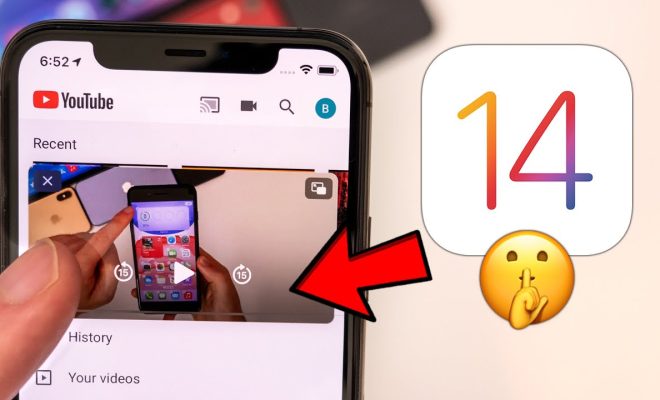
Picture-in-picture, or PiP, is a handy feature that allows you to watch videos while multitasking on your iPhone or iPad. This is an excellent way to stay connected and entertained without taking you away from other essential tasks. In this article, we will take you through the steps needed to enable and use the picture-in-picture feature on your iOS device.

Requirements:

– An iPhone or iPad running iOS 14 or iPadOS 14.

– A compatible app that supports Picture-in-Picture mode, such as Apple’s native TV app, YouTube app (premium accounts), Netflix, FaceTime video calls, etc.

Step 1: Update your iOS device

Ensure your iPhone or iPad is running the latest version of the operating system (iOS 14 or iPadOS 14). If you haven’t yet updated, go to Settings > General > Software Update and follow the on-screen instructions to update your device.

Step 2: Enable Picture-in-Picture mode

By default, picture-in-picture mode should be enabled on your iOS device. However, if it’s not working or you want to double-check whether it’s enabled:

1. Go to Settings > General.

2. Choose “Picture in Picture.”

3. Make sure the toggle next to “Start PiP Automatically” is green. If it’s off, simply tap the toggle to enable it.

Step 3: Use Picture-in-Picture with a compatible app

Now that PiP mode is enabled, you can experience it with one of the compatible apps mentioned above:

1. Open a supported application like Apple’s native TV app or Netflix.

2. Begin playing the video you want to watch.

3. Swipe up from the bottom of the screen—or press the Home button (if your device has one)—to minimize the app and go back to the home screen.

4. The video will automatically resize and appear in a floating window that you can move to one of the four corners of the screen.

Note: For YouTube premium users, you have to tap the video while it’s playing and then tap the Picture-in-Picture icon in the top-left corner to activate PiP mode.

Step 4: Adjust Picture-in-Picture controls

Once your video is playing in PiP mode, you can control it just like you would in a full-screen view:

1. Play or pause your video using the central play/pause button.

2. Move the PiP window around by dragging it with your finger.

3. Expand the window by pinching out or shrink it by pinching in.

4. Close the PiP window by tapping the X in the top-left corner of the window.

Conclusion:

Picture-in-Picture mode on your iPhone or iPad is an incredibly useful feature that enables seamless multitasking without missing out on your favorite videos or calls. By following these simple steps, you can take advantage of this feature and experience a whole new level of convenience while using your iOS device.


Previous Article

How to Use Your Digital Camera as ...

Next Article

How to Use Google Maps on an ...

Matthew Lynch

Related articles More from author

  • Tech Advice

    The 10 Best Memory Foam Mattresses That Offer Comfort And Support

    August 9, 2023
    By Matthew Lynch
  • Tech Advice

    The Best Ultraportable Laptops for 2023

    July 19, 2023
    By Matthew Lynch
  • Tech Advice

    2024 Kia EV9 First Drive: Tunnel Vision Is a Good Thing

    August 19, 2023
    By Matthew Lynch
  • Tech Advice

    The 10 Biggest Fintech Companies In America

    August 11, 2023
    By Matthew Lynch
  • Tech Advice

    The benefits of jumping rope: A fun, full-body workout

    July 6, 2023
    By Matthew Lynch
  • Tech Advice

    Improve Your TV’s Picture by Changing This 1 Setting

    July 16, 2023
    By Matthew Lynch

Search

Login & Registration

  • Log in
  • Entries feed
  • Comments feed
  • WordPress.org

Newsletter

Signup for The Tech Edvocate Newsletter and have the latest in EdTech news and opinion delivered to your email address!

About Us

Since technology is not going anywhere and does more good than harm, adapting is the best course of action. That is where The Tech Edvocate comes in. We plan to cover the PreK-12 and Higher Education EdTech sectors and provide our readers with the latest news and opinion on the subject. From time to time, I will invite other voices to weigh in on important issues in EdTech. We hope to provide a well-rounded, multi-faceted look at the past, present, the future of EdTech in the US and internationally.

We started this journey back in June 2016, and we plan to continue it for many more years to come. I hope that you will join us in this discussion of the past, present and future of EdTech and lend your own insight to the issues that are discussed.

Newsletter

Signup for The Tech Edvocate Newsletter and have the latest in EdTech news and opinion delivered to your email address!

Contact Us

The Tech Edvocate
910 Goddin Street
Richmond, VA 23231
(601) 630-5238
[email protected]

Copyright © 2026 Matthew Lynch. All rights reserved.