
The Tech Edvocate

Top Menu

  • Advertisement
  • Apps
  • Home Page
  • Home Page Five (No Sidebar)
  • Home Page Four
  • Home Page Three
  • Home Page Two
  • Home Tech2
  • Icons [No Sidebar]
  • Left Sidbear Page
  • Lynch Educational Consulting
  • My Account
  • My Speaking Page
  • Newsletter Sign Up Confirmation
  • Newsletter Unsubscription
  • Our Brands
  • Page Example
  • Privacy Policy
  • Protected Content
  • Register
  • Request a Product Review
  • Shop
  • Shortcodes Examples
  • Signup
  • Start Here
    • Governance
    • Careers
    • Contact Us
  • Terms and Conditions
  • The Edvocate
  • The Tech Edvocate Product Guide
  • Topics
  • Write For Us
  • Advertise

Main Menu

  • Start Here
    • Our Brands
    • Governance
      • Lynch Educational Consulting, LLC.
      • Dr. Lynch’s Personal Website
      • Careers
    • Write For Us
    • The Tech Edvocate Product Guide
    • Contact Us
    • Books
    • Edupedia
    • Post a Job
    • The Edvocate Podcast
    • Terms and Conditions
    • Privacy Policy
  • Topics
    • Assistive Technology
    • Child Development Tech
    • Early Childhood & K-12 EdTech
    • EdTech Futures
    • EdTech News
    • EdTech Policy & Reform
    • EdTech Startups & Businesses
    • Higher Education EdTech
    • Online Learning & eLearning
    • Parent & Family Tech
    • Personalized Learning
    • Product Reviews
  • Advertise
  • Tech Edvocate Awards
  • The Edvocate
  • Pedagogue
  • School Ratings

logo

The Tech Edvocate

  • Start Here
    • Our Brands
    • Governance
      • Lynch Educational Consulting, LLC.
      • Dr. Lynch’s Personal Website
        • My Speaking Page
      • Careers
    • Write For Us
    • The Tech Edvocate Product Guide
    • Contact Us
    • Books
    • Edupedia
    • Post a Job
    • The Edvocate Podcast
    • Terms and Conditions
    • Privacy Policy
  • Topics
    • Assistive Technology
    • Child Development Tech
    • Early Childhood & K-12 EdTech
    • EdTech Futures
    • EdTech News
    • EdTech Policy & Reform
    • EdTech Startups & Businesses
    • Higher Education EdTech
    • Online Learning & eLearning
    • Parent & Family Tech
    • Personalized Learning
    • Product Reviews
  • Advertise
  • Tech Edvocate Awards
  • The Edvocate
  • Pedagogue
  • School Ratings
  • A Visitor’s Guide to Fresno (CA), United States

  • A Visitors Guide to New Orleans (LA), United States

  • A Visitors Guide to Sacramento (CA), United States

  • A Visitors Guide to Lyon, France

  • JisuLife Ultra2 Portable Fan: A Powerful Multi-Function Cooling Solution

  • A Visitors Guide to Viña del Mar, Chile

  • A Visitors Guide to Århus, Denmark

  • A Visitors Guide to Bakersfield (CA), United States

  • A Visitors Guide to Aurora (CO), United States

  • A Visitor’s Guide to Toledo (OH), United States

How To
Home›How To›How to Use Have I Been Pwned

How to Use Have I Been Pwned
By Matthew Lynch
March 3, 2024
0
Spread the love

Introduction

Cybersecurity is a top concern in today’s digital world. Our personal data is frequently at risk due to data breaches and hacks. One way to stay informed about these potential hazards is by using the website Have I Been Pwned (HIBP). This article will guide you through how to use HIBP effectively to keep your information secure.

What is Have I Been Pwned?

HIBP is a free online service that helps you determine whether your email address or password has been compromised in any data breaches. Created by security researcher, Troy Hunt, it uses breached datasets to give you a clear picture of your online vulnerability. It also provides guidance on how to respond if your data has been exposed.

How To Use Have I Been Pwned

1. Visit the website

Go to https://haveibeenpwned.com/ in your web browser. The website layout is simple and easy to navigate.

2. Check your email address

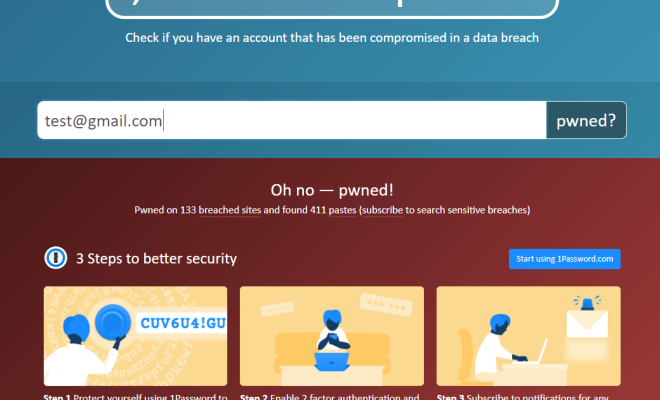
On the homepage, you’ll see a search bar prompting you to enter your email address. Type in an email address and click the ‘pwned?’ button. If your email has been involved in any known data breaches, HIBP will list them along with some details about each incident.

3. Check for password exposure

Navigate to the “Passwords” tab on the menu bar at the top of the page. Here, you can enter a password you’ve used or plan on using in the search bar.Hashing technique is used for ensuring that HIBP won’t store or reveal your password anywhere.

If it’s present in any exposed datasets,you’ll be informed about it but never intend on using any sensitive passwords here.

4. Sign up for notifications

To stay up-to-date with potential breaches in real-time, click on “Notify Me” in the main menu. HIBP will request your email address to send breach notifications directly to your inbox.

Protecting Yourself

1. Update your passwords regularly

Regularly changing your passwords is a simple yet essential measure of cybersecurity. Use strong, unique passwords for each account and make a habit of updating them every few months.

2. Enable Two-Factor Authentication (2FA)

Always enable two-factor authentication on websites and apps that support it. 2FA provides an extra layer of security by requiring you to prove your identity and prevents unauthorized access to your accounts.

3. Be cautious with sharing personal information

Be mindful of what information you share online, especially on social media platforms where attackers can gather personal details.

4. Stay informed

Sign up for breach notifications, follow cybersecurity news sources, and maintain general awareness of the current threats facing individuals online.

Conclusion

Have I Been Pwned is a valuable tool in managing your online security by being aware of data breaches and their effects on your personal information. By using this service and following best practices for protecting yourself, you’ll be better equipped to safeguard your data in an increasingly vulnerable digital world.


Previous Article

The 12 Best Leather Couches and Sofas ...

Next Article

Best Solar Panel Installation Companies in Puerto ...

Matthew Lynch

Related articles More from author

  • How To

    How to Trade Items on Team Fortress 2

    April 2, 2024
    By Matthew Lynch
  • How To

    3 Ways to Use an Immersion Blender

    October 7, 2023
    By Matthew Lynch
  • How To

    How to Make the Girl You Like Miss You

    April 1, 2024
    By Matthew Lynch
  • How To

    How to Make Concrete: 13 Steps

    October 6, 2023
    By Matthew Lynch
  • How To

    3 Ways to Dread Hair

    October 8, 2023
    By Matthew Lynch
  • How To

    3 Ways to Clean a Bong

    October 3, 2023
    By Matthew Lynch

Search

Login & Registration

  • Register
  • Log in
  • Entries feed
  • Comments feed
  • WordPress.org

Newsletter

Signup for The Tech Edvocate Newsletter and have the latest in EdTech news and opinion delivered to your email address!

About Us

Since technology is not going anywhere and does more good than harm, adapting is the best course of action. That is where The Tech Edvocate comes in. We plan to cover the PreK-12 and Higher Education EdTech sectors and provide our readers with the latest news and opinion on the subject. From time to time, I will invite other voices to weigh in on important issues in EdTech. We hope to provide a well-rounded, multi-faceted look at the past, present, the future of EdTech in the US and internationally.

We started this journey back in June 2016, and we plan to continue it for many more years to come. I hope that you will join us in this discussion of the past, present and future of EdTech and lend your own insight to the issues that are discussed.

Newsletter

Signup for The Tech Edvocate Newsletter and have the latest in EdTech news and opinion delivered to your email address!

Contact Us

The Tech Edvocate
910 Goddin Street
Richmond, VA 23231
(601) 630-5238
[email protected]

Copyright © 2025 Matthew Lynch. All rights reserved.