The Tech Edvocate

Top Menu

  • Advertisement
  • Apps
  • Home Page
  • Home Page Five (No Sidebar)
  • Home Page Four
  • Home Page Three
  • Home Page Two
  • Home Tech2
  • Icons [No Sidebar]
  • Left Sidbear Page
  • Lynch Educational Consulting
  • My Account
  • My Speaking Page
  • Newsletter Sign Up Confirmation
  • Newsletter Unsubscription
  • Our Brands
  • Page Example
  • Privacy Policy
  • Protected Content
  • Register
  • Request a Product Review
  • Shop
  • Shortcodes Examples
  • Signup
  • Start Here
    • Governance
    • Careers
    • Contact Us
  • Terms and Conditions
  • The Edvocate
  • The Tech Edvocate Product Guide
  • Topics
  • Write For Us
  • Advertise

Main Menu

  • Start Here
    • Our Brands
    • Governance
      • Lynch Educational Consulting, LLC.
      • Dr. Lynch’s Personal Website
      • Careers
    • Write For Us
    • The Tech Edvocate Product Guide
    • Contact Us
    • Books
    • Edupedia
    • Post a Job
    • The Edvocate Podcast
    • Terms and Conditions
    • Privacy Policy
  • Topics
    • Assistive Technology
    • Child Development Tech
    • Early Childhood & K-12 EdTech
    • EdTech Futures
    • EdTech News
    • EdTech Policy & Reform
    • EdTech Startups & Businesses
    • Higher Education EdTech
    • Online Learning & eLearning
    • Parent & Family Tech
    • Personalized Learning
    • Product Reviews
  • Advertise
  • Tech Edvocate Awards
  • The Edvocate
  • Pedagogue
  • School Ratings

logo

The Tech Edvocate

  • Start Here
    • Our Brands
    • Governance
      • Lynch Educational Consulting, LLC.
      • Dr. Lynch’s Personal Website
        • My Speaking Page
      • Careers
    • Write For Us
    • The Tech Edvocate Product Guide
    • Contact Us
    • Books
    • Edupedia
    • Post a Job
    • The Edvocate Podcast
    • Terms and Conditions
    • Privacy Policy
  • Topics
    • Assistive Technology
    • Child Development Tech
    • Early Childhood & K-12 EdTech
    • EdTech Futures
    • EdTech News
    • EdTech Policy & Reform
    • EdTech Startups & Businesses
    • Higher Education EdTech
    • Online Learning & eLearning
    • Parent & Family Tech
    • Personalized Learning
    • Product Reviews
  • Advertise
  • Tech Edvocate Awards
  • The Edvocate
  • Pedagogue
  • School Ratings
  • Dramatic: AI Surveillance Giant Cuts Hundreds of Jobs Amid Privacy Backlash

  • Dramatic: Anthropic Claude AI Just Banned ‘Cruel’ Behavior — Here’s Why It Matters

  • This One Shift in Gaming VC Could Reshape the Entire Industry

  • The AI Doctor Is Coming: Is It a Miracle or a Menace?

  • Unmasking the AI Deepfake Threat: Why Corporate America’s Billions Are at Risk

  • Shocking: China’s AI Programmers Collapse — A Disturbing Glimpse Into Our Future?

  • Dramatic Spike: College Costs Projected to Soar 7.5% — Are You Ready?

  • 20 Million Records Exposed: The Reckless Truth Behind the Oracle Health Data Breach

  • The AI Cybersecurity Threat: A Dangerous New Frontier

  • Unbelievable: [Automaker Name]’s Self-Driving Cars Under Fire After Fatal Crash — Here’s What We Know

Digital & Mobile Technology
Home›Digital & Mobile Technology›How to Use CSS box-shadow: Tricks and Examples

How to Use CSS box-shadow: Tricks and Examples
By Matthew Lynch
June 13, 2023
0
Spread the love

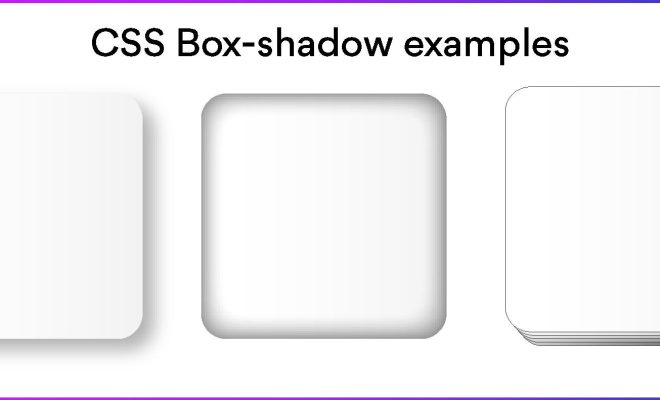
CSS box-shadow is a powerful tool that can add depth and texture to your web pages. With this tool, you can make elements appear more dynamic, visually appealing, and stand out from other web pages. Here are some tricks and examples to get you started with using CSS box-shadow.

1. Understanding the CSS box-shadow property

Before diving into the examples, it’s important to understand the CSS box-shadow property. The box-shadow property specifies one or more box shadows that attach to an element. The syntax for this property is as follows:

box-shadow: horizontal-offset vertical-offset blur spread color;

– The horizontal-offset and vertical-offset are the distance of the shadow from the element, and can be either positive or negative values.
– The blur and spread values determine the size of the shadow. The blur value determines the amount of blurring around the edges of the shadow, while the spread value determines the amount of spreading of the shadow.
– The color value determines the color of the shadow.

2. Creating a drop shadow effect

One popular use of CSS box-shadow is to create a drop shadow effect. To achieve this effect, you can set the horizontal offset and vertical offset values as 0, the blur value to a higher number, and the color of the shadow to a darker shade of the element’s color. For example:

box-shadow: 0px 0px 10px 0px #888888;

The above code will create a subtle drop shadow effect for the element, without making it look too dramatic.

3. Add multiple shadows for layered effect

You can also add multiple shadows to an element to create a layered effect. To do this, simply separate the values with a comma. For example:

box-shadow: 0px 0px 10px 0px #999999, 0px 0px 15px 0px #555555;

In the above code, we have set two shadows with different blur values and colors, which produces a layered effect.

4. Make an element glow

CSS box-shadow can also be used to make elements glow. To achieve this effect, you can set a lighter shade of the element’s color as the color value for the shadow. For example:

box-shadow: 0px 0px 20px 0px #FADC63;

This code will create a soft glow around the element.

5. Create a simple border effect

CSS box-shadow can also be used to create a simple border effect. To do this, set the spread value to 0 and adjust the other values accordingly. For example:

box-shadow: 0px 0px 0px 2px #333333;

In the above code, we have set the blur and spread values to 0, and increased the size of the shadow by setting the horizontal and vertical offset values to 2px. This gives the element a border-like effect.

In conclusion, CSS box-shadow is a versatile tool that can be used to create a variety of effects for your web pages. With these examples, you can explore the possibilities of box-shadow and see how it can enhance the design of your website.


Previous Article

Stop Lights Flickering in Your iPhone Videos ...

Next Article

How to Use Stacks to Keep Your ...

Matthew Lynch

Related articles More from author

  • Digital & Mobile Technology

    How to Deregister an Amazon Alexa Device Before Giving It Away

    May 28, 2023
    By Matthew Lynch
  • Digital & Mobile Technology

    What is the In-Line Mic on Headphones?

    June 22, 2023
    By Matthew Lynch
  • Digital & Mobile Technology

    How to Fix It When a Zoom Camera Is Not Working

    June 23, 2023
    By Matthew Lynch
  • Digital & Mobile Technology

    How to Enable Quick Removal of USB Drives on Windows

    May 28, 2023
    By Matthew Lynch
  • Digital & Mobile Technology

    How to Install Python PIP on Windows, Mac, and Linux

    June 22, 2023
    By Matthew Lynch
  • Digital & Mobile Technology

    The Best Keyboard Keycaps

    July 31, 2023
    By Matthew Lynch

Search

Login & Registration

  • Log in
  • Entries feed
  • Comments feed
  • WordPress.org

Newsletter

Signup for The Tech Edvocate Newsletter and have the latest in EdTech news and opinion delivered to your email address!

About Us

Since technology is not going anywhere and does more good than harm, adapting is the best course of action. That is where The Tech Edvocate comes in. We plan to cover the PreK-12 and Higher Education EdTech sectors and provide our readers with the latest news and opinion on the subject. From time to time, I will invite other voices to weigh in on important issues in EdTech. We hope to provide a well-rounded, multi-faceted look at the past, present, the future of EdTech in the US and internationally.

We started this journey back in June 2016, and we plan to continue it for many more years to come. I hope that you will join us in this discussion of the past, present and future of EdTech and lend your own insight to the issues that are discussed.

Newsletter

Signup for The Tech Edvocate Newsletter and have the latest in EdTech news and opinion delivered to your email address!

Contact Us

The Tech Edvocate
910 Goddin Street
Richmond, VA 23231
(601) 630-5238
[email protected]

Copyright © 2026 Matthew Lynch. All rights reserved.