The Tech Edvocate

Top Menu

  • Advertisement
  • Apps
  • Home Page
  • Home Page Five (No Sidebar)
  • Home Page Four
  • Home Page Three
  • Home Page Two
  • Home Tech2
  • Icons [No Sidebar]
  • Left Sidbear Page
  • Lynch Educational Consulting
  • My Account
  • My Speaking Page
  • Newsletter Sign Up Confirmation
  • Newsletter Unsubscription
  • Our Brands
  • Page Example
  • Privacy Policy
  • Protected Content
  • Register
  • Request a Product Review
  • Shop
  • Shortcodes Examples
  • Signup
  • Start Here
    • Governance
    • Careers
    • Contact Us
  • Terms and Conditions
  • The Edvocate
  • The Tech Edvocate Product Guide
  • Topics
  • Write For Us
  • Advertise

Main Menu

  • Start Here
    • Our Brands
    • Governance
      • Lynch Educational Consulting, LLC.
      • Dr. Lynch’s Personal Website
      • Careers
    • Write For Us
    • The Tech Edvocate Product Guide
    • Contact Us
    • Books
    • Edupedia
    • Post a Job
    • The Edvocate Podcast
    • Terms and Conditions
    • Privacy Policy
  • Topics
    • Assistive Technology
    • Child Development Tech
    • Early Childhood & K-12 EdTech
    • EdTech Futures
    • EdTech News
    • EdTech Policy & Reform
    • EdTech Startups & Businesses
    • Higher Education EdTech
    • Online Learning & eLearning
    • Parent & Family Tech
    • Personalized Learning
    • Product Reviews
  • Advertise
  • Tech Edvocate Awards
  • The Edvocate
  • Pedagogue
  • School Ratings

logo

The Tech Edvocate

  • Start Here
    • Our Brands
    • Governance
      • Lynch Educational Consulting, LLC.
      • Dr. Lynch’s Personal Website
        • My Speaking Page
      • Careers
    • Write For Us
    • The Tech Edvocate Product Guide
    • Contact Us
    • Books
    • Edupedia
    • Post a Job
    • The Edvocate Podcast
    • Terms and Conditions
    • Privacy Policy
  • Topics
    • Assistive Technology
    • Child Development Tech
    • Early Childhood & K-12 EdTech
    • EdTech Futures
    • EdTech News
    • EdTech Policy & Reform
    • EdTech Startups & Businesses
    • Higher Education EdTech
    • Online Learning & eLearning
    • Parent & Family Tech
    • Personalized Learning
    • Product Reviews
  • Advertise
  • Tech Edvocate Awards
  • The Edvocate
  • Pedagogue
  • School Ratings
  • How to create estimates in Buildertrend

  • How to use Bluebeam for punch lists

  • Procore vs Viewpoint features

  • How to submit invoices in Procore

  • How to set up Monday.com for contractors

  • Can PlanGrid track punch lists

  • How to create selections in CoConstruct

  • How to markup drawings in PlanGrid

  • How to use PlanGrid for blueprints

  • How to create custom tools in Bluebeam

Digital & Mobile Technology
Home›Digital & Mobile Technology›How to Use Augmented Reality on Your iPhone

How to Use Augmented Reality on Your iPhone
By Matthew Lynch
July 31, 2023
0
Spread the love

As technology continues to advance, we see augmented reality becoming more and more prevalent in our everyday lives. From mobile gaming to social media filters, the possibilities of AR seem endless. If you own an iPhone, you may not realize how easy it is to use AR on your device. In this article, we’ll guide you through the steps of using augmented reality on your iPhone and explore some of the exciting features it offers.

Step 1: Find AR-Enabled Apps

The first step to using AR on your iPhone is to find apps that are enabled with the technology. The App Store has an extensive collection of AR-enabled apps across various genres, including gaming, education, and shopping. Simply open the App Store, tap on the search bar and type ‘AR apps’ to see a list of popular AR apps that are available for download.

Step 2: Enable AR on Your iPhone

Before using AR on your iPhone, make sure that it is enabled. To do this, go to the settings app, tap on ‘General,’ and select ‘Software Update’ to ensure that your device is up to date. Afterward, open ‘Camera’ and swipe left to activate the ‘AR Mode.’ In some iPhone models, you may also need to turn on ‘Location Services’ to optimize the AR experience.

Step 3: Start Exploring

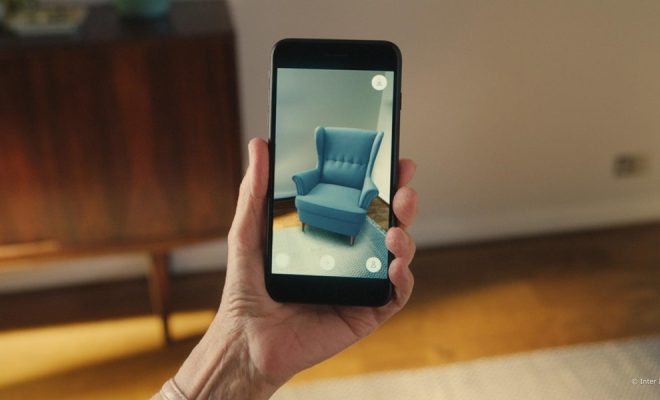
Once you have found AR-enabled apps and enabled the AR mode on your iPhone camera, it’s time to start exploring. Each app has its unique features, so familiarize yourself with the app before diving in. For example, in shopping apps, you can virtually try on clothes or view furniture in your home before buying. In gaming apps, you can battle robots or catch Pokémon in the real world.

Step 4: Personalize Your AR Experience

iPhone offers various options to personalize your AR experience. You can control how you interact with the objects, enable/disable the virtual sound effects, and even choose your preferred language. These settings can be found in the app individually or in the general iPhone settings.

Conclusion

As you can see, augmented reality on your iPhone is not as complicated as it may seem. It’s easy to find AR-enabled apps, and the iPhone’s built-in AR mode ensures that you can start exploring right away. AR adds a new dimension to our daily experiences, and it’s exciting to think about the possibilities it will bring in the near future. So go ahead, explore, and let your imagination run wild!


Previous Article

Is DirecTV Down… Or Is It Just ...

Next Article

SD/SDHC Camcorder Memory Cards

Matthew Lynch

Related articles More from author

  • Digital & Mobile Technology

    Digital Camera Features: What You Need

    June 22, 2023
    By Matthew Lynch
  • Digital & Mobile Technology

    How to Download and Install Minecraft Maps

    August 5, 2023
    By Matthew Lynch
  • Digital & Mobile Technology

    What Is a WEBP File?

    June 15, 2023
    By Matthew Lynch
  • Digital & Mobile Technology

    How to Use LAV Filters on Windows, and What They Do

    August 3, 2023
    By Matthew Lynch
  • Digital & Mobile Technology

    Ways You Can Spend Your Cryptocurrency

    June 22, 2023
    By Matthew Lynch
  • Digital & Mobile Technology

    How to Use Stacks to Keep Your Desktop and Dock Organized on a Mac

    June 13, 2023
    By Matthew Lynch

Search

Login & Registration

  • Log in
  • Entries feed
  • Comments feed
  • WordPress.org

Newsletter

Signup for The Tech Edvocate Newsletter and have the latest in EdTech news and opinion delivered to your email address!

About Us

Since technology is not going anywhere and does more good than harm, adapting is the best course of action. That is where The Tech Edvocate comes in. We plan to cover the PreK-12 and Higher Education EdTech sectors and provide our readers with the latest news and opinion on the subject. From time to time, I will invite other voices to weigh in on important issues in EdTech. We hope to provide a well-rounded, multi-faceted look at the past, present, the future of EdTech in the US and internationally.

We started this journey back in June 2016, and we plan to continue it for many more years to come. I hope that you will join us in this discussion of the past, present and future of EdTech and lend your own insight to the issues that are discussed.

Newsletter

Signup for The Tech Edvocate Newsletter and have the latest in EdTech news and opinion delivered to your email address!

Contact Us

The Tech Edvocate
910 Goddin Street
Richmond, VA 23231
(601) 630-5238
[email protected]

Copyright © 2026 Matthew Lynch. All rights reserved.