The Tech Edvocate

Top Menu

  • Advertisement
  • Apps
  • Home Page
  • Home Page Five (No Sidebar)
  • Home Page Four
  • Home Page Three
  • Home Page Two
  • Home Tech2
  • Icons [No Sidebar]
  • Left Sidbear Page
  • Lynch Educational Consulting
  • My Account
  • My Speaking Page
  • Newsletter Sign Up Confirmation
  • Newsletter Unsubscription
  • Our Brands
  • Page Example
  • Privacy Policy
  • Protected Content
  • Register
  • Request a Product Review
  • Shop
  • Shortcodes Examples
  • Signup
  • Start Here
    • Governance
    • Careers
    • Contact Us
  • Terms and Conditions
  • The Edvocate
  • The Tech Edvocate Product Guide
  • Topics
  • Write For Us
  • Advertise

Main Menu

  • Start Here
    • Our Brands
    • Governance
      • Lynch Educational Consulting, LLC.
      • Dr. Lynch’s Personal Website
      • Careers
    • Write For Us
    • The Tech Edvocate Product Guide
    • Contact Us
    • Books
    • Edupedia
    • Post a Job
    • The Edvocate Podcast
    • Terms and Conditions
    • Privacy Policy
  • Topics
    • Assistive Technology
    • Child Development Tech
    • Early Childhood & K-12 EdTech
    • EdTech Futures
    • EdTech News
    • EdTech Policy & Reform
    • EdTech Startups & Businesses
    • Higher Education EdTech
    • Online Learning & eLearning
    • Parent & Family Tech
    • Personalized Learning
    • Product Reviews
  • Advertise
  • Tech Edvocate Awards
  • The Edvocate
  • Pedagogue
  • School Ratings

logo

The Tech Edvocate

  • Start Here
    • Our Brands
    • Governance
      • Lynch Educational Consulting, LLC.
      • Dr. Lynch’s Personal Website
        • My Speaking Page
      • Careers
    • Write For Us
    • The Tech Edvocate Product Guide
    • Contact Us
    • Books
    • Edupedia
    • Post a Job
    • The Edvocate Podcast
    • Terms and Conditions
    • Privacy Policy
  • Topics
    • Assistive Technology
    • Child Development Tech
    • Early Childhood & K-12 EdTech
    • EdTech Futures
    • EdTech News
    • EdTech Policy & Reform
    • EdTech Startups & Businesses
    • Higher Education EdTech
    • Online Learning & eLearning
    • Parent & Family Tech
    • Personalized Learning
    • Product Reviews
  • Advertise
  • Tech Edvocate Awards
  • The Edvocate
  • Pedagogue
  • School Ratings
  • A Visitor’s Guide to Nashville-Davidson (TN), United States

  • A Visitors Guide to Portland (OR), United States

  • 7 Men’s Bruno Marc Shoes That Are the Perfect Christmas Gift

  • A Visitors Guide to Oklahoma City (OK), United States

  • A Visitor’s Guide to Tucson, Arizona, United States

  • A Visitor’s Guide to Hamilton, Canada

  • Beware of Fiverr: You Might Get Scammed

  • The Future of Artificial Intelligence: Navigating the Next Frontier

  • Best Home Backup Generators for 2026

  • Online Learning Platforms: Transforming Education in the Digital Age

Assistive Technology
Home›Assistive Technology›How to Use Alexa Messaging

How to Use Alexa Messaging
By Matthew Lynch
June 21, 2023
0
Spread the love

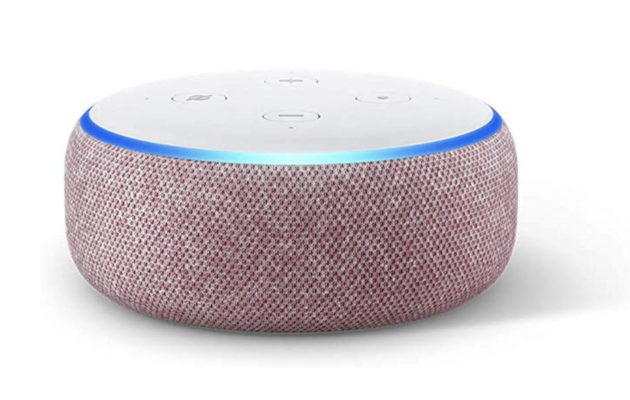
Alexa is a virtual assistant developed by Amazon that can be used for a variety of tasks, from playing music to controlling smart home devices. One of its lesser-known features is the ability to send and receive messages. In this article, we’ll go over how to use Alexa messaging.

Setting Up Alexa Messaging

Before you can use Alexa messaging, you’ll need to set it up. Here’s how:

1. Open the Alexa app on your smartphone or tablet.

2. Tap on the Conversations icon in the bottom center of the screen.

3. Follow the prompts to sign in or create an Amazon account if you haven’t already.

4. Tap on the Contacts icon in the upper right corner of the screen.

5. Tap on the “+” button to add a contact.

6. Enter the name and phone number of the person you want to message.

7. Tap on the Send Invitation button to send a message request to the contact.

Once the contact accepts your message request, you’re ready to start messaging.

Sending a Message with Alexa

To send a message with Alexa, follow these steps:

1. Wake up Alexa by saying “Alexa” or pressing the Alexa button on your device.

2. Say “Send a message to [contact name].”

3. Speak your message out loud.

4. Alexa will confirm the message and ask if you want to send it.

5. Say “Yes” to send the message.

Your contact will receive the message on their Alexa device or in the Alexa app.

Receiving a Message with Alexa

When someone sends you a message with Alexa, you’ll receive a notification on your Alexa device or in the Alexa app. To listen to the message, follow these steps:

1. Wake up Alexa by saying “Alexa” or pressing the Alexa button on your device.

2. Say “Play my messages.”

3. Alexa will play your messages in the order they were received.

You can also listen to messages in the Conversations section of the Alexa app.

Conclusion

Alexa messaging is a convenient way to stay in touch with friends and family. Once you’ve set it up, sending and receiving messages is easy. Just remember to speak clearly and wait for Alexa to confirm your message before sending it. Happy messaging!


Previous Article

How to Spot Fake Profiles on Facebook

Next Article

Is an Octa-Core Better than a Quad-Core? ...

Matthew Lynch

Related articles More from author

  • Assistive Technology

    How to Transfer Contacts From an iPhone to a Samsung

    June 10, 2023
    By Matthew Lynch
  • Assistive Technology

    How to Select Multiple Files on Mac

    June 15, 2023
    By Matthew Lynch
  • Assistive Technology

    How to Rotate an Image in Photoshop

    June 10, 2023
    By Matthew Lynch
  • Assistive Technology

    How to Set Up Apple Mail Rules

    June 12, 2023
    By Matthew Lynch
  • Assistive Technology

    Composite Video Connections Explained

    June 9, 2023
    By Matthew Lynch
  • Assistive Technology

    Ways to Use the top Command in Linux

    June 23, 2023
    By Matthew Lynch

Search

Login & Registration

  • Register
  • Log in
  • Entries feed
  • Comments feed
  • WordPress.org

Newsletter

Signup for The Tech Edvocate Newsletter and have the latest in EdTech news and opinion delivered to your email address!

About Us

Since technology is not going anywhere and does more good than harm, adapting is the best course of action. That is where The Tech Edvocate comes in. We plan to cover the PreK-12 and Higher Education EdTech sectors and provide our readers with the latest news and opinion on the subject. From time to time, I will invite other voices to weigh in on important issues in EdTech. We hope to provide a well-rounded, multi-faceted look at the past, present, the future of EdTech in the US and internationally.

We started this journey back in June 2016, and we plan to continue it for many more years to come. I hope that you will join us in this discussion of the past, present and future of EdTech and lend your own insight to the issues that are discussed.

Newsletter

Signup for The Tech Edvocate Newsletter and have the latest in EdTech news and opinion delivered to your email address!

Contact Us

The Tech Edvocate
910 Goddin Street
Richmond, VA 23231
(601) 630-5238
[email protected]

Copyright © 2025 Matthew Lynch. All rights reserved.