The Tech Edvocate

Top Menu

  • Advertisement
  • Apps
  • Home Page
  • Home Page Five (No Sidebar)
  • Home Page Four
  • Home Page Three
  • Home Page Two
  • Home Tech2
  • Icons [No Sidebar]
  • Left Sidbear Page
  • Lynch Educational Consulting
  • My Account
  • My Speaking Page
  • Newsletter Sign Up Confirmation
  • Newsletter Unsubscription
  • Our Brands
  • Page Example
  • Privacy Policy
  • Protected Content
  • Register
  • Request a Product Review
  • Shop
  • Shortcodes Examples
  • Signup
  • Start Here
    • Governance
    • Careers
    • Contact Us
  • Terms and Conditions
  • The Edvocate
  • The Tech Edvocate Product Guide
  • Topics
  • Write For Us
  • Advertise

Main Menu

  • Start Here
    • Our Brands
    • Governance
      • Lynch Educational Consulting, LLC.
      • Dr. Lynch’s Personal Website
      • Careers
    • Write For Us
    • The Tech Edvocate Product Guide
    • Contact Us
    • Books
    • Edupedia
    • Post a Job
    • The Edvocate Podcast
    • Terms and Conditions
    • Privacy Policy
  • Topics
    • Assistive Technology
    • Child Development Tech
    • Early Childhood & K-12 EdTech
    • EdTech Futures
    • EdTech News
    • EdTech Policy & Reform
    • EdTech Startups & Businesses
    • Higher Education EdTech
    • Online Learning & eLearning
    • Parent & Family Tech
    • Personalized Learning
    • Product Reviews
  • Advertise
  • Tech Edvocate Awards
  • The Edvocate
  • Pedagogue
  • School Ratings

logo

The Tech Edvocate

  • Start Here
    • Our Brands
    • Governance
      • Lynch Educational Consulting, LLC.
      • Dr. Lynch’s Personal Website
        • My Speaking Page
      • Careers
    • Write For Us
    • The Tech Edvocate Product Guide
    • Contact Us
    • Books
    • Edupedia
    • Post a Job
    • The Edvocate Podcast
    • Terms and Conditions
    • Privacy Policy
  • Topics
    • Assistive Technology
    • Child Development Tech
    • Early Childhood & K-12 EdTech
    • EdTech Futures
    • EdTech News
    • EdTech Policy & Reform
    • EdTech Startups & Businesses
    • Higher Education EdTech
    • Online Learning & eLearning
    • Parent & Family Tech
    • Personalized Learning
    • Product Reviews
  • Advertise
  • Tech Edvocate Awards
  • The Edvocate
  • Pedagogue
  • School Ratings
  • Zola Suite pricing 2026

  • How to become Airbnb Superhost

  • Yelp Elite status how to get

  • Rocket Matter vs CosmoLex comparison

  • Lawyaw vs Documate which is better

  • How to use Yelp for marketing

  • How many templates in Lawyaw

  • Can TripAdvisor reviews be edited

  • How to manage documents in Zola Suite

  • Filevine vs Litify features

Digital & Mobile Technology
Home›Digital & Mobile Technology›How to Update Meta (Oculus) Quest and Quest 2

How to Update Meta (Oculus) Quest and Quest 2
By Matthew Lynch
June 2, 2023
0
Spread the love

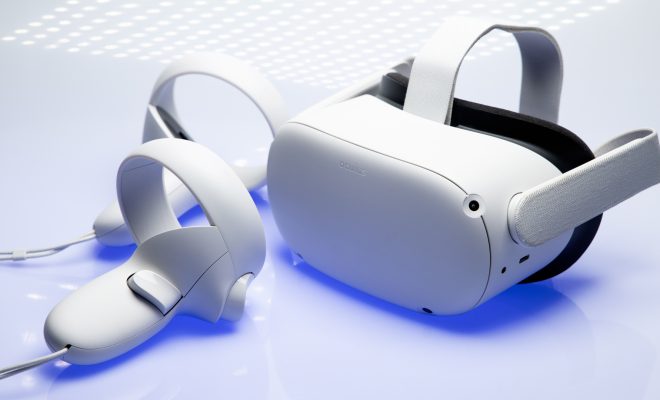
The Oculus Quest and Quest 2 are popular virtual reality headsets that offer a high-quality VR experience. To keep your device functioning at its best, it’s important to keep it updated. Updating the firmware on your Oculus Quest or Quest 2 is easy and ensures you have access to the latest features, bug fixes, and security patches. In this article, we’ll guide you through the simple steps to update your Oculus Quest and Quest 2.

Before updating your headset, it’s important to make sure you have enough battery life and storage space available. You’ll need at least 50% battery and 5GB of storage space to proceed with the update.

How to Update Meta (Oculus) Quest and Quest 2

Step 1: Turn on your Oculus Quest or Quest 2 and put on the headset.

Step 2: Connect your Oculus Quest or Quest 2 to Wi-Fi. You can do this by going to Settings > Wi-Fi.

Step 3: Look for the ‘Updates’ section in the Settings menu. If an update is available, you’ll see an option to download and install it.

Step 4: If necessary, clear any downloads that are pending or failed by clicking on ‘All Downloads’ in the Settings menu. Then, select the ‘X’ next to the download you want to cancel.

Step 5: Click ‘Download’ to begin the update process. The update file size can vary depending on the update, so it may take some time to download.

Step 6: Once the update has finished downloading, click on ‘Install Now’ to begin the installation process. If you’re prompted to restart your headset, do so.

Step 7: Wait for the installation to complete. This may take several minutes.

Step 8: Once the installation is complete, you’ll be able to enjoy the latest features and improvements in your Oculus Quest or Quest 2 experience.

In conclusion, updating your Oculus Quest or Quest 2 is a straightforward process that doesn’t require much effort. Keeping your VR headset updated will ensure that you have access to the latest features, bug fixes, and security patches. Always remember to check for updates periodically to ensure that you’re up-to-date with the latest firmware version. Happy gaming!

Previous Article

How to Make Green Dye in Minecraft

Next Article

What Is an ICS File?

Matthew Lynch

Related articles More from author

  • Digital & Mobile Technology

    How to Text From a PC to a Cell Phone on Cricket Service

    May 29, 2023
    By Matthew Lynch
  • Digital & Mobile Technology

    Best Screen Sharing Apps for Android and iPhone

    August 3, 2023
    By Matthew Lynch
  • Digital & Mobile Technology

    Best USB Wi-Fi Adapters of 2023

    June 1, 2023
    By Matthew Lynch
  • Digital & Mobile Technology

    Synology DS920+ Review: The Best Power User NAS

    June 22, 2023
    By Matthew Lynch
  • Digital & Mobile Technology

    Large Senior-Friendly Keyboards and Icons for Android

    June 15, 2023
    By Matthew Lynch
  • Digital & Mobile Technology

    What Is a Virtual LAN (VLAN)?

    June 3, 2023
    By Matthew Lynch

Search

Login & Registration

  • Log in
  • Entries feed
  • Comments feed
  • WordPress.org

Newsletter

Signup for The Tech Edvocate Newsletter and have the latest in EdTech news and opinion delivered to your email address!

About Us

Since technology is not going anywhere and does more good than harm, adapting is the best course of action. That is where The Tech Edvocate comes in. We plan to cover the PreK-12 and Higher Education EdTech sectors and provide our readers with the latest news and opinion on the subject. From time to time, I will invite other voices to weigh in on important issues in EdTech. We hope to provide a well-rounded, multi-faceted look at the past, present, the future of EdTech in the US and internationally.

We started this journey back in June 2016, and we plan to continue it for many more years to come. I hope that you will join us in this discussion of the past, present and future of EdTech and lend your own insight to the issues that are discussed.

Newsletter

Signup for The Tech Edvocate Newsletter and have the latest in EdTech news and opinion delivered to your email address!

Contact Us

The Tech Edvocate
910 Goddin Street
Richmond, VA 23231
(601) 630-5238
[email protected]

Copyright © 2026 Matthew Lynch. All rights reserved.