The Tech Edvocate

Top Menu

  • Advertisement
  • Apps
  • Home Page
  • Home Page Five (No Sidebar)
  • Home Page Four
  • Home Page Three
  • Home Page Two
  • Home Tech2
  • Icons [No Sidebar]
  • Left Sidbear Page
  • Lynch Educational Consulting
  • My Account
  • My Speaking Page
  • Newsletter Sign Up Confirmation
  • Newsletter Unsubscription
  • Our Brands
  • Page Example
  • Privacy Policy
  • Protected Content
  • Register
  • Request a Product Review
  • Shop
  • Shortcodes Examples
  • Signup
  • Start Here
    • Governance
    • Careers
    • Contact Us
  • Terms and Conditions
  • The Edvocate
  • The Tech Edvocate Product Guide
  • Topics
  • Write For Us
  • Advertise

Main Menu

  • Start Here
    • Our Brands
    • Governance
      • Lynch Educational Consulting, LLC.
      • Dr. Lynch’s Personal Website
      • Careers
    • Write For Us
    • The Tech Edvocate Product Guide
    • Contact Us
    • Books
    • Edupedia
    • Post a Job
    • The Edvocate Podcast
    • Terms and Conditions
    • Privacy Policy
  • Topics
    • Assistive Technology
    • Child Development Tech
    • Early Childhood & K-12 EdTech
    • EdTech Futures
    • EdTech News
    • EdTech Policy & Reform
    • EdTech Startups & Businesses
    • Higher Education EdTech
    • Online Learning & eLearning
    • Parent & Family Tech
    • Personalized Learning
    • Product Reviews
  • Advertise
  • Tech Edvocate Awards
  • The Edvocate
  • Pedagogue
  • School Ratings

logo

The Tech Edvocate

  • Start Here
    • Our Brands
    • Governance
      • Lynch Educational Consulting, LLC.
      • Dr. Lynch’s Personal Website
        • My Speaking Page
      • Careers
    • Write For Us
    • The Tech Edvocate Product Guide
    • Contact Us
    • Books
    • Edupedia
    • Post a Job
    • The Edvocate Podcast
    • Terms and Conditions
    • Privacy Policy
  • Topics
    • Assistive Technology
    • Child Development Tech
    • Early Childhood & K-12 EdTech
    • EdTech Futures
    • EdTech News
    • EdTech Policy & Reform
    • EdTech Startups & Businesses
    • Higher Education EdTech
    • Online Learning & eLearning
    • Parent & Family Tech
    • Personalized Learning
    • Product Reviews
  • Advertise
  • Tech Edvocate Awards
  • The Edvocate
  • Pedagogue
  • School Ratings
  • Kazino spēļu vadības elementu un informācijas izkārtojuma pielāgošana dažādiem ekrāniem

  • Kā māksla un mehānika veido spēļu automātu portfeļa atšķirības

  • How Sequel Slots Retain Familiar Features While Updating Play

  • Filtre poskytovateľov a rozpoznateľnosť herných kolekcií v kasínach

  • Razvoj iskanja in filtrov v vse obsežnejših katalogih kazino iger

  • Cinematic Intros Meet Familiar Reel Based Slot Play

  • Eventyrmotiver giver bonussekvenser retning og sammenhæng

  • Sådan former lydoplevelsen forskellige casinospil

  • Kameraføring former oplevelsen af roulette og blackjack på stream

  • Fra enkle browserbaserede casinospil til digitale formater med flere muligheder

Digital & Mobile Technology
Home›Digital & Mobile Technology›How to Stop Individual App Tracking on iPhone

How to Stop Individual App Tracking on iPhone
By Matthew Lynch
July 31, 2023
0
Spread the love

When you install certain apps on your iPhone, you may notice that they ask for permission to track your activity across other apps and websites. While some users may find this feature helpful for personalized advertising, others may prefer to keep their online activity private. In this article, we will guide you through the steps to disable individual app tracking on your iPhone.

Step 1: Go to Settings

The first step in disabling individual app tracking on your iPhone is to go to Settings. Tap on the Settings app icon on your home screen to open the app.

Step 2: Tap on Privacy

Once you are in the Settings app, scroll down until you see the Privacy section. Tap on Privacy to open the Privacy settings.

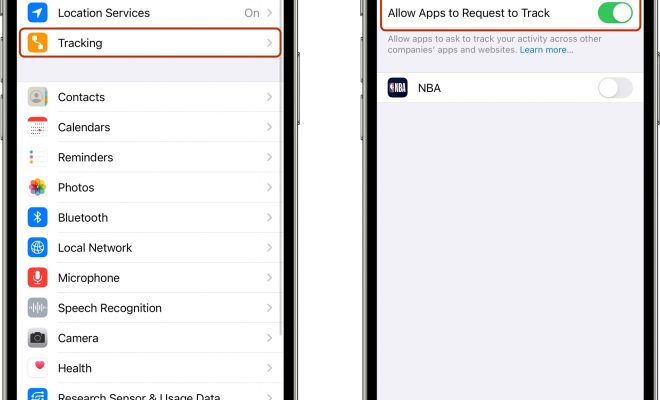
Step 3: Tap on Tracking

Under the Privacy settings, you will see a section labeled Tracking. Tap on Tracking to open the settings related to app tracking.

Step 4: Disable App Tracking

Here, you will see a list of apps that have requested permission to track your activity. To disable app tracking for a specific app, simply toggle the switch next to the app name to the off position. Once the switch turns gray, the app will no longer be able to track your activity across other apps and websites.

Step 5: Adjust App Permissions

If you want to adjust the permission settings for all apps on your iPhone, you can do so by toggling the switch next to Allow Apps to Request to Track to the off position. This will prevent all apps from requesting permission to track your activity.

It is important to note that disabling app tracking may limit the personalized ads you see on your device. However, it will also ensure your online activity is not being monitored by potentially invasive apps.

Overall, disabling individual app tracking on your iPhone is a quick and easy way to protect your online privacy. By following these simple steps, you can take control over the apps that track your activity and prevent them from accessing your personal information.


Previous Article

The Different Types of Computer Memory & ...

Next Article

Amazon Echo Sub: Good Hardware Meets Limited ...

Matthew Lynch

Related articles More from author

  • Digital & Mobile Technology

    How to Turn Off 5G on the Samsung Galaxy S21 and S22

    June 22, 2023
    By Matthew Lynch
  • Digital & Mobile Technology

    Ryzen 3, 5, 7, or 9: Which Should You Buy?

    September 8, 2023
    By Matthew Lynch
  • Digital & Mobile Technology

    The Best BSD-Based Operating Systems of All Time

    June 23, 2023
    By Matthew Lynch
  • Digital & Mobile Technology

    What Is a Hackintosh Computer?

    June 9, 2023
    By Matthew Lynch
  • Digital & Mobile Technology

    Best Legal Streaming Services With Local Channels

    June 7, 2023
    By Matthew Lynch
  • Digital & Mobile Technology

    Common Tinder Mistakes You Need to Avoid Making

    June 13, 2023
    By Matthew Lynch

Search

Login & Registration

  • Log in
  • Entries feed
  • Comments feed
  • WordPress.org

Newsletter

Signup for The Tech Edvocate Newsletter and have the latest in EdTech news and opinion delivered to your email address!

About Us

Since technology is not going anywhere and does more good than harm, adapting is the best course of action. That is where The Tech Edvocate comes in. We plan to cover the PreK-12 and Higher Education EdTech sectors and provide our readers with the latest news and opinion on the subject. From time to time, I will invite other voices to weigh in on important issues in EdTech. We hope to provide a well-rounded, multi-faceted look at the past, present, the future of EdTech in the US and internationally.

We started this journey back in June 2016, and we plan to continue it for many more years to come. I hope that you will join us in this discussion of the past, present and future of EdTech and lend your own insight to the issues that are discussed.

Newsletter

Signup for The Tech Edvocate Newsletter and have the latest in EdTech news and opinion delivered to your email address!

Contact Us

The Tech Edvocate
910 Goddin Street
Richmond, VA 23231
(601) 630-5238
[email protected]

Copyright © 2026 Matthew Lynch. All rights reserved.