The Tech Edvocate

Top Menu

  • Advertisement
  • Apps
  • Home Page
  • Home Page Five (No Sidebar)
  • Home Page Four
  • Home Page Three
  • Home Page Two
  • Home Tech2
  • Icons [No Sidebar]
  • Left Sidbear Page
  • Lynch Educational Consulting
  • My Account
  • My Speaking Page
  • Newsletter Sign Up Confirmation
  • Newsletter Unsubscription
  • Our Brands
  • Page Example
  • Privacy Policy
  • Protected Content
  • Register
  • Request a Product Review
  • Shop
  • Shortcodes Examples
  • Signup
  • Start Here
    • Governance
    • Careers
    • Contact Us
  • Terms and Conditions
  • The Edvocate
  • The Tech Edvocate Product Guide
  • Topics
  • Write For Us
  • Advertise

Main Menu

  • Start Here
    • Our Brands
    • Governance
      • Lynch Educational Consulting, LLC.
      • Dr. Lynch’s Personal Website
      • Careers
    • Write For Us
    • The Tech Edvocate Product Guide
    • Contact Us
    • Books
    • Edupedia
    • Post a Job
    • The Edvocate Podcast
    • Terms and Conditions
    • Privacy Policy
  • Topics
    • Assistive Technology
    • Child Development Tech
    • Early Childhood & K-12 EdTech
    • EdTech Futures
    • EdTech News
    • EdTech Policy & Reform
    • EdTech Startups & Businesses
    • Higher Education EdTech
    • Online Learning & eLearning
    • Parent & Family Tech
    • Personalized Learning
    • Product Reviews
  • Advertise
  • Tech Edvocate Awards
  • The Edvocate
  • Pedagogue
  • School Ratings

logo

The Tech Edvocate

  • Start Here
    • Our Brands
    • Governance
      • Lynch Educational Consulting, LLC.
      • Dr. Lynch’s Personal Website
        • My Speaking Page
      • Careers
    • Write For Us
    • The Tech Edvocate Product Guide
    • Contact Us
    • Books
    • Edupedia
    • Post a Job
    • The Edvocate Podcast
    • Terms and Conditions
    • Privacy Policy
  • Topics
    • Assistive Technology
    • Child Development Tech
    • Early Childhood & K-12 EdTech
    • EdTech Futures
    • EdTech News
    • EdTech Policy & Reform
    • EdTech Startups & Businesses
    • Higher Education EdTech
    • Online Learning & eLearning
    • Parent & Family Tech
    • Personalized Learning
    • Product Reviews
  • Advertise
  • Tech Edvocate Awards
  • The Edvocate
  • Pedagogue
  • School Ratings
  • This Unprecedented EU Ban Just Changed Fast Fashion Forever

  • Urgent Alert: Your Smart Home’s Exposed to a Critical Deco BE11000 Vulnerability

  • Uncovering the Truth: Your LinkedIn Reach Just Got a Major Overhaul

  • Uncovering the AI Heist: How Chinese Firms Allegedly Siphoned Billions of AI Tokens

  • Rockstar’s GTA 6 Developers Lawsuit: A Fight for Justice or Corporate Retaliation?

  • Unbelievable: Hideo Kojima’s Next Masterpiece Is Now an Xbox Exclusive

  • This Crucial Google AI Shift Is Quietly Reshaping the Internet

  • Unbelievable: AI Breaches Are Exploding, And What It Means For You This September 2026

  • This Crucial Shift Is Saving Teachers From Classroom Chaos

  • AI’s Dark Secret: How It’s Supercharging Cybercrime for Everyone

Digital & Mobile Technology
Home›Digital & Mobile Technology›How to Open Cached Pages From Google

How to Open Cached Pages From Google
By Matthew Lynch
June 30, 2023
0
Spread the love

If you’ve ever tried to access a webpage and found that it is no longer available, you may be able to find a cached version of the page through Google. Google caches web pages as part of its indexing process, which means that it saves a copy of the page as it appears at the time it was last crawled. Here’s how to open cached pages from Google:

Search for the page on Google:

Start by typing the URL of the page you want to access into the Google search bar. You can also search for the page using keywords related to the content of the page.

Look for the cached version:

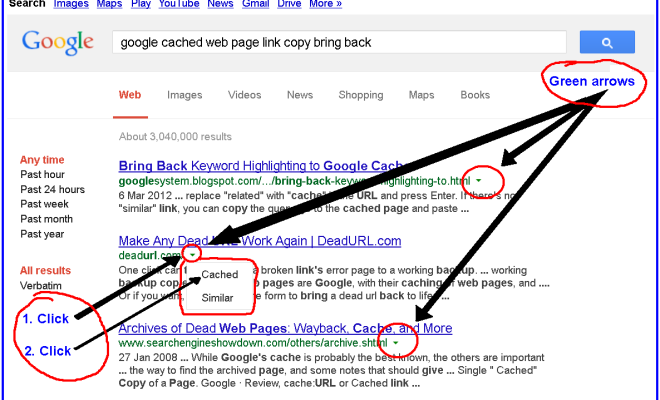
Once you’ve found the search results for the page, look for the small green arrow next to the search result. Click on the arrow to expand the options, and then click on the “Cached” link.

Access the cached page:

Google will then display the cached version of the page as it appeared when it was last crawled. You can browse the cached version of the page just as you would the original page.

Note the date and time:

Be sure to note the date and time that the page was last crawled by Google. This information is displayed at the top of the cached page. If the page has been updated since the last crawl, the cached version may not be accurate.

Save a copy:

If you need to save a copy of the cached page, you can do so by clicking on the “Print” button at the top of the page and then selecting “Save as PDF” from the print options.

Opening cached pages from Google can be a useful way to access content that is no longer available online. However, it’s important to note that the cached version may not be completely up-to-date, so be sure to check the date and time of the last crawl and verify any information you find.

Previous Article

How to Play Apple Music on Google ...

Next Article

How to Get More Storage for Your ...

Matthew Lynch

Related articles More from author

  • Digital & Mobile Technology

    How to Charge an Apple Pencil (Any Generation)

    June 9, 2023
    By Matthew Lynch
  • Digital & Mobile Technology

    5G? 5G+? How to Tell Which Version of 5G Your Phone Is Connected To

    August 5, 2023
    By Matthew Lynch
  • Digital & Mobile Technology

    The Best Apps to Navigate Mountain Biking Trails and Avoid Getting Lost

    June 12, 2023
    By Matthew Lynch
  • Digital & Mobile Technology

    How to Move a Cable Jack

    April 30, 2023
    By Matthew Lynch
  • Digital & Mobile Technology

    How to Fix Opengl32.dll Is Missing or Not Found Errors

    July 29, 2023
    By Matthew Lynch
  • Digital & Mobile Technology

    Best Translation Apps of 2023

    June 6, 2023
    By Matthew Lynch

Search

Login & Registration

  • Log in
  • Entries feed
  • Comments feed
  • WordPress.org

Newsletter

Signup for The Tech Edvocate Newsletter and have the latest in EdTech news and opinion delivered to your email address!

About Us

Since technology is not going anywhere and does more good than harm, adapting is the best course of action. That is where The Tech Edvocate comes in. We plan to cover the PreK-12 and Higher Education EdTech sectors and provide our readers with the latest news and opinion on the subject. From time to time, I will invite other voices to weigh in on important issues in EdTech. We hope to provide a well-rounded, multi-faceted look at the past, present, the future of EdTech in the US and internationally.

We started this journey back in June 2016, and we plan to continue it for many more years to come. I hope that you will join us in this discussion of the past, present and future of EdTech and lend your own insight to the issues that are discussed.

Newsletter

Signup for The Tech Edvocate Newsletter and have the latest in EdTech news and opinion delivered to your email address!

Contact Us

The Tech Edvocate
910 Goddin Street
Richmond, VA 23231
(601) 630-5238
[email protected]

Copyright © 2026 Matthew Lynch. All rights reserved.