
The Tech Edvocate

Top Menu

  • Advertisement
  • Apps
  • Home Page
  • Home Page Five (No Sidebar)
  • Home Page Four
  • Home Page Three
  • Home Page Two
  • Home Tech2
  • Icons [No Sidebar]
  • Left Sidbear Page
  • Lynch Educational Consulting
  • My Account
  • My Speaking Page
  • Newsletter Sign Up Confirmation
  • Newsletter Unsubscription
  • Our Brands
  • Page Example
  • Privacy Policy
  • Protected Content
  • Register
  • Request a Product Review
  • Shop
  • Shortcodes Examples
  • Signup
  • Start Here
    • Governance
    • Careers
    • Contact Us
  • Terms and Conditions
  • The Edvocate
  • The Tech Edvocate Product Guide
  • Topics
  • Write For Us
  • Advertise

Main Menu

  • Start Here
    • Our Brands
    • Governance
      • Lynch Educational Consulting, LLC.
      • Dr. Lynch’s Personal Website
      • Careers
    • Write For Us
    • The Tech Edvocate Product Guide
    • Contact Us
    • Books
    • Edupedia
    • Post a Job
    • The Edvocate Podcast
    • Terms and Conditions
    • Privacy Policy
  • Topics
    • Assistive Technology
    • Child Development Tech
    • Early Childhood & K-12 EdTech
    • EdTech Futures
    • EdTech News
    • EdTech Policy & Reform
    • EdTech Startups & Businesses
    • Higher Education EdTech
    • Online Learning & eLearning
    • Parent & Family Tech
    • Personalized Learning
    • Product Reviews
  • Advertise
  • Tech Edvocate Awards
  • The Edvocate
  • Pedagogue
  • School Ratings

logo

The Tech Edvocate

  • Start Here
    • Our Brands
    • Governance
      • Lynch Educational Consulting, LLC.
      • Dr. Lynch’s Personal Website
        • My Speaking Page
      • Careers
    • Write For Us
    • The Tech Edvocate Product Guide
    • Contact Us
    • Books
    • Edupedia
    • Post a Job
    • The Edvocate Podcast
    • Terms and Conditions
    • Privacy Policy
  • Topics
    • Assistive Technology
    • Child Development Tech
    • Early Childhood & K-12 EdTech
    • EdTech Futures
    • EdTech News
    • EdTech Policy & Reform
    • EdTech Startups & Businesses
    • Higher Education EdTech
    • Online Learning & eLearning
    • Parent & Family Tech
    • Personalized Learning
    • Product Reviews
  • Advertise
  • Tech Edvocate Awards
  • The Edvocate
  • Pedagogue
  • School Ratings
  • A Visitors Guide to Pittsburgh (PA), United States

  • A Visitors Guide to Colorado Springs (CO), United States

  • 5 Pairs of Shoes That Will Instantly Step Your Shoe Game Up

  • Radiant Youthful Skin is the Perfect Christmas Gift

  • Give Your Loved One the Gift of Youthful, Radiant Skin this Christmas

  • Give Your Loved One the Gift of a Restful Night Sleep this Christmas

  • Nex Playground’s Holiday Sales Bring Active Play Indoors This Seaso

  • A Visitors Guide to Louisville (KY), United States

  • A Visitor’s Guide to Nashville-Davidson (TN), United States

  • A Visitors Guide to Portland (OR), United States

How To
Home›How To›How to Make an Apple Store Appointment

How to Make an Apple Store Appointment
By Matthew Lynch
March 1, 2024
0
Spread the love

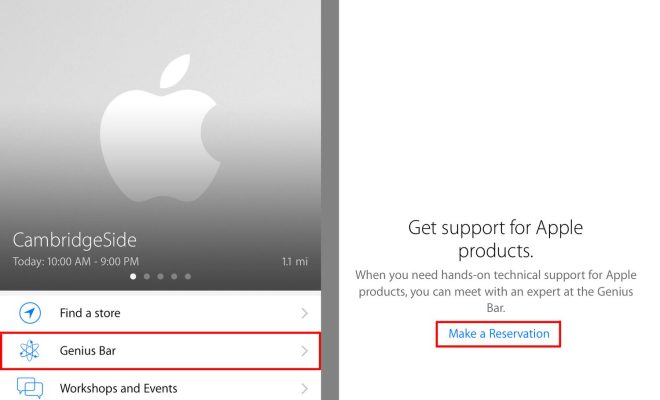
Whether you require assistance with your Apple device or wish to explore the latest products, scheduling an appointment at the Apple Store is a convenient way to receive personalized assistance. In this article, we will guide you through the process of making an appointment at your local Apple Store.

1. Access the Apple Support website.

To begin, visit the Apple Support website (https://support.apple.com/) in your web browser. This portal offers various support options, including live chat, phone services, and scheduled appointments.

2. Select the appropriate product.

Scroll down to find the product category corresponding to your needs (such as iPhone, iPad, or Mac). Click on the category to proceed.

3. Choose a support topic.

On the following page, you will be presented with a list of common issues and topics. Select the one that best matches your needs. This will help Apple provide tailored assistance during your appointment.

4. Click on “Get Support.”

After selecting your topic, click on the “Get Support” button located near the bottom of the page. This will redirect you to a page offering various support options.

5. Schedule an appointment.

On this page, you will be presented with options like “Talk to Apple Support Now,” “Chat,” and “Schedule a Call.” To make an in-store appointment, select “Bring in for Repair.” This option will allow you to schedule a time and location for your visit to an Apple Store or authorized service provider.

6. Sign in with your Apple ID.

You will be prompted to log in with your AppleID and password before proceeding with scheduling the appointment. If you don’t have one yet, create one by clicking on “Create one now.”

7. Provide necessary information about your device.

Input relevant details about your product, such as its serial number or IMEI (if applicable). You can usually find this information on the back of your device or in its “Settings” menu.

8. Select your closest store.

Choose a convenient location for your appointment by entering your zip code or city and selecting the Apple Store nearest to you.

9. Choose a date and time.

Select an available date and time for your appointment from the calendar displayed on-screen. Confirm your selection and click “Continue.”

10. Review your appointment details and finalize.

Before completing the process, verify all the provided information is correct, including your selected location, date, and time. Once you’re satisfied, click “Confirm Appointment.”

You will receive a confirmation email containing all the relevant information about your Apple Store appointment. Ensure you arrive on time with your device (and any accessories related to the issue) prepared for evaluation. By following these steps, you’ll be on your way to receiving expert assistance in no time!


Previous Article

How to Grow Mistletoe

Next Article

20 Best Places to Sell Shoes Online ...

Matthew Lynch

Related articles More from author

  • How To

    How to Install a Water Softener

    March 23, 2024
    By Matthew Lynch
  • How To

    How to Get the Love of Your Life

    March 1, 2024
    By Matthew Lynch
  • How To

    How to Get Skinnier Legs

    February 22, 2024
    By Matthew Lynch
  • How To

    3 Ways to Solve Logarithms

    March 22, 2024
    By Matthew Lynch
  • How To

    3 Ways to Make a Person Feel Awkward

    December 7, 2023
    By Matthew Lynch
  • How To

    3 Ways to Develop Your Own Drawing Style

    January 3, 2024
    By Matthew Lynch

Search

Login & Registration

  • Register
  • Log in
  • Entries feed
  • Comments feed
  • WordPress.org

Newsletter

Signup for The Tech Edvocate Newsletter and have the latest in EdTech news and opinion delivered to your email address!

About Us

Since technology is not going anywhere and does more good than harm, adapting is the best course of action. That is where The Tech Edvocate comes in. We plan to cover the PreK-12 and Higher Education EdTech sectors and provide our readers with the latest news and opinion on the subject. From time to time, I will invite other voices to weigh in on important issues in EdTech. We hope to provide a well-rounded, multi-faceted look at the past, present, the future of EdTech in the US and internationally.

We started this journey back in June 2016, and we plan to continue it for many more years to come. I hope that you will join us in this discussion of the past, present and future of EdTech and lend your own insight to the issues that are discussed.

Newsletter

Signup for The Tech Edvocate Newsletter and have the latest in EdTech news and opinion delivered to your email address!

Contact Us

The Tech Edvocate
910 Goddin Street
Richmond, VA 23231
(601) 630-5238
[email protected]

Copyright © 2025 Matthew Lynch. All rights reserved.